The four ways to catch a lead your client's phone missed
A missed call is a lost client. Compare the GoHighLevel AI Receptionist, a human VA, missed-call text-back and voicemail on the eight things that matter.
It is a Friday in roofing season and your client’s phone rang three times between six and eight in the evening, after the office closed. Two of those callers had water coming through a ceiling. By the time anyone at the company saw the missed-call list on Monday, both of them had already booked the competitor who answered on the first ring Friday night. Your client does not phrase it as a lead-response problem. They phrase it as “can you just turn on the AI thing everyone keeps talking about.”
So you open their sub-account to turn on the AI thing, and you find there are not one but four different ways to stop a ringing phone from becoming a lost job, and they do not do the same work. One answers the call with a voice. One is a person you hire. One is a text message that goes out the second the call drops. One is the voicemail greeting they already have, which is the thing that just cost them two roofs.
This is the decision an agency makes for a client who is bleeding leads after hours, and it is a real choice between real mechanisms, not a single product with a switch. Here is what each of the four actually does inside GoHighLevel, where each one quietly fails, and which one fits which client.
What “answer the phone” actually means in GoHighLevel
Before the four options make sense, be precise about the gap you are filling. A client does not lose leads evenly. They lose them in specific windows, and each window has a different shape.
The inbound a client actually misses
The missed lead is almost never the call that comes in at eleven on a Tuesday morning when someone is at the desk. It is the call after close. It is the second call that lands while the first one is still being handled. It is the form fill at midnight that nobody sees until the morning, by which point the person has already pinged a few other companies and booked whoever replied first. It is the Instagram message about pricing that sits unread overnight. The pattern is the same across trades: the lead arrives when no human is available to catch it, and a lead that is not caught in the first few minutes is a different, colder thing by the time someone gets to it.
That is the whole game, and it is worth saying plainly because it decides everything downstream. You are not trying to replace the receptionist who is already answering. You are trying to cover the shift that is currently going to voicemail, and to answer the overflow when the one human on the phone is already busy. Get that framing right and the four options sort themselves by how well each covers that specific gap.
The four places that gap gets filled
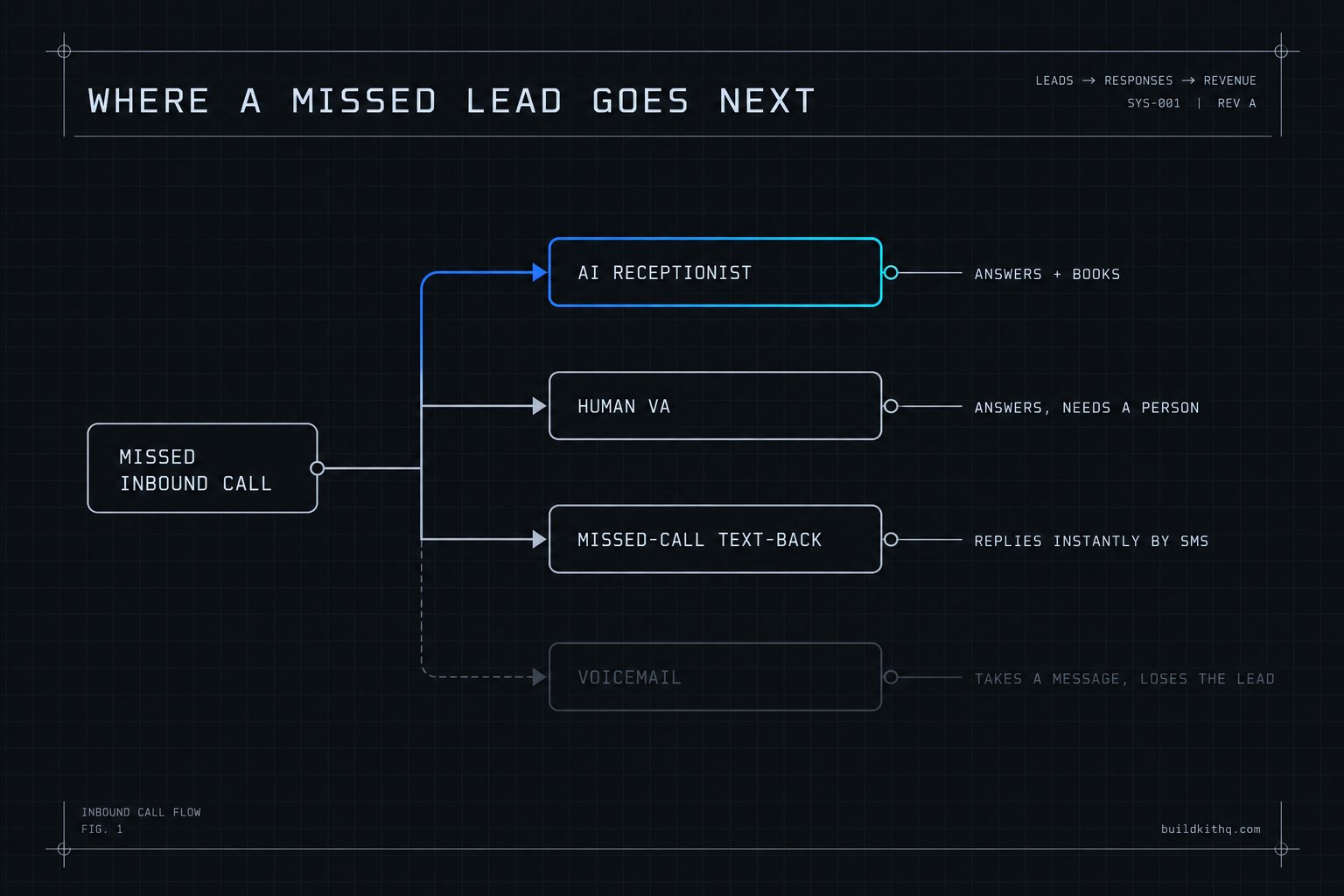
Inside and around a GoHighLevel sub-account, that after-hours and overflow inbound gets caught in one of four ways. The AI Receptionist answers the call with a voice, built on HighLevel’s Voice AI and Conversation AI. A human virtual assistant answers as a person, under the client’s brand. A missed-call text-back automation does not answer the call at all, it fires a text the instant the call drops. And voicemail, the default, takes a message and hopes someone listens to it.
They look interchangeable on a feature list and they are not. One is a conversation, one is a person, one is a single automated message, and one is a recording. The rest of this guide is about the gap between those four things, because buying the wrong one is how an agency spends a client’s money and still loses the leads.
How the AI Receptionist actually answers
The AI Receptionist is the one most people picture when the client says “the AI thing,” so be clear about what it does and what it needs. Working from HighLevel’s own Conversation AI setup, the bot collects the caller’s details, answers the common questions, supports booking an appointment, and routes the conversation where it needs to go. On a kit build it answers every call around the clock, qualifies who is on the line, books the appointment into the calendar and transfers the genuinely hot ones through to a human, in natural conversation.
Two things make or break it, and both are configuration rather than magic. The bot only books if the calendar behind it is wired correctly, which HighLevel spells out in its guide to configuring bot goals: before appointment booking will work, the calendar has to be set up, with its availability and routing already in place. And the voice and conversation features are billed as usage on top of the plan, not bundled into it, which HighLevel’s pricing page states as usage based charges. So the AI Receptionist is powerful and it is conditional: it answers beautifully when the calendar underneath it is real and the goals are specific, and it answers into a void when either one is vague.
The missed-call text-back is the simplest of the four. It is one automation: the call drops, a trigger fires, and an SMS goes out saying some version of “sorry we missed you, what can we help with.” The VA is the opposite kind of thing, a human being who picks up under the client’s name and uses judgment you cannot script. And voicemail is not a mechanism at all, it is the absence of one. Keep those four shapes in your head and the comparison stops being marketing and starts being engineering.
The eight things that separate them
Price is one column and it is the wrong one to lead with. Here are the eight that actually decide whether a client’s phone turns a Friday-night call into a booked job or a missed one.
| What the client needs | AI Receptionist | Human VA | Missed-call text-back | Voicemail |
|---|---|---|---|---|
| Answers after hours and overflow | Always, instantly | Only staffed hours | Instantly, by text | Takes a message |
| Books into the calendar itself | Yes, if the calendar is wired | Yes, if given access | No, sends a link | No |
| Handles a judgment call | Scripted goals only | Yes, a real person | No | No |
| Cost shape | Platform usage, billed by use | Monthly retainer | Built into the plan | Free |
| Setup before it works | Calendar, goals, A2P for SMS | Hiring, scripting, access | A2P registration, one automation | None |
| What breaks it | Unwired calendar, vague goals | Turnover, off-brand replies | Unregistered number, nothing sends | Nothing, it just loses the lead |
| Copies across client sub-accounts | Travels with the kit | Costs more per account | Travels with the kit | Everywhere by default |
| Time to a live answer | About a business day | Weeks to hire and train | About a business day | Instant and useless |
Read it down the columns, not across the rows. Voicemail wins the cost column at zero dollars and loses every column that describes catching a lead, which is the only reason the client called you. The VA wins the judgment row and nothing else cheaply, because a person costs a monthly retainer and does not work the overnight shift unless you pay for the overnight shift. The text-back is quietly strong: it costs almost nothing once it exists, it fires instantly, and its one weakness is that it cannot have a conversation, it can only start one. The AI Receptionist is the only column where “answers after hours,” “books into the calendar,” and “time to a live answer” all line up at once, provided you accept a usage-billed cost and you do the configuration it depends on.
The word that does the damage across this table is “answering service,” because three of these four get sold under it and only one of them is a person. Keep the mechanism in view and the sales language stops mattering.
Where each one quietly fails you
Every one of these can look live on the screen and catch nothing in the world. Here are the four failures that come up most on real accounts, what you see when it happens, and how to get out.
The AI that books into a calendar nobody connected
You turn the AI Receptionist on, call it to test, and it has a perfectly natural conversation right up until it tries to book, where it either offers no times or books into nothing. The client watches the demo, hears a smooth voice, and assumes it is working. Three days later they ask why the appointment the AI “booked” is not on anyone’s calendar.
What you see: a fluent bot that talks well. What is actually wrong: appointment booking depends on a configured calendar, and HighLevel says so directly in its bot-goals guide, so a bot pointed at a calendar with no availability, no routing, or the wrong connected account will converse and never actually book. The fix is to build the calendar first and the bot second, every time. Wire the availability, the routing and the team assignment, book a test appointment by hand to confirm the calendar itself works, and only then let the AI near it. This is the same trap that catches imported snapshots generally, which our guide on why an imported calendar books wrong walks through end to end.
The text-back that fires and never sends
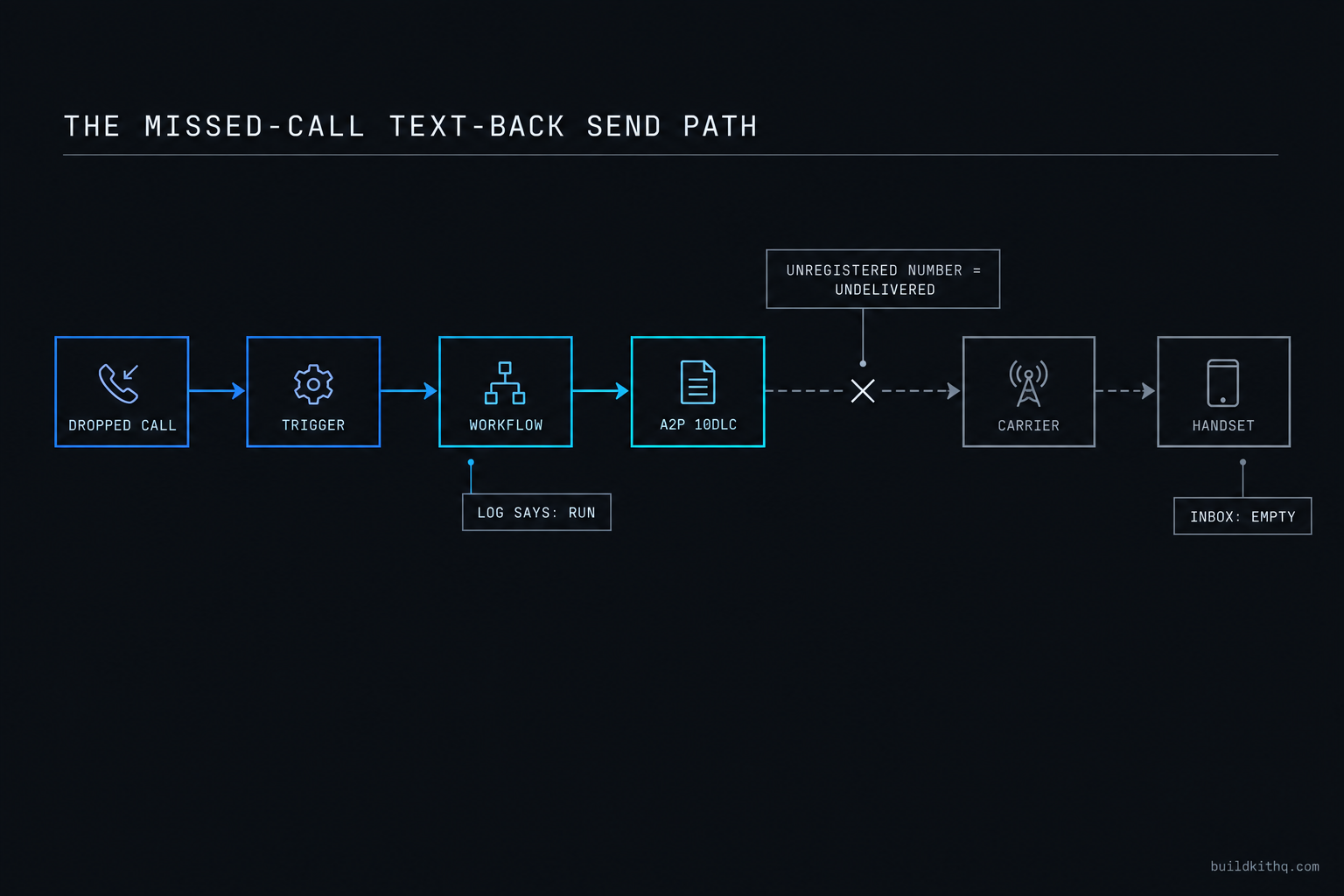
You build the missed-call text-back, the automation history shows it running on every dropped call, and the client still swears no texts are going out. They are right. The automation is firing and the messages are sitting undelivered, because the sending number was never registered under A2P 10DLC.
What you see: a green, running automation with a tidy execution log. What is actually wrong: in the current carrier environment an unregistered number does not deliver, so the single most important automation for catching a missed call is the one most likely to be silently dead on a fresh account. The fix is to register the A2P brand and campaign before you promise the client anything, then send a real text to your own phone and confirm it arrives on the handset, not just in the log. A workflow that “ran” is not a message that landed. Our full trace of why workflows fire but nothing sends is the diagnosis to run the first time a client says the texts are not arriving.
The VA who answers but cannot book
You hire a virtual assistant to answer after hours, they pick up warmly, take the caller’s details, and then cannot actually book anything because they were never given calendar access, or they book into the wrong calendar because nobody showed them which one. The client is paying a monthly retainer for a human who is functionally an expensive message-taker.
What you see: a person answering politely and a client who likes the human touch. What is actually wrong: answering is only half the job, and the half that converts is booking, which needs access, training and a clear routing map the VA never got. The fix is to treat a VA like any other part of the build: give them a defined calendar, a written script for the common calls, and a clear rule for when to book versus when to transfer. A VA with no booking path is a receptionist who can only say “someone will call you back,” which is the outcome you hired them to prevent. If you would rather not manage that yourself, that is the point of a managed VA engagement rather than a cold hire.
The voicemail baseline that quietly loses the lead
This one does not break, which is exactly the problem. Voicemail works perfectly. It records the message, it keeps it safe, and it loses the lead anyway, because the lead already called the next company while your client’s greeting was still playing. There is no error log here and nothing to fix, because nothing is broken. The lead is simply gone, and because it was never captured, it never shows up as a number anyone counts.
What you see: a working voicemail and a client who thinks they are covered. What is actually wrong: the gap between a message left and a message returned is where the lead dies, and for an after-hours caller with an emergency that gap is the whole decision. The fix is to stop treating voicemail as coverage and treat it as the thing you are replacing. Even a bare missed-call text-back beats it, because a text that goes out in the first minute at least holds the conversation open while the competitor’s voicemail is still recording.
The numbers, on one clock
Here is what the four cost across a year for one client sub-account, with the assumptions printed so you can drop in your own. The point is not a single right answer, it is to put the four on the same clock so the monthly options stop looking cheap by sleight of hand.
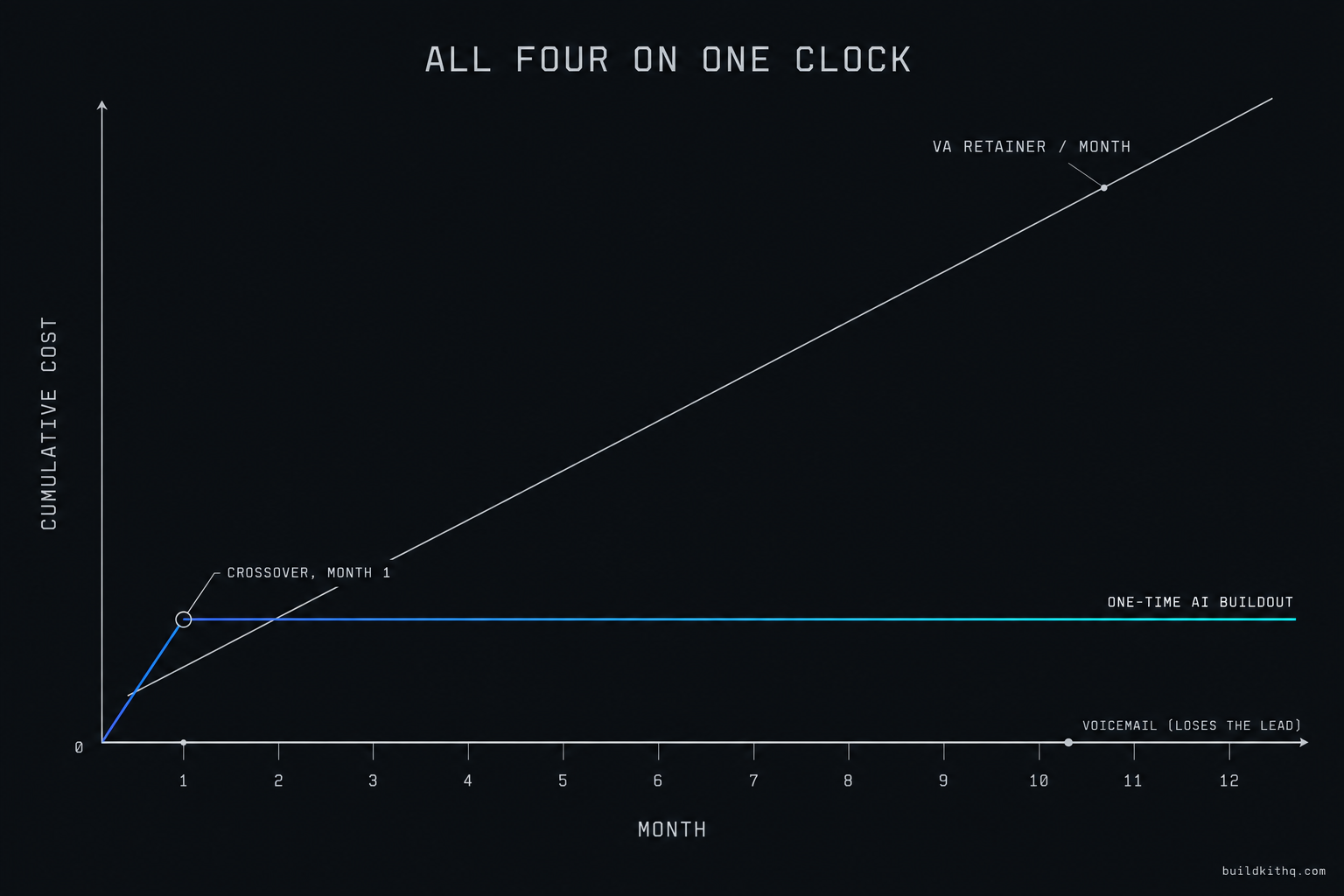
Start with the floor, because it is the same under all four. HighLevel publishes three plans: Starter at $97 a month, Unlimited at $297 a month, and Agency Pro at $497 a month, each with a 14-day free trial. For an agency running client accounts, Unlimited is the working plan, so the floor is $297 a month, about $3,564 across a year, before a single call is answered. That number does not move between the four options, which is exactly why it should not decide between them.
Now the layer on top. Voicemail adds nothing in cash and loses the lead, so its real cost is the job that walked. The missed-call text-back adds almost nothing once it exists, because it rides the SMS the plan already sends. The AI Receptionist is billed as platform usage, which scales with how much it answers rather than a flat line, and the done-for-you build of it on this site starts from $1,450 as a one-time setup. A human VA is a recurring retainer, from $1,200 a month, which across a year is $14,400 and renews every year after.
Put those on one clock and the shape is clear. A VA retainer passes any one-time AI buildout inside the first month and keeps climbing, which is correct when you are paying for human judgment and wrong when you only needed something to answer.
The illustrative scenario that actually matters to the client is the cost of the lead they are losing now. Say their average job is worth $600 to them and they close one in four of the people they actually speak to. If the phone misses two callable leads a week after hours, that is roughly eight or nine a month, of which they would have closed two, at $600 each, so about $1,200 a month walking to whoever answered first. Swap in your client’s real job value and close rate and the number moves, but the direction does not: the leak is almost always larger than the fix.
The reason speed matters this much is not opinion. The widely reported MIT and InsideSales Lead Response Management study, summarised here, found the odds of qualifying a lead were about twenty-one times higher when the first contact happened inside five minutes rather than thirty. An after-hours lead that waits until Monday is not a slightly worse lead, it is a different and far colder one, which is why the thing that answers in the first minute is worth more than its cost almost every time.
Which fix fits which client
The right choice depends on what the client is actually short of, so match the mechanism to the shortage rather than to the sales page.
If the client is losing leads purely to after-hours and overflow, and their calls are mostly routine booking and qualifying, the AI Receptionist is the column where everything they need lines up, and it travels with the rest of the build. If their first conversation genuinely needs a human, a distressed caller, a high-stakes quote, a brand that lives on a real voice, a VA earns its retainer and the AI covers the overnight shift behind them. If the budget is tight and you need something live this week, the missed-call text-back is the highest-return single automation you can ship, as long as the A2P registration behind it is real. And if the client insists voicemail is fine, your job is to show them the two roofs that booked the competitor on Friday night, because voicemail is the status quo they hired you to change.
Most mature accounts end up running more than one on purpose: the AI Receptionist for coverage, the text-back as the instant safety net on every dropped call, and a VA reserved for the handful of calls where a human changes the outcome. The kit ships the first two already wired, which is why an agency can stand the whole thing up in about a business day rather than a month of configuration. The HVAC contractor kit and the plumbing company kit both lead with this because emergency trades lose the most to a missed call, and the full price list puts every kit on one page.
The objections, including the one against us
If this piece only argued for the AI it would not be worth your time, so here are the strongest arguments against it, answered straight.
“An AI voice will annoy my client’s callers more than voicemail does.” Sometimes, and for a certain kind of caller, yes. A clumsy bot that loops is worse than a clean voicemail, which is a real risk and the reason the configuration matters so much. The honest version is not “AI always wins,” it is “a well-configured AI that books beats voicemail, and a badly configured one does not.” If you cannot build it to book cleanly, ship the text-back instead and do not pretend the bot is ready. The failure is almost always setup, not the idea.
“Why pay for an AI buildout when a text-back is nearly free?” Because they answer different calls. A text-back cannot have the conversation, it can only start one, and for a caller who wants an answer right now and will book on the spot, a text that says “we will get back to you” loses to a voice that books the appointment in the same call. For simple inbound the text-back is genuinely enough, and you should sell exactly that rather than overbuilding. The AI earns its cost when the conversation itself is where the booking happens.
“A human VA will always beat a bot, so why not just hire one.” For judgment, yes, and nobody serious argues otherwise. But a VA does not work the three-in-the-morning shift unless you pay for the three-in-the-morning shift, and they bring turnover, training and off-brand answers that the bot does not. The real comparison is not human versus machine, it is “what covers the overnight gap at a cost that matches the leads in it.” Often that is the AI for coverage and the VA for the calls that deserve a person, not one or the other.
“How is your version different from any other GHL agency selling AI setup?” Two things you can check without trusting us. The build is listed before you buy it, so you can see that the AI Receptionist, the AI Chatbot and the missed-call and no-show recovery all ship wired together rather than sold as separate add-ons. And installation is free with every kit, with 10 hours of dedicated installation support, to be used within 12 days of purchase, which covers the calendar wiring and the A2P registration that are exactly where these builds die. If a shop will not show you the build or stand behind the install, that is the comparison, and it is one you can run in a browser tab.
The two roofs that booked the competitor on Friday night are not a technology problem and they are not a motivation problem. They are a coverage problem, and coverage is a thing you buy or build in one of four specific ways. Once you know which of the four covers which gap, the client’s ringing phone stops being a leak and starts being a decision you can make in an afternoon.
Quick answers
No, it covers the calls the front desk cannot. It answers after hours, during overflow and when the line is already busy, qualifies the caller and books into the calendar. During staffed hours a human still handles the nuanced conversations. Think of it as the shift that was going to voicemail, now answered.
No. The automation fires, but the message sits undelivered because the sending number was never registered. This is the single most common reason a text-back looks live and catches nothing. Register the A2P brand first, send a test to your own phone, and only then tell a client it is working.
HighLevel bills its AI features as usage on top of the subscription, which its pricing page states plainly as usage based charges. The platform floor for an agency is Unlimited at $297 a month. Budget the AI as a variable line that scales with how much it answers, not a flat add-on.
Yes. Every kit ships the AI Receptionist and the AI Chatbot already wired to the calendar and the follow-up, alongside the missed-call and no-show recovery. Installation is free with every kit, and you get 10 hours of dedicated installation support, to be used within 12 days of purchase.
When the first conversation needs judgment a script cannot carry: a distressed caller, a high-value quote, a situation where the wrong answer costs more than a missed booking. A VA is also the right call for a client whose brand lives on a human voice. Many agencies run the AI for coverage and a VA for the calls that matter most.
Keep reading
What a finished GoHighLevel account does with a lead
A lead moves through five stages in a finished GoHighLevel account. Here is what each stage is wired to, and the handoffs where a half-built one drops it.
Read itThe AI receptionist in your kit answers, but never books
An imported kit's AI receptionist replies around the clock and books no one. Here is the booking path underneath, the four places it breaks, and the fix.
Read itYour kit's emails all say delivered, and land in spam
Your kit's emails show as delivered and still land in spam. Here is the deliverability setup that gets a GoHighLevel sub-account into the Gmail inbox.
Read it