The AI receptionist in your kit answers, but never books
An imported kit's AI receptionist replies around the clock and books no one. Here is the booking path underneath, the four places it breaks, and the fix.
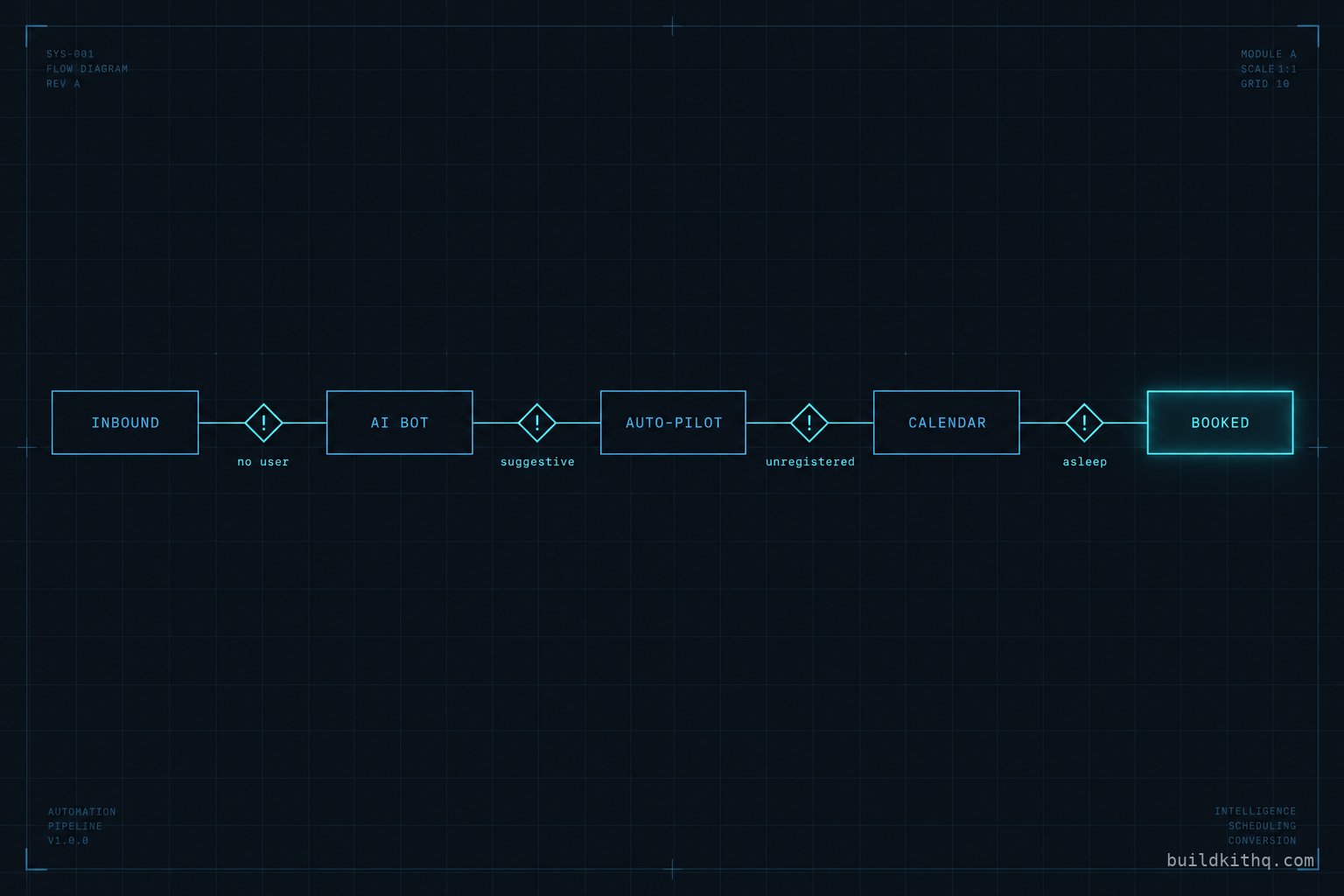
Monday morning at an auto repair shop, the service advisor opens the HighLevel inbox and finds forty conversations from the weekend. The AI receptionist answered every one of them. A customer whose check-engine light came on Saturday asked if the shop could look at it. The bot replied, politely, that yes it could, and asked a couple of good questions about the car. Another asked for a price on brake pads. The bot answered that too. A third just wrote “can I come in Monday.” The bot said it would be happy to help them find a time.
Not one of those forty is on the calendar. The bay is half empty at 9am and the phone starts ringing with the same people, now annoyed, asking why nobody got back to them. They did get back. The bot got back to all of them. It just never put a single person into a slot.
Nothing errored. The bot is running, the replies are thoughtful, the tone is right. What is missing is the one move the whole thing exists to make: turning a conversation into a booking. That move is not the bot talking. It is the bot reaching a calendar, finding a real slot, and writing an appointment to it, and that reach is wired to the account the kit lands in, not to the snapshot. This is the reference for that wiring. What the booking path actually is, the four places it quietly stops short, and the short pass that fixes it before a client is the one counting an empty bay.
What the booking path actually is
An AI receptionist in a GoHighLevel kit is not one thing. It is a chain, and a booking only happens when every link holds. Miss the chain for the chat window and you will spend an afternoon retraining a bot that was never the problem.
The first link is the bot itself. HighLevel calls it Conversation AI, and it reads the contact’s history in the CRM, answers inbound messages, collects details and, when it is configured to, moves the conversation toward an appointment. You build and configure it from the bot setup flow, which HighLevel documents in how to set up a Conversation AI bot. A kit ships this part done: the training, the tone, the questions the bot asks a caller about their car or their job, and the instruction that the goal of the conversation is a booking.
The second link is the mode the bot runs in. A bot can suggest replies for a human to approve, or it can run on auto-pilot and send them itself. Auto-pilot is the only mode that works unattended, which is the entire point of a receptionist. HighLevel’s auto-pilot mode for Conversation AI is where you turn it on per channel, and it is also where Sleep Mode lives: the setting that stops the bot talking once a human has stepped into the thread, so your advisor and the bot are not both replying to the same customer.
The third link is the calendar the bot is bound to. Inside the bot’s tools you pick a calendar, and that calendar is where appointments get written. This is the link people forget is account-specific. The bot can be perfect and the calendar can be a stub, and a stub offers no slots.
The fourth link is the calendar’s own availability, which does not come from the calendar. It comes from the users connected to it. A booking calendar reads free and busy times from each team member’s connected Google or Outlook account, and HighLevel is explicit that every user on a round-robin or collective calendar has to connect their own Google calendar for their availability to count. No connected user, no availability, no slot to offer.
The fifth link is the channel the booking link travels on. When the bot offers a time over text, that text leaves from a phone number, and on a call the receptionist is a Voice AI agent bound to that number through its inbound call flow. The number is account infrastructure too, and if it cannot send, the booking offer never reaches the customer no matter how well the bot phrased it.
Five links. The kit ships the first two whole and the shape of the rest. The last three are wired to the account, and the account is where a resold kit stops short.
The four ways it stops short
A kit imports clean. The bot is there, it answers, the tone is right. It stops short at the seams, and the seams are the links that touch the account. Here is what the client reports, what is actually wrong underneath, and the fix.
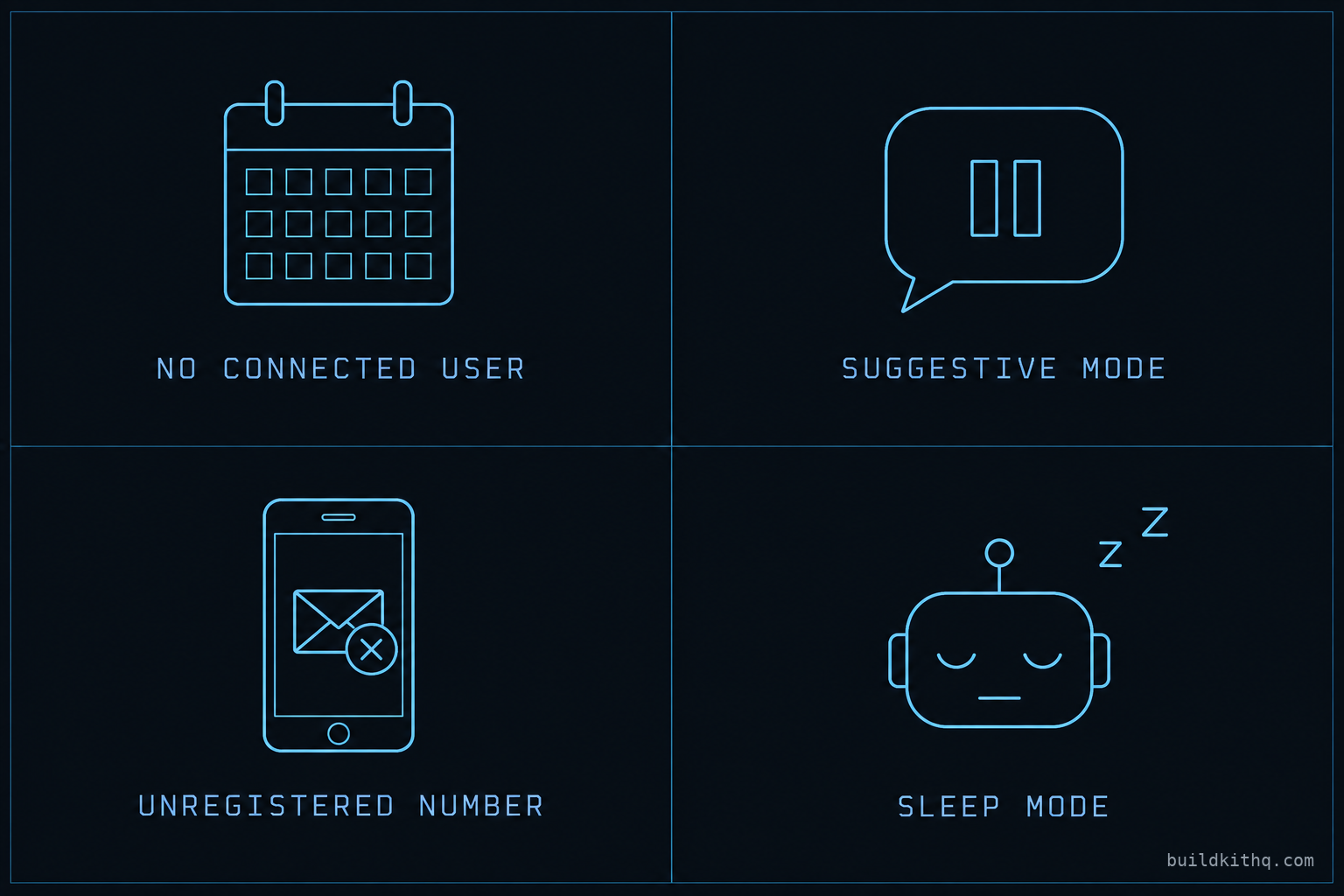
One: the calendar has no connected availability. The client says the bot never offers a time, or offers times that turn out to be fantasy. Underneath, the booking calendar imported fine as an object, but its availability reads from the users attached to it, and in a fresh sub-account those users either do not exist or have never connected a Google or Outlook account. A calendar with no connected user has no free slots to show, so the bot, asked for a time, has nothing real to hand over and either stalls or improvises. The fix is to open the calendar the bot is bound to, put the real team members on it, have each of them connect their own calendar through the account owner’s own authorization rather than a login-as shortcut, and set the working hours and slot interval the shop actually keeps. Then ask the bot for a booking in a test conversation and watch a real slot appear.
Two: the bot is still in suggestive mode. The client says the bot writes lovely replies that sit in the inbox until someone sends them, which on a Saturday is nobody. Underneath, the bot imported in suggestive mode, where it drafts and waits for a human to approve. That is a safe default and a useless receptionist. Nothing the bot writes goes out on its own, so the weekend of conversations is forty drafts, not forty bookings. The fix is to turn on auto-pilot for the channels the client uses, confirm it is on for SMS and for the live chat widget and for Facebook or Instagram if the shop runs them, then send a real inbound from a phone you hold and confirm a reply leaves without anyone clicking send.
Three: the number cannot send the booking link. The client says the bot says it is sending a link and the customer swears no link arrived. Underneath, the bot handed the message to the number and the carrier dropped it, because the number’s A2P 10DLC brand and campaign were never registered and approved in this sub-account. Registration is per sending entity, so every client you resell into needs their own, and until it clears the carrier filters outbound text on sight. The bot is innocent here. The fix is to register the number before the account goes live, which is exactly what A2P 10DLC setup covers, and then to send one real booking offer to your own phone and watch it land. If texts fire but still nothing books, the problem is upstream at the calendar, which is the whole reason workflows can fire while nothing sends is a separate failure worth knowing on its own.
Four: Sleep Mode leaves the bot mute at the wrong moment. The client says the bot works for a while, then goes silent partway through a conversation and the booking never closes. Underneath, Sleep Mode is doing its job a little too well. It stops the bot once a human has replied in the thread, which is correct when your advisor takes over, and wrong when the advisor fired off a one-word “thanks” from their phone three days ago and the contact has come back warm. The bot sees the human reply, goes to sleep, and the returning customer talks to no one. The fix is to decide how long the bot stays asleep after a human touches a thread, set it to match how the shop actually works, and test the case that bites: a contact who was handled by a person once and messages again a week later.
There is a fifth that is really a sharper version of the first, and it is worth a line because it looks identical to the client. The bot is bound to the wrong calendar. A kit may ship more than one calendar, a consult calendar and a service calendar, and the bot imported pointed at whichever one the kit was built against. In the new account the client renamed or rebuilt one of them, and now the bot is writing appointments to a calendar nobody looks at while the front desk works off another. Bookings are happening. They are just landing somewhere the shop never checks. The fix is to confirm the calendar named in the bot’s booking tool is the same calendar the front desk runs the day from, and to pick one calendar as the live one if the account drifted into two.
The diagnosis table
When a client reports that the AI receptionist “isn’t working,” they are describing a symptom, not a cause, and the same symptom has more than one cause. Run the symptom down this table before you touch the bot’s training, because the training is almost never the problem.
| What the client reports | What is actually wrong | Where you fix it |
|---|---|---|
| Bot replies well, books no one | No connected user on the bound calendar | Calendar settings, connect each team member’s own calendar |
| Good replies sit unsent until a human sends them | Bot is in suggestive mode, not auto-pilot | Bot settings, turn on auto-pilot per channel |
| Bot says it sent a link, customer got nothing | Number’s A2P brand and campaign not registered | Register the number, then send a real test |
| Bot answers, then goes silent mid-thread | Sleep Mode triggered by an old human reply | Auto-pilot settings, tune the sleep window |
| Bot offers times nobody is actually free | Calendar hours or slot interval never set | Calendar settings, set real working hours |
| Customer calls, phone rings out, no booking | Voice AI not bound to the number’s inbound flow | Phone number inbound call flow, bind the agent |
None of these is a retrain. Every one of them is a setting that points at the account, and every one of them imported pointing at the account the kit was built in. That is the pattern worth carrying away: when an imported receptionist underperforms, suspect the wiring to the account before you suspect the intelligence in the bot.
The numbers: what an empty bay actually costs
Every AI receptionist runs on a GoHighLevel account, and that account is a flat cost no matter how many sub-accounts you stack on it. On the pricing HighLevel publishes, and that we re-checked this week, the Unlimited plan is $297 a month or $2,970 a year and Agency Pro is $497 a month or $4,970 a year, each with a 14-day trial and Starter at $97 a month beneath them. Those figures were confirmed against HighLevel’s published pricing through search this run rather than fetched directly, so read them as off the pricing page, not quoted from an invoice. The one thing to tell a client plainly is that the AI itself does not ride on that flat fee. Conversation AI, Voice AI, SMS and email draw on usage-based credits that scale with how much the bot talks, so a receptionist that handles more conversations costs a little more to run. That is a feature, not a surprise, as long as nobody promised the client a fixed number.
The kit is the other number, and it is a one-time one. The auto repair shop kit is $1,135, with the whole catalogue listed in full on the pricing page before anyone buys. Set that against the platform bill it rides on and the receptionist buildout it saves, and the arithmetic is a reseller’s, not a consumer’s.
The receptionist is built to two targets the client states, and that we only ever write as targets and never as measured results: a 70 percent no-show recovery target once the reminder and recovery sequences are live, and five to ten reviews a month once the review request fires on a completed job. Both of those depend on the booking happening first. A no-show sequence protects appointments that exist, and a review request fires on a job that got booked, so a receptionist that books nobody hits neither target, not because the targets are wrong but because the chain never started.
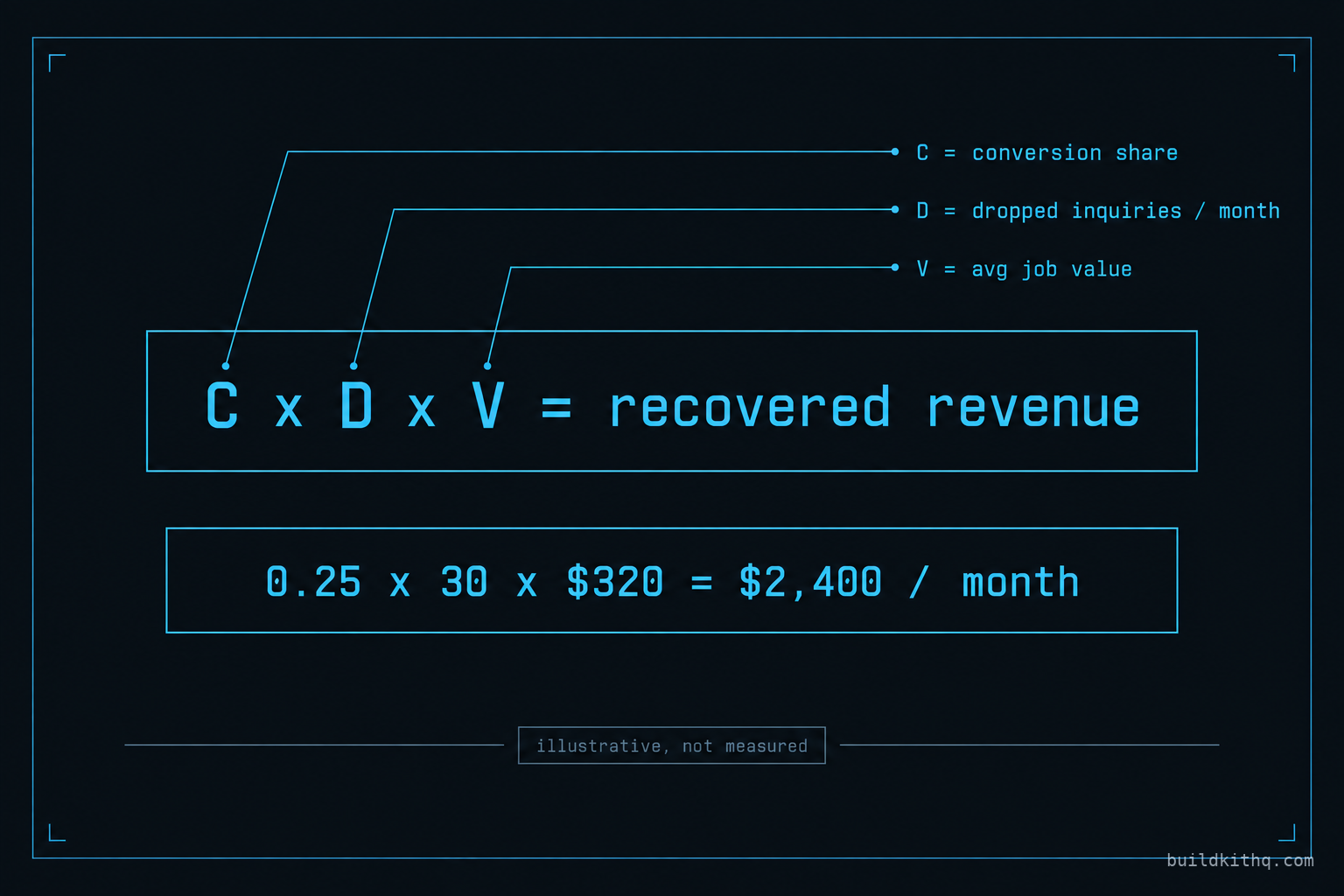
Put your own figures against it, because the method is the point, not our example. Call the after-hours and overflow inquiries an account drops each month D, and your average booked job value V. If the receptionist converts even a modest share C of those dropped inquiries into bookings, the revenue it defends is C times D times V. A shop dropping thirty weekend and overflow inquiries a month, booking a quarter of them at a 320 dollar average ticket, is 0.25 times 30 times 320, which is 2,400 dollars a month it was handing to voicemail. Swap in your own D, C and V and the shape holds. Then notice that all of it collapses to zero the moment the bot is bound to a calendar with no connected user, which is exactly why the wiring deserves more attention than the wording.
The go-live pass that keeps it honest
None of this is hard. It is a fixed pass you run once per resale, before the client ever logs in, and it is the difference between a receptionist that looks done and one that books. Run it in the same order every time and it takes minutes.
Bind the calendar first. Open the bot, find the appointment booking tool, and confirm it names a calendar that exists in this account and is the one the front desk works from. Then connect availability: put the real team members on that calendar, have each connect their own Google or Outlook account, and set the working hours and slot interval the business actually keeps. Then flip the mode: turn on auto-pilot for every channel the client uses, not just the one you tested, and set the Sleep Mode window to match how the shop hands threads between the bot and a human. Then clear the channel: register the number’s A2P brand and campaign, and on a phone that answers calls, bind the Voice AI agent to the inbound flow. Last, run one real conversation end to end. Text the business like a customer would, let the bot qualify you, take the slot it offers, and confirm the appointment is sitting on the calendar the front desk checks, with the reminder queued.
Five steps, one order, every account. It is the same discipline as the wider snapshot QA pass before a client handoff, narrowed to the one component clients judge hardest because they can see it talking. If you would rather not run it by hand on every account, that build and relink is exactly what a GoHighLevel AI receptionist engagement covers, and it is the same pass whether it is an auto repair shop booking bay time or a dental practice booking chairs, each with its own questions, its own calendar and its own idea of a good slot.
The objections worth answering
I will just forward the phone to a VA after hours. You can, and a good VA will book better than any bot on the calls they reach. But a VA sleeps, takes the holidays the shop stays open through, and costs the same whether two inquiries come in or forty. The receptionist answers the Saturday 11pm text while the VA is off, qualifies it, and books it, and hands the genuinely hard ones to a human in the morning. The honest framing is not bot instead of person. It is bot for the overflow and the after-hours, person for the judgment, which is the whole comparison in AI receptionist versus a VA versus text-back. A receptionist that books the easy ones is what frees the person for the ones that need them.
The AI will book garbage: wrong service, wrong slot, tire-kickers. It books what you let it book, and the kit ships the guardrails for exactly this. The qualifying questions are the gate: the bot asks what the car is doing, or what the job is, before it offers a time, and you can set which calendar and which slots it is allowed to offer so it never books a two-hour diagnostic into a fifteen-minute oil-change window. The failure people mean when they say this is usually a bot with no qualifying questions and a single calendar, which is a configuration you can see and change, not a fact about AI. Tune the questions to the trade and the garbage rate drops to roughly what a distracted human at a front desk produces.
If I have to re-wire the calendar and the number on every client anyway, why buy the kit? This is the fair one, and the honest answer is that the re-wire is real and the kit does not pretend otherwise. The calendar connections, the registered number and the real users are account infrastructure, and no snapshot on any platform carries account infrastructure, the same way none of them carry your sending domain. What the kit carries is everything above that line: the bot, its training for the trade, the qualifying questions, the booking tool already pointed at a calendar role, the fallback to a human, and the reminder and review sequences that hang off a booking once it exists. You buy the receptionist built and owe the relink, which is minutes. Build the bot, the training and the sequences from scratch per client and you are doing the week the kit already did, under time pressure on a live account. If a shop tells you a snapshot ships with the calendar connected and the number registered, it is either wrong or about to wire someone else’s phone number into your client’s account.
The usage-based AI cost makes the bill unpredictable. It is variable, not unpredictable. The AI draws credits in proportion to how much it talks, so the bill tracks volume the same way a phone bill does, and a shop that suddenly gets twice the inquiries is a shop with twice the bookings to pay for it. The receptionist that worries you on cost is the one talking to forty people and booking none, because that is pure spend with nothing recovered. Fix the booking path and the usage turns into appointments, which is the only version of this cost that is worth paying.
Quick answers
Start at the calendar binding. Open the bot, find the appointment booking tool, and confirm it names a calendar that exists in this sub-account and has at least one user with a connected calendar. A bot with no bound calendar, or one pointed at a calendar with zero connected availability, will talk all day and never offer a real slot, because it has nothing to offer.
The bot is in suggestive mode, not auto-pilot. In suggestive mode it writes the reply and waits for a human to approve and send it, which means nothing goes out on a weekend or after hours. Turn on auto-pilot for the channels the client actually uses, test it on a real inbound, and confirm a message sends without anyone touching it.
The link sends over SMS, and SMS will not deliver from a number whose A2P 10DLC brand and campaign are not registered and approved. The bot does its job, hands the message to the number, and the carrier drops it. Register the number before go-live and send one real test to a phone you hold.
It books into whatever calendar you bind it to, and that calendar reads availability from the users connected to it. Connect the real team members' calendars, set the calendar's working hours and slot interval, and the bot offers only slots the account actually has. Skip that and it offers times nobody is free.
The re-wire is real, and it is the account infrastructure no snapshot carries: the calendar connections, the registered number, the real users. What the kit carries is the bot itself, its training, the qualifying questions, the booking tool and the fallback to a human, written for the trade. You buy the build and owe the relink, the same line every snapshot draws.
Keep reading
What a finished GoHighLevel account does with a lead
A lead moves through five stages in a finished GoHighLevel account. Here is what each stage is wired to, and the handoffs where a half-built one drops it.
Read itThe four ways to catch a lead your client's phone missed
A missed call is a lost client. Compare the GoHighLevel AI Receptionist, a human VA, missed-call text-back and voicemail on the eight things that matter.
Read itYour kit's emails all say delivered, and land in spam
Your kit's emails show as delivered and still land in spam. Here is the deliverability setup that gets a GoHighLevel sub-account into the Gmail inbox.
Read it