Your kit's emails all say delivered, and land in spam
Your kit's emails show as delivered and still land in spam. Here is the deliverability setup that gets a GoHighLevel sub-account into the Gmail inbox.
A dental client called three weeks after handover. Not angry, just puzzled. New patients were booking off the funnel fine, but almost nobody was confirming their appointment, so the front desk was back on the phone every morning re-confirming the next day’s chairs. That is the exact job the kit was built to take off them. We opened the account. Every confirmation and every reminder carried the same green word in the log: delivered. Hundreds of them, delivered, across three weeks.
So we ran the one test that settles it. We added a personal Gmail address as a contact, booked a fake appointment, and let the confirmation fire for real. It arrived. It arrived in the Spam folder, under a red banner warning the message might be dangerous. The reminder a day later went to Promotions, which on a phone is a tab most people never open. The automation had done everything it was built to do. It did it into a folder no patient reads.
This is the email version of a failure that turns up on every channel a kit ships. The workflow fires, the platform says delivered, and the message still never reaches a human, because delivered and inbox are two different events with a wall of spam filtering between them. The log only ever reports the first one. This guide is the setup that earns you the second: what an email has to prove before Gmail will file it in the inbox, where an imported sub-account fails to prove it, and the rules Gmail and Yahoo now enforce whether you knew about them or not.
Delivered is a receipt, not a destination
There is a quiet lie in the word delivered. GoHighLevel marks a message delivered when the receiving mail server accepts it at the SMTP handshake. That acceptance is the last thing the sending side can see. Gmail accepts almost everything, including mail it has already decided to bury, and only then runs the message through its own filters to choose inbox, Promotions or Spam. That decision happens after the handshake and never reports back, so delivered tells you Gmail took the message and nothing about where Gmail put it.
That makes the first move the same one that saves every send investigation, and it is the single thing to take away even if you read nothing else. Do not judge email from the delivery log. Judge it from a real inbox. Put an address you control on Gmail into the account as a contact, trigger the real message, and look at where it lands and what the header says. If it reaches the inbox clean, the account is set up and your problem is a specific list or a specific campaign. If it lands in Spam or Promotions, the account never earned the inbox, and no amount of rewriting the subject line fixes a trust problem at the domain.
Once you are testing placement instead of trusting the log, the causes sort into a short list, and every one of them lives on the path the email travels out of the account.
The path an email takes out of a sub-account
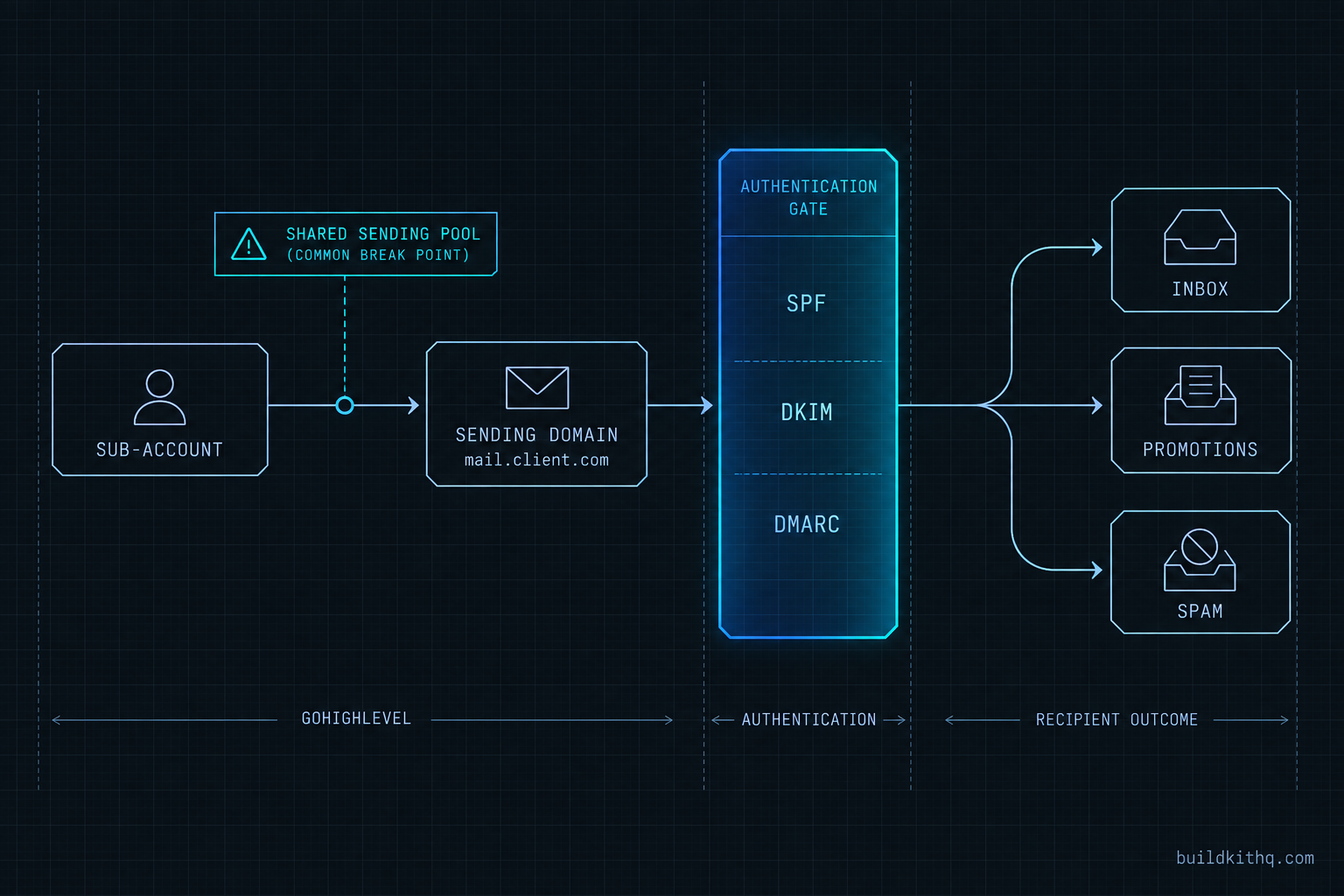
Out of the box, a GoHighLevel sub-account sends through LC Email, HighLevel’s built-in service, which runs on shared infrastructure behind the scenes. On that default, a brand-new account is sending on a reputation it shares with every other account that also never set anything up, which includes a steady supply of people sending things Gmail does not like. You inherit the average of that crowd. The entire job of email setup is to climb off the shared pool and onto a domain whose reputation is yours alone.
That starts with a sending domain. The convention is a subdomain used only for email, something like mail.theclientdomain.com, connected under the sub-account’s email settings. HighLevel then shows you a set of DNS records to add at the client’s registrar. You add them, wait for DNS to propagate, and verify. From that point the From address sends as that subdomain, and the three records you published are what receiving servers read to decide whether to trust it.
What SPF, DKIM and DMARC each prove
These three are not interchangeable and they do not do the same job. Receivers want three different questions answered, and there is one record for each.
- SPF is a DNS text record that lists which servers are allowed to send mail for the domain. The receiver checks the sending server against that list. It answers “is this server allowed to send for this domain.” The published spec caps an SPF check at ten DNS-querying mechanisms, a limit that matters more than it sounds, as described in RFC 7208, section 4.6.4.
- DKIM adds a cryptographic signature to the message header, which the receiver verifies against a public key you publish in DNS. It answers “was this message really sent by this domain, and has it been altered in transit.” Google requires DKIM keys of at least 1024 bits and recommends 2048, per its own email sender guidelines.
- DMARC is a policy record at
_dmarcthat tells receivers what to do when the first two fail, and it adds one more demand: alignment. The visible From domain has to match the domain that SPF or DKIM authenticated. A DMARC policy readsp=noneto monitor only,p=quarantineto send failures to spam, orp=rejectto refuse them outright. Google accepts an enforcement policy of none as the starting point, sop=noneis enough to satisfy the requirement while you watch the reports.
Alignment is the part an import quietly fails. A kit’s email can go out and even pass SPF on the shared infrastructure while the From address still belongs to the client’s own domain. SPF passes for the sending service, the From says the client, nothing lines up, and DMARC fails the message even though two of the three checks technically passed. That is the gap a dedicated, verified sending domain closes.
What Gmail and Yahoo now require
Since February 2024, Gmail and Yahoo apply a shared baseline to anyone sending in volume to their users, aimed at senders of roughly 5,000 or more messages a day to Gmail addresses, and increasingly expected of everyone. These are not best-practice suggestions anymore. They are the conditions for the message being accepted at all, and a non-compliant sender now faces rate limiting or outright rejection. The requirements below are Google’s own, from its email sender guidelines, with the unsubscribe mechanics defined in RFC 8058.
| Requirement | What it actually means | Where it lives |
|---|---|---|
| SPF and DKIM | Both authentication records published and passing for the sending domain | DNS on the sending subdomain |
| DMARC | A policy record present; p=none is enough to start |
_dmarc TXT record |
| DMARC alignment | The visible From domain matches the SPF or DKIM domain | From address plus the published records |
| One-click unsubscribe | A List-Unsubscribe and List-Unsubscribe-Post header on marketing mail, plus a visible link |
Added by HighLevel on marketing email; verify it |
| Spam rate below 0.30% | Complaints in Postmaster Tools kept under the line; Google advises under 0.10% | Your list and sending behaviour |
| TLS in transit | The connection carrying the mail is encrypted | Handled by the sending infrastructure |
| Valid reverse DNS (PTR) | The sending IP resolves back to a matching hostname | Handled by the sending infrastructure |
Read the right-hand column, because it tells you which of these are yours to fix. The top four sit on the sending domain and its From address, which is exactly what you set up when you move off the shared pool. The spam rate is your list and your sending habits. TLS and reverse DNS are carried by the sending infrastructure and are not something you configure per account. So the work that lands an account in the inbox is a small, finite list: publish the records, align the From, keep the complaints down, and keep the unsubscribe honest.
Where it breaks after an import
What follows is the diagnosis version of that list: what you see, what is actually wrong, and the fix, for the breaks that account for nearly every imported account we have opened that was sending and landing in spam.
The account is still on the shared sending pool
You see mail marked delivered but sitting in Spam, and the From address is a generic no-reply or a HighLevel default rather than the client’s own domain. What is wrong is that nobody ever moved the account onto a verified sending domain, so it is still borrowing the shared reputation of every unconfigured account on the platform. The fix is the setup above: connect a dedicated sending subdomain, publish SPF, DKIM and DMARC, and set the From address to send as that subdomain. This one change does more for placement than every other item on the page combined.
SPF returns a permerror from too many lookups
You see DKIM passing but SPF failing intermittently, and DMARC aggregate reports showing SPF failures you cannot explain. What is wrong is that the SPF record has grown past the ten DNS-lookup ceiling, usually because it chains several include statements that each pull in more, and once it tips over the limit the receiver returns a permerror and treats SPF as failed. The fix is to flatten the record: remove unused includes, drop the ptr and mx mechanisms, and keep the whole evaluation under ten lookups, as the limit is laid out in RFC 7208. Nothing in DNS warns you about this, so the only early signal is in the DMARC reports.
The From domain does not align
You see both SPF and DKIM showing pass in the raw headers, and DMARC still failing the message. What is wrong is alignment: the mail was authenticated for the sending service’s domain, not the client’s From domain, so neither authenticated domain matches what the recipient sees in the From line. The fix is to send from the connected subdomain whose DKIM key you actually published, and to make the From address use that same domain, so that the thing you authenticated and the thing the reader sees are one and the same.
Marketing sends have no one-click unsubscribe
You see transactional mail like confirmations landing fine, while a campaign to a list drops into spam or gets throttled. What is wrong is that bulk messages are going out without the one-click unsubscribe headers that Gmail and Yahoo now require on marketing and subscribed mail. HighLevel adds these headers to marketing email, but an imported template or a message sent through the wrong email type can miss them. The fix is to confirm the List-Unsubscribe-Post header is present, which you do by opening a seed message and viewing the original, and to keep a visible unsubscribe link in the body as well.
A big first send on a cold domain
You see a first campaign pull strong opens, and then the domain’s mail starts hitting spam for weeks afterward. What is wrong is that a brand-new sending domain with no history was handed thousands of messages at once, tripped the spam-complaint threshold, and burned the reputation it had not yet built. The fix is a warm-up: ramp the daily volume up gradually while watching the complaint rate, start with the most engaged contacts, and never make a cold reactivation blast the first thing a new domain ever does. If the plan is to wake an old list, read why workflows can fire and still send nothing first, and treat a database reactivation campaign as its own careful project rather than a launch-day event.
The numbers that decide the inbox
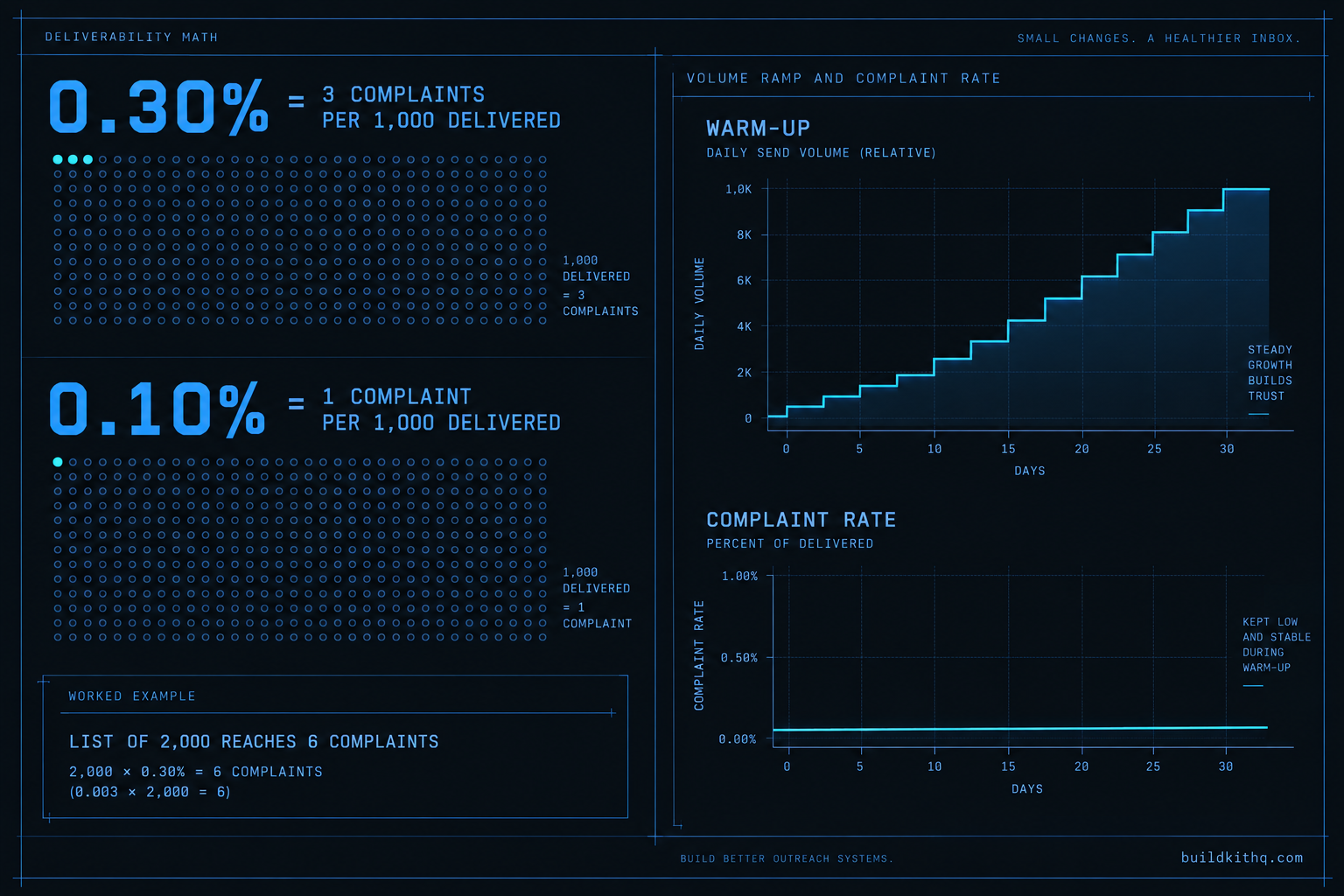
Deliverability feels like a black box, but the part that governs reputation is a plain ratio you can hold in your head. Google asks senders to keep the spam rate reported in Postmaster Tools below 0.30%, and separately advises staying under 0.10%, in the same sender guidelines. Convert that from a percentage into people and it stops being abstract.
At 0.30%, that is three recipients marking a message as spam for every thousand the account delivers. Take a modest client list of 2,000 contacts and a single campaign. Three per thousand across 2,000 delivered is six people. Six recipients hitting the report button is all it takes to reach the line Google draws. Aim for the safer target instead, 0.10%, and the budget is one per thousand, so just two complaints across that same 2,000-contact send puts the domain at the number Google would rather you stay under. The assumptions here are simple and worth stating so you can swap your own in: these are complaint counts measured against delivered volume to Gmail users, aggregated by Postmaster Tools, and the arithmetic scales straight with your list size.
The lesson in those small numbers is that reputation is not decided by a majority. It is decided by a handful of annoyed people, which is why warm-up and list hygiene are not optional polish. A domain earns trust by sending wanted mail to people who open it, in rising volume, and loses it in a single ill-judged blast. There is no published daily cap you can read off and obey, so the method is the number: start low, raise the volume in steps while the complaint rate stays flat, and let a domain reach a few thousand a day over a couple of weeks rather than on its first morning.
The setup itself costs nothing on top of the subscription the account already runs. HighLevel’s own plans, read from its pricing page on 23 October 2026, are Starter at $97 a month, Unlimited at $297 a month and Agency Pro at $497 a month, each with a 14-day free trial. Those are a third party’s subscription prices, listed here only to make the point that none of them is a deliverability upgrade. You cannot buy your way into the inbox by moving up a tier. The records are free to publish, the behaviour is free to get right, and the only genuinely expensive outcome is a burned domain, which costs far more time to recover than it ever took to set up.
The objections worth answering
LC Email works out of the box, so why touch DNS at all. It works until it does not, and the point it stops is the point it matters. On the shared pool your client’s placement rides on the behaviour of strangers, and the first time you send to Gmail and Yahoo at any real volume you meet the February 2024 baseline, which expects mail authenticated on your own domain. A verified sending domain is not an advanced upgrade you add later. It is the floor an account stands on, and a serious client send should start from it.
A kit cannot fix deliverability, so what is a kit site doing writing this. That objection is correct on the facts, and worth saying plainly. A snapshot cannot ship your client’s DNS, their sending domain or their reputation, because all three are per-account and belong to the client, not to any file you import. What a kit ships is the email automation that sits on top of deliverability: the nurture, the reminders, the reactivation. We write this because the most common reason a kit’s email appears broken is not the kit, it is an account that was never moved off the shared pool, and buying a kit does not skip that step. On a BuildKitHQ kit the installation support hours cover connecting the email domain in HighLevel, which is why the setup is spelled out here rather than left as a surprise.
Is a dedicated IP the real answer. For most agency volumes, no, and often the opposite. A dedicated sending domain is not the same thing as a dedicated IP, and a cold IP carrying low volume never accumulates enough sending history to build a reputation, so it can hurt placement rather than help it. The reliable default is a shared but reputable sending platform with your own authenticated domain riding on top. The lever that moves the inbox is the domain and the sending behaviour, not the IP address underneath them.
Email is the channel on a kit most likely to look like it works while reaching nobody, precisely because the log is so confident. Treat delivered as a receipt, test placement in a real inbox, move every account onto its own authenticated domain, and keep the complaint rate low, and the automations a kit ships stop firing into empty folders. If you want the wider view of where email sits in a finished build, the QA pass before a client handoff and the five stages a finished account runs both put this step in its place, and the full rate card is on the pricing page.
Quick answers
Delivered means the receiving mail server accepted the message. Acceptance is not placement. Gmail takes almost everything, then decides inbox, promotions or spam by its own filters afterward, and none of that reports back into the log. The only honest test is to send a real message to a real inbox you control and look at where it lands.
Each client sends as their own brand, so each sub-account needs its own verified sending domain, usually a subdomain reserved for email. Authentication proves a specific domain sent the mail, so one shared domain across clients would mix their reputations together. Set up a dedicated sending subdomain per account and point the From address at it.
No kit on any platform can. Those records live in your client's DNS and belong to their domain, which no snapshot contains. A kit ships the email automations that depend on deliverability being right. The DNS setup is per account, and on a BuildKitHQ kit the installation support hours cover connecting the email domain in HighLevel.
Google asks senders to keep the spam rate reported in Postmaster Tools below 0.30%, and separately advises staying under 0.10%. At 0.30% that is three people marking a message as spam for every thousand delivered. A small number of annoyed recipients, not a majority, is what moves a domain toward the spam folder.
Gmail and Yahoo require marketing and subscribed messages to support one-click unsubscribe and carry a visible unsubscribe link. Technically that means a List-Unsubscribe header and a List-Unsubscribe-Post header, the pair defined in RFC 8058. HighLevel adds these to marketing email, but confirm they are present with a seed test before a real campaign.
Keep reading
What a finished GoHighLevel account does with a lead
A lead moves through five stages in a finished GoHighLevel account. Here is what each stage is wired to, and the handoffs where a half-built one drops it.
Read itThe AI receptionist in your kit answers, but never books
An imported kit's AI receptionist replies around the clock and books no one. Here is the booking path underneath, the four places it breaks, and the fix.
Read itThe four ways to catch a lead your client's phone missed
A missed call is a lost client. Compare the GoHighLevel AI Receptionist, a human VA, missed-call text-back and voicemail on the eight things that matter.
Read it