Your workflows are firing but nothing is sending
The workflow log says the action ran, yet no text or email arrives. Here is the GoHighLevel send path, where an imported snapshot breaks it, and the fix.
A plumbing client called on a Tuesday, three days after we handed over the account. Every workflow was live. The execution logs were green. The speed to lead automation showed a text going out fourteen seconds after each form fill, exactly as designed. And the client had booked nobody. Not one of the week’s leads had heard a word back.
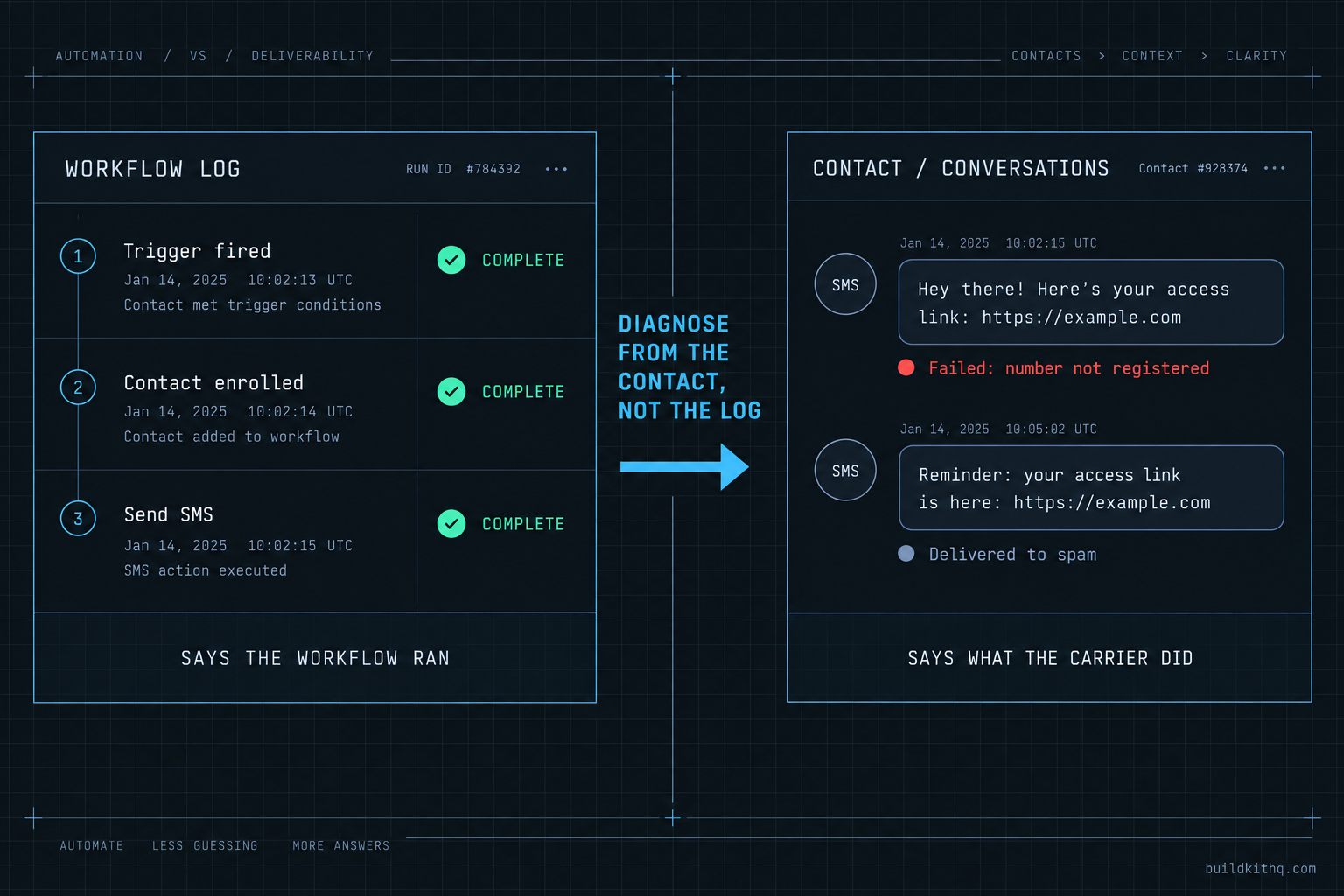
We opened one of those contacts and looked at the Conversations tab instead of the workflow log. The outbound text was sitting there with a red status and a one line error about the sending number not being registered. The workflow had done its job perfectly. It fired, it built the message, it handed it to the phone system, and the phone system had nowhere to send it. The snapshot was fine. The send path underneath it had never been switched on.
This is the failure that gets blamed on the kit more than any other, and it is almost never the kit. A workflow firing and a message arriving are two different events with a lot of machinery in between. When you import a snapshot, you import the machinery on the workflow side. The machinery on the sending side belongs to the sub-account, and it starts empty. This guide walks the whole path, shows you the four places it breaks after an import, and gives you the check that tells the difference in about a minute.
The difference between fired and sent
There is a genre of GoHighLevel troubleshooting article about workflows that never trigger: you submit a test form and the automation does nothing. That is a real problem and it has a tidy diagnosis order, most of it on the trigger side. This is not that article.
This is about the harder case, the one that wastes a week because everything looks correct. The workflow triggers. It enrols the contact. The action step runs and the log marks it complete. And still nothing lands on a phone or in an inbox. The trigger side is working. The delivery side is not, and the workflow log will not tell you, because the log stops at the moment the workflow hands the message off.
So the first move is always the same, and it is the one thing to take away even if you read nothing else. Do not diagnose a send problem from the workflow execution log. Diagnose it from the contact. Open the contact record, open Conversations, and read the status on the individual message. A workflow log tells you the workflow ran. The Conversations tab tells you what the carrier or the mail server actually did with what the workflow produced. Those are different truths, and only the second one matters to the client whose phone stayed quiet.
Once you are reading the message status instead of the workflow status, the causes sort themselves into a short list. Every one of them lives on the send path, so it helps to know what that path actually is.
The send path, end to end
A message in GoHighLevel travels further than most people building the workflow ever look. The workflow is the first few feet of a much longer pipe, and the leaks are almost always further down, in the part the snapshot did not bring with it.
The SMS path
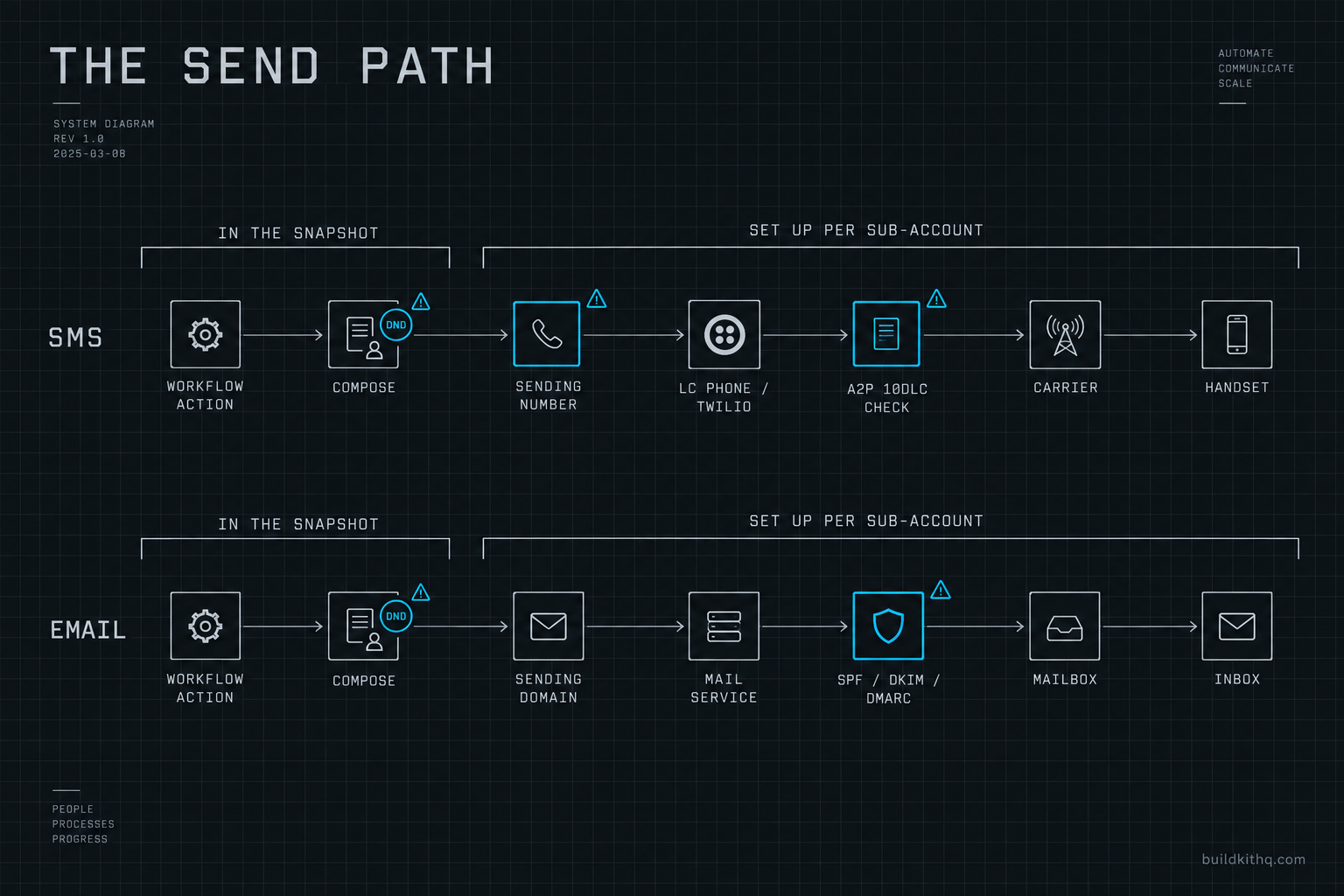
When a workflow hits a Send SMS action, here is what happens after the log goes green. The platform composes the message, substituting your custom values into the template. It attaches a sending number, the phone number that belongs to this sub-account. It hands the message to the underlying phone provider, which for a standard HighLevel account is LC Phone, HighLevel’s own layer over Twilio. The provider checks whether this number is allowed to send application-to-person traffic to US mobile numbers, which in the United States means checking A2P 10DLC registration. If the brand and campaign are registered and approved, the message goes to the carrier. The carrier runs its own filtering, and if it passes, it reaches the handset.
Count the steps that have nothing to do with your snapshot. The sending number is bought per sub-account. The A2P registration is filed per sub-account against a real business. The carrier decision is made by AT&T or T-Mobile or Verizon, not by anything in the kit. A snapshot cannot carry any of that, because none of it is snapshot content. It is account infrastructure, and it is set up new every time.
The email path
Email is shorter but breaks in a quieter way. The workflow hits a Send Email action, composes the message, and hands it to the mail service. The message goes out with a From address on some domain. The receiving mail server, Gmail or Yahoo or a corporate server, decides where to put it, and that decision is driven almost entirely by whether the sending domain is authenticated. Authentication means three DNS records: SPF, which says which servers may send for the domain, DKIM, which cryptographically signs the mail, and DMARC, which tells the receiver what to do when the first two do not line up.
If those records are missing or wrong, the email does not bounce with a loud error. It sends. The workflow marks it complete. And it lands in spam, or it is silently dropped, and the client tells you three weeks later that their open rate is zero. Email failures are worse than SMS failures precisely because they are invisible from inside the platform. The message shows as sent because, technically, it was sent. It just was not trusted.
That is the whole path. Now the four places an import leaves it broken.
Where it breaks after an import
If you want the checklist form of the setup that prevents all of this, our snapshot import guide has it as a pre-launch list. What follows is the diagnosis version: what you see, what is actually wrong, and how to fix it, for the four causes that account for nearly every dead send path we have opened.
The A2P brand was never registered
What you see. SMS actions complete in the workflow log. In the contact’s Conversations tab the outbound text carries a red or failed status, often with a message about the number not being registered or the campaign not being approved. Email, if the domain is set up, works fine, which is the detail that convinces people the snapshot is half broken. It is not. SMS and email travel different paths and only one of them is blocked.
What is actually wrong. United States carriers filter application-to-person traffic from unregistered 10-digit long codes at the network edge. The message leaves HighLevel, reaches the carrier, and is dropped before it reaches the handset. No amount of re-importing the snapshot changes this, because the registration is a property of the sub-account and the business behind it, not of the workflow.
The fix. Register the A2P brand and at least one campaign for this sub-account, then wait for approval before you rely on SMS. This is the long pole in any launch, so start it first. It also carries real, separate costs that nobody bundles into a kit price, which the numbers section below lays out. If you would rather not touch the registration paperwork, filing it correctly the first time is exactly what our A2P 10DLC setup service does, and it is one of the tasks the free installation support hours on every kit already cover.
The sending domain is not authenticated
What you see. Email actions complete. Nothing bounces. The client says the emails are not arriving, or they find them in spam, or the open rate is flat zero across a live campaign. From inside GoHighLevel everything looks sent, because it was.
What is actually wrong. The sub-account is sending from a domain with no SPF, DKIM or DMARC records, or from HighLevel’s shared sending address. Mailbox providers no longer treat that mail as trustworthy. Since February 2024, Gmail and Yahoo require bulk senders to authenticate with SPF and DKIM, publish a DMARC policy, keep their spam complaint rate below 0.30 percent, and honor one-click unsubscribe. Google defines a bulk sender as anyone sending more than 5,000 messages a day to personal Gmail accounts, and the rules are documented in Google’s own sender guidelines. Below that volume you can still send, but you are living on borrowed goodwill, and a snapshot’s nurture campaign will push most agencies toward that line faster than they expect.
The fix. Set up a dedicated sending domain in the sub-account and publish the SPF, DKIM and DMARC records at the DNS host. Send a test to a Gmail address and a Yahoo address, then open the raw message and confirm SPF and DKIM both pass and DMARC aligns. This takes minutes once you have DNS access, and it is the single highest-return fix on this list because it is invisible until you look for it.
The number never provisioned
What you see. SMS actions error immediately, sometimes with a message about no sending number being available. Or a number exists but forwarding is dead, so replies and missed-call automations behave strangely.
What is actually wrong. Phone numbers belong to the sub-account and do not travel in a snapshot. Either no number was ever bought for this account, or one was bought but the provisioning did not finish, or the number is there but the forwarding and calling settings were never configured. The workflow references a Send SMS action that has no line to send on.
The fix. Buy or port a number into the sub-account, confirm it shows as active, and set the call forwarding and whisper settings. Do this before A2P, because you register a campaign against numbers, and it is cleaner to have the number in place first. A well-built kit like the plumbing company kit assumes this number exists and wires every missed-call and speed-to-lead automation to it, but it cannot buy the line for you.
The contact is marked Do Not Disturb
What you see. Most contacts receive messages fine, but a specific group gets nothing, and the workflow log shows the send action skipped rather than failed. This one hides in plain sight because it is not an error, it is the platform doing exactly what it was told.
What is actually wrong. Do Not Disturb can be set at the contact level, per channel, and it can also arrive baked into contacts that came in with an import or a bulk upload. A contact with SMS Do Not Disturb switched on will have every SMS action skipped, silently and correctly. If a snapshot was pushed onto a sub-account that already held contacts, or contacts were imported from a spreadsheet with the flag set, whole segments can be muted without anyone choosing to mute them.
The fix. Open an affected contact and check the Do Not Disturb settings for each channel. If a segment is muted, fix it in bulk, but first make sure you actually have consent to message them, because Do Not Disturb is sometimes the only thing keeping you compliant. This is also why importing into a fresh sub-account beats importing over an existing one: you inherit fewer surprises.
There is a fifth cause worth naming even though it sits on the boundary between trigger and delivery. A workflow can be published but filtered so tightly that your real contacts never reach the send step: a trigger keyed to a tag the live form does not apply, or a segment condition that excludes everyone. The action never runs, so there is no message status to read at all. If Conversations shows no attempt rather than a failed attempt, that is your tell, and the fix is on the trigger side. The workflow examples guide covers how those triggers are supposed to be wired.
What the send path actually costs
The send path is not just work, it is money, and it is money that never appears on a kit’s price tag because it is not part of the kit. Knowing the real numbers keeps you from underquoting a client and from assuming a one-time snapshot price is the whole bill. Every figure below links to the provider’s own pricing page. They were verified against those pages in September 2026, and carrier pass-through rates in particular change, so re-check before you put a number in front of a client.
Turning SMS on for one US sub-account means A2P 10DLC fees, and HighLevel states these are passed straight through from The Campaign Registry and the carriers with no HighLevel markup. Through LC Phone, which runs on Twilio, Twilio’s published A2P pricing sets the rate. A standard brand registration is a one-time $44. A low-volume standard brand, which fits most single-location agencies, is a one-time $4, and Twilio documents an even cheaper sole proprietor path for the smallest senders. Campaign registration is a one-time $15. The recurring campaign fee runs from about $1.50 to $10 a month depending on the use case. On top of that, carriers add a pass-through fee per message segment, in the range of a fraction of a cent, so a few tenths of a cent per text.
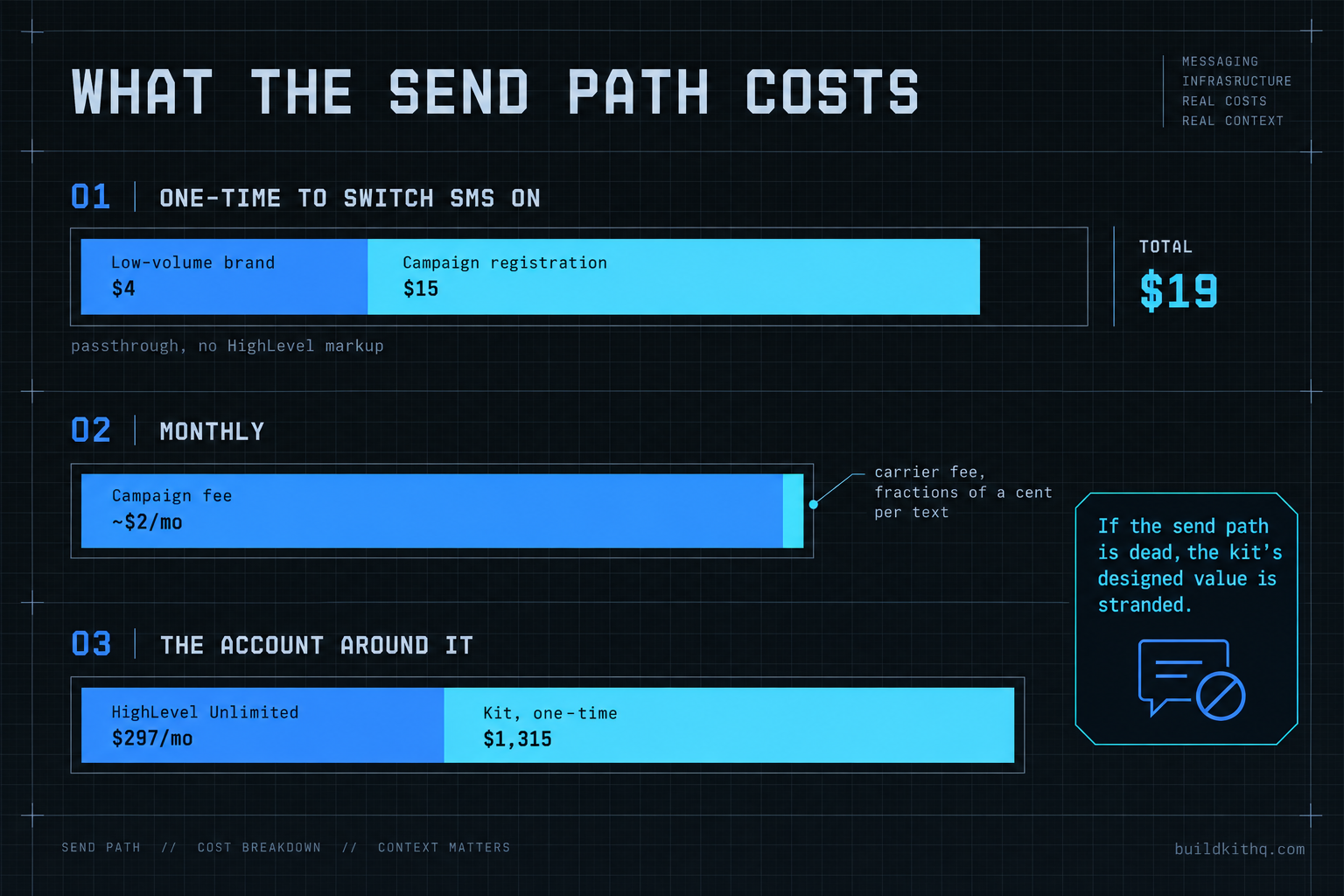
Put that together for a small client. Take the low-volume standard brand at $4, one campaign at $15 to register, and say $2 a month to keep it running. That is $19 to switch SMS on and roughly $2 a month after, plus the per-segment carrier fee on whatever volume you actually send. Against that, the HighLevel account the sub-account lives in is $297 a month on HighLevel’s Unlimited plan, the price on HighLevel’s own pricing page verified in September 2026, and the kit itself is a one-time price: the plumbing company kit is $1,315. The A2P line is small, but it is the difference between every automation in a $1,315 kit working and none of it working, which is a strange corner to leave uncosted.
Now the value side, and read this as a design target rather than a promise, because it is arithmetic on your own numbers, not a measured result. A no-show recovery automation is built to a 70 percent recovery target, and a review automation to a typical 5 to 10 reviews a month. Say a clinic running the dental practice kit books 40 appointments a month and 10 people fail to show. A build aimed at recovering 70 percent of those is targeting 7 rebooked appointments. Put your own average job value in place of the example: at, say, $200 a visit, that is $1,400 of work the send path either recovers or does not. If the send path is dead, the recovery target is zero, the review target is zero, and the whole designed value of the kit is stranded behind a $19 registration nobody filed. Substitute your real appointment count, no-show rate and job value and the shape holds: the cheapest line item gates the most expensive outcome.
The objections worth answering
“The kit is broken, I want a refund.” It is the fair first reaction and it is almost always wrong. Confirm it in a minute: open a failed contact, read the message status in Conversations, and if it says the number is unregistered or the domain is unauthenticated, the kit did its job and the send path did not. A snapshot cannot carry your A2P registration or your DNS records any more than a car can come with your driver’s license. That said, all sales are final once an order is created and the share link is sent, so the honest move on our side is to make the send path easy, which is why installation support hours cover exactly this setup.
“I will just reimport the snapshot and start clean.” Reimporting changes nothing here, and on a live sub-account it can overwrite customisation you wanted to keep. The send path failures are not in the assets, so replacing the assets leaves every one of them exactly where it was. Worse, a fresh push over a configured account can wipe custom values and reconnected calendars, turning one problem into several. Diagnose the delivery path instead. It is faster than a reimport and it does not cost you your setup.
“Why buy a kit at all if I still have to do A2P and DNS myself?” This is the strongest objection and it deserves a straight answer. You would have to register A2P and authenticate a domain for a client no matter where the automations came from, including if you built every workflow by hand over a weekend. That work is a property of running a real messaging account, not of buying a kit, so it is not a cost the kit adds. What the kit removes is the build: the automations, the funnels, the review and no-show and reactivation logic, delivered within 24 business hours of purchase confirmation, business hours being 9am to 5pm Central Monday to Friday, so a Friday afternoon order lands on Monday. Installation is free with every kit, and it comes with 10 hours of dedicated installation support to be used within 12 days of purchase, which explicitly covers A2P registration and email domain setup. You are not paying to skip the send path. You are paying to skip the fortnight of building, and getting help with the send path included.
“Can I just use email and skip the A2P headache?” You can send email while A2P is pending, and it is the right way to keep a launch moving. But email without an authenticated domain has its own quiet failure, the one in the second cause above, and it is arguably worse because it fails silently into spam rather than loudly with a red status. Skipping A2P does not let you skip the send path. It just moves which half of it you have to get right first.
If you want the send path handled end to end rather than diagnosed after the fact, that is what a done-for-you GoHighLevel setup is, and the FAQ answers the common questions about what installation support does and does not include before you buy.
Quick answers
A completed action means the workflow handed the message to the sending channel, not that a carrier delivered it. The message can still be blocked at the A2P layer, dropped for a marked Do Not Disturb contact, or filtered as spam. Open the contact's Conversations tab and read the message status there, not the workflow log.
No. US carriers filter unregistered 10DLC traffic at the network edge, so messages leave the platform and quietly fail. Register the brand and campaign for that sub-account first. Voice and email do not depend on 10DLC, so those paths can work while SMS registration is pending.
No snapshot on any platform includes either. A2P is filed per sub-account against a real business, and a sending domain is authenticated with DNS records you control. A kit ships the workflows and messages; the send path underneath them is always set up for the account it lands in.
The email domain and Do Not Disturb checks take minutes. A2P is the long pole: brand and campaign registration commonly clear in a day or two but can run longer if carriers ask for more detail. Start A2P first and work the other checks while it is pending.
Almost never. The send path is account infrastructure, not snapshot content, so a workflow can import perfectly and still have nowhere to send. Confirm the workflow action ran in the execution log, then walk the delivery path below before you blame the build.
Keep reading
What a finished GoHighLevel account does with a lead
A lead moves through five stages in a finished GoHighLevel account. Here is what each stage is wired to, and the handoffs where a half-built one drops it.
Read itThe AI receptionist in your kit answers, but never books
An imported kit's AI receptionist replies around the clock and books no one. Here is the booking path underneath, the four places it breaks, and the fix.
Read itThe four ways to catch a lead your client's phone missed
A missed call is a lost client. Compare the GoHighLevel AI Receptionist, a human VA, missed-call text-back and voicemail on the eight things that matter.
Read it