The review automation is running, and the Google profile stays empty
Your kit's review requests fire on every finished job, yet the client's Google profile gains nothing. Here is the review path, where an import breaks it, and the fix.
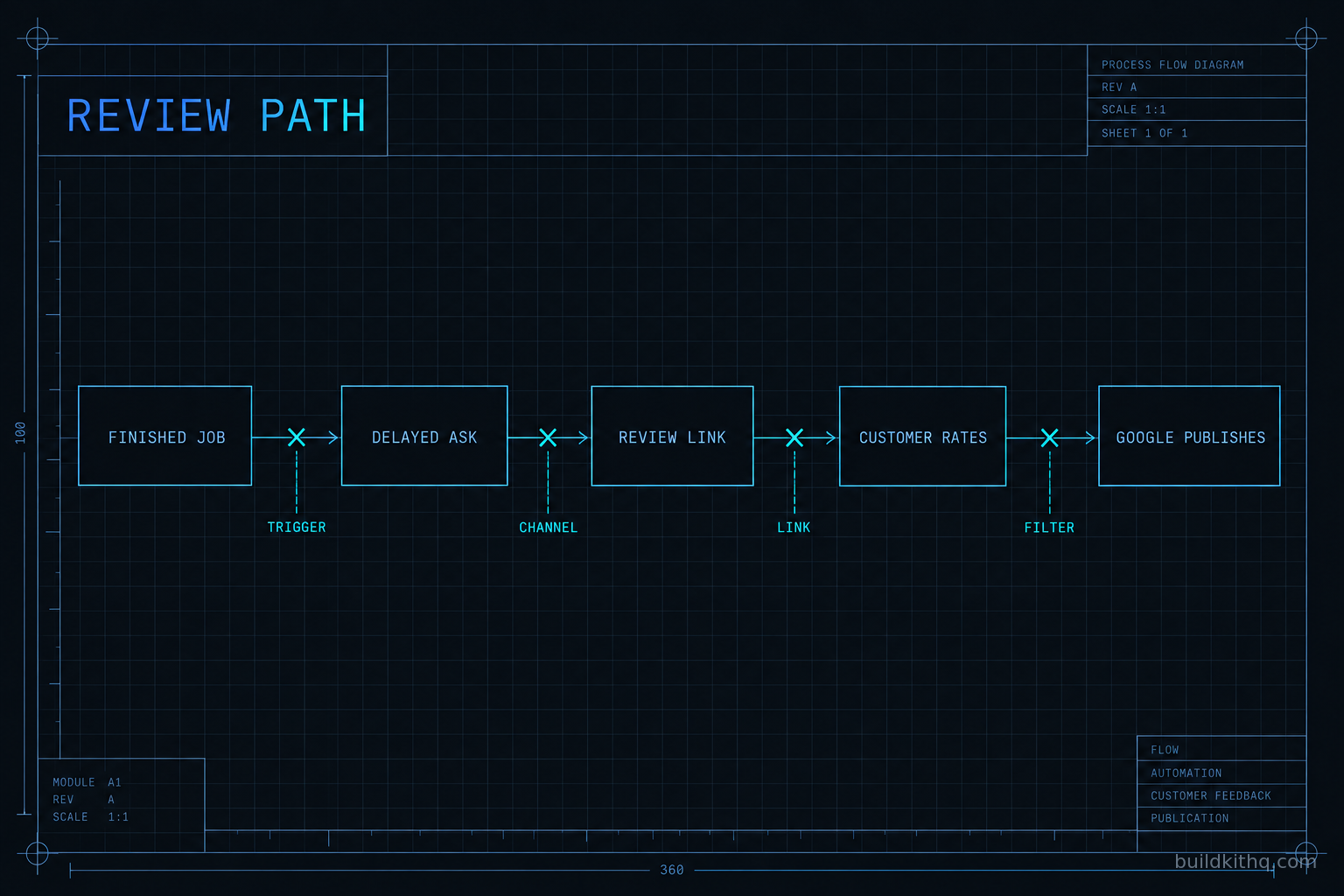
A chiropractic client called a month after handover, pleasant but puzzled. The review automation was live. The workflow log showed a request going out the morning after every finished visit, exactly as built. And the clinic’s Google profile had gained nothing. Same star count as the day we handed it over, same review total, a flat line for four weeks while the front desk saw patients all day.
We sent ourselves the review request from inside the account and tapped the link on a phone. It opened a blank Google page, no business attached. The workflow had done its job. It waited for the visit, built the message, inserted a review link, and sent the whole thing on time to a real patient. The review link it inserted pointed at nothing, because the sub-account’s Google Business Profile had never been connected, so the link was a placeholder that looked like a link and resolved to air.
This is the review version of a failure we see on every channel: the automation runs perfectly and still produces zero, because the thing it hands off to was never set up. A request going out and a review appearing are two different events with a Google-shaped gap between them, and the workflow log only ever reports the first. This guide walks the whole review path, shows you the four places an imported kit leaves it producing nothing, and gives you the test that tells the difference in about a minute.
The difference between sent and published
There is a comforting lie in the word sent. A GoHighLevel workflow marks a review request complete the instant it hands the message to SMS or email. That is the last thing the workflow can see. Everything that has to happen next for a review to exist, the customer tapping the link, landing on the right Google profile, choosing stars, writing a line, and Google deciding to publish it, happens outside the platform, and none of it reports back into the log you are staring at.
So the first move is the same one that saves every send investigation, adapted for reviews, and it is the single thing to take away even if you read nothing else. Do not judge a review automation from the workflow log. Judge it from the link. Send yourself the real request, open it on a phone the way a customer would, and tap through. If it opens the client’s Google review panel with the business named and the stars ready, the automation works and your problem is upstream or at the profile. If it opens a blank page, a generic Google search, or somebody else’s business, you have found the break without reading a single log line.
Once you are testing the link instead of trusting the log, the causes sort into a short list. Every one of them lives on the review path, so it helps to know what that path actually is.
The review path, end to end
A review in GoHighLevel travels much further than the workflow that starts it. The automation is the first few feet of the pipe. The leaks are almost always further down, in the part the kit did not bring with it because it could not.
It starts with a completion event. A kit does not ask for a review at random. It waits for a signal that a job is finished: an appointment marked as showed, an opportunity dragged into a won stage, an invoice paid, a job tagged complete. That event is the trigger, and it is the hinge the whole automation hangs on. When the event fires, the workflow waits a set delay, usually long enough that the customer is home and not still in the chair, then sends the ask.
The ask goes out on a channel, a text or an email or both, and it carries one thing that matters more than the wording: the review link. That link is not your GoHighLevel domain and it is not a funnel. It is a Google review link tied to the client’s Google Business Profile, either the short g.page review URL or a place-ID review address that opens the rating panel directly. Inside GoHighLevel, the Reputation feature stores that link once the Google Business Profile has been connected under the sub-account’s settings, and the review-request workflow drops it into the message as a custom value. No connected profile, no real link.
The customer taps it, lands on the client’s Google review card already signed in to their own Google account, picks a rating, writes a sentence, and submits. Then the last step, the one nobody controls: Google decides whether to publish. It runs the review through its own filters. Is the reviewer a real account with history. Is this a sudden burst on a profile that normally gets nothing. Does the pattern look incentivized or staged. If it passes, the review lands and the rating updates. If it does not, Google holds or drops it, usually with no notice to anyone.
Then the cadence, which is what separates a review automation from a single reminder. A good kit does not ask once and give up. It re-asks the people who did not respond on a spaced schedule, suppresses anyone who already left a review so you never nag a happy customer, and caps how often one contact is touched. That ongoing cadence is the thing that turns an occasional ask into a monthly flow.
Count the steps that have nothing to do with the snapshot. The Google Business Profile belongs to the client and is connected per account. The review link is generated from that profile, on that account. Google’s publish decision belongs to Google. A snapshot carries the trigger, the timing, the message, and the follow-up logic. The profile all of it points at is built new every time, and until it is, the cleverest cadence in the world is addressing an empty room.
Where it breaks after an import
What follows is the diagnosis version of the setup: what you see, what is actually wrong, and how to fix it, for the four breaks that account for nearly every review automation we have opened that was running and producing nothing. If you want the wider context of where reviews sit in a finished account, the five stages a finished account runs puts the review step in its place in the whole flow.
The Google Business Profile was never connected
What you see. Requests go out and arrive. The text or email reads correctly. But the review link opens a blank Google page, drops the customer on a plain Google search, or opens the wrong business entirely. Nobody can leave a review because there is nowhere to leave it.
What is actually wrong. The review-request step inserts a review-link custom value that is empty or still holds the placeholder it shipped with, because the sub-account’s Google Business Profile was never connected under settings and no real link was ever generated. The workflow is faithfully sending a link to nothing. This is the break in the chiropractic account above, and it is the most common one by a wide margin because it is invisible until somebody taps the link.
The fix. Connect the client’s Google Business Profile in the sub-account, generate the review link from the connected profile, and put that real link into the custom value the workflow reads. Then send yourself the request and tap it on a phone. If it opens the client’s review panel with the business named, the most expensive silence on the account just ended. This is also one of the tasks the free installation support hours on every kit cover, and the connection takes minutes once you have access to the client’s profile.
The ask lands on a dead channel
What you see. The workflow completes, but the customer never saw the message. The contact’s Conversations tab shows the text with a failed status, or the email is sitting in a spam folder, so the review link that works perfectly is never tapped because nobody read the ask that carried it.
What is actually wrong. The review ask inherits every problem the send path has. If the sub-account’s A2P 10DLC brand is not registered, the text is filtered at the carrier before it reaches a handset. If the sending domain has no SPF, DKIM, and DMARC records, the email lands in spam or is dropped. The review automation is not special here. It is a message like any other, and a message cannot drive a review it never delivers.
The fix. Fix the send path first, then the review path, because one depends on the other. Register A2P for the sub-account, authenticate the sending domain, and confirm the ask actually reaches a human before you worry about tap-through. The full diagnosis of a dead send path, SMS and email both, is in workflows fire but nothing sends, and the same checks apply to a review request to the letter.
The completion trigger never fires
What you see. No request goes out at all, even though the workflow is published and looks healthy. The log is not red. It is empty, because the thing that is supposed to start the automation never happened.
What is actually wrong. The kit keys the trigger to a specific signal: an appointment status of showed, an opportunity moved into a won stage with a particular name, a tag applied at completion. The live account finishes jobs a different way. The front desk closes a visit with a status the trigger does not watch, or the pipeline stage was renamed when the snapshot landed, so the exact event the workflow waits for is never produced. The automation is listening for a knock that never comes.
The fix. Find how this account actually records a finished job, in its own words, then point the trigger at that exact signal. Watch a real appointment get closed and see what changes on the contact and the opportunity. Then complete one dummy job the real way and confirm the request fires. A chiropractic clinic kit assumes visits are marked showed and wires the ask to that, but if the clinic marks them some other way, the trigger has to follow the clinic, not the other way around.
Google is holding or filtering the reviews
What you see. Customers tell you they left a review. You watched the count tick up by one or two. Then it slid back to where it was, and the review you saw with your own eyes is gone from the public profile.
What is actually wrong. Google filters reviews it does not trust, and it does not explain itself when it does. A brand-new profile that suddenly receives a run of reviews looks manufactured. Reviews left on the shop’s own tablet, on the shop’s own wifi, from the same device all afternoon, look staged. Reviewers with no history on their Google account carry less weight. The reviews were genuine, but the pattern tripped a filter, and Google held them. Its own Business Profile policy on fake and incentivized reviews spells out that it can remove reviews and restrict a profile when it sees manipulation, and a profile under restriction can have new reviews paused outright.
The fix. Slow the ramp on a new or quiet profile instead of blasting a backlog at it in one week. Ask customers to review from their own phone, on their own connection, after they have left, never from a tablet at the counter. Give a new profile time to look like what it is, a real business getting real reviews at a human pace. There is no switch to flip here. The cadence in a well-built kit already paces the ask for exactly this reason, so do not override it with a one-time blast.
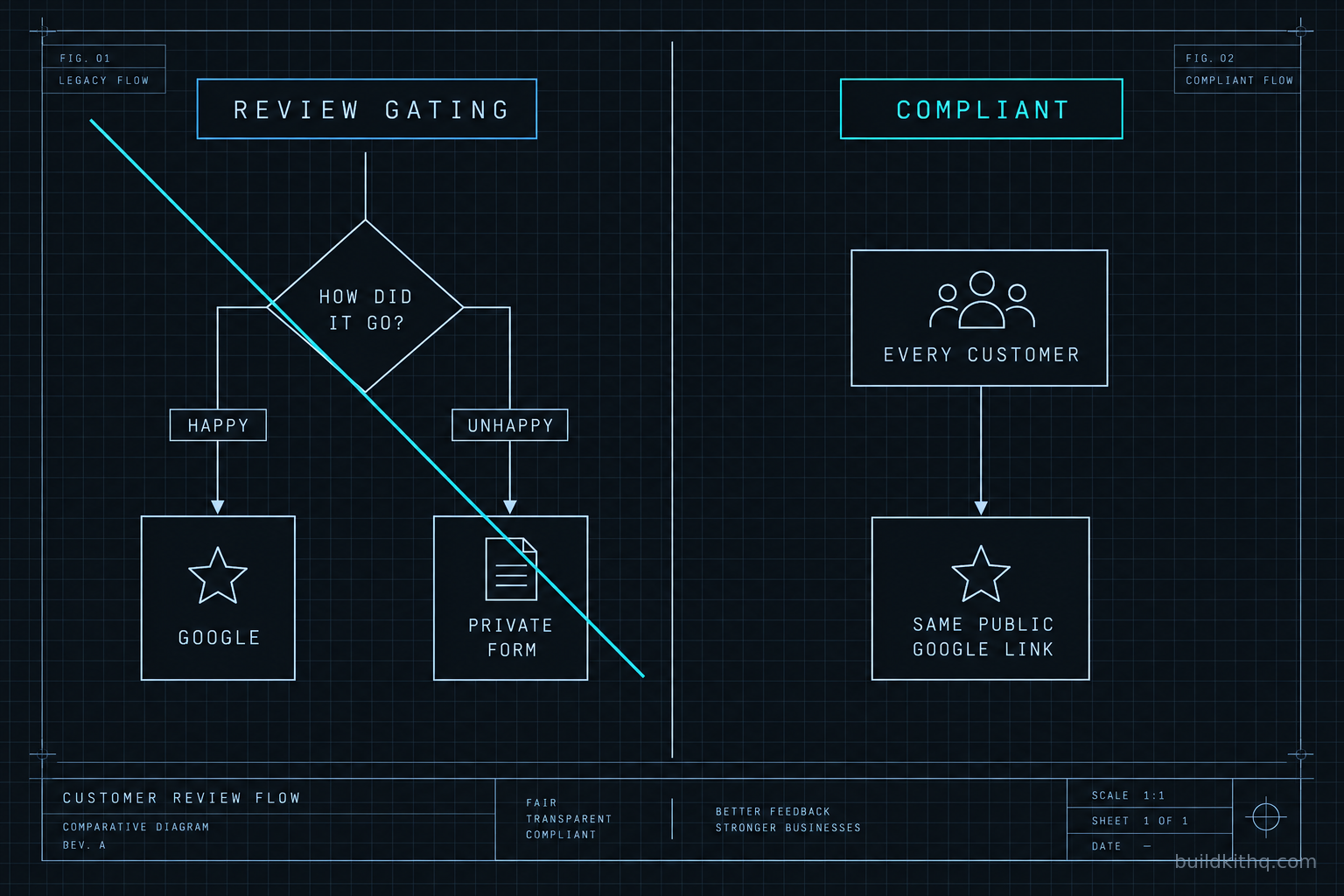
There is a fifth pattern worth naming on its own, because it is not an accident and it is the one that can cost a client their whole profile. Some review flows are built with a sentiment gate: a first step asks the customer how it went, sends the happy ones to Google, and quietly routes the unhappy ones to a private feedback form that never reaches the public profile. It looks clever and it protects the star average, and it is now a liability on two fronts. Google treats screening who may post as fake engagement under the same policy above. And the United States Federal Trade Commission’s rule on fake reviews and testimonials, in effect since October 21, 2024, bans suppressing genuine reviews and buying or incentivizing them, with civil penalties that run as high as $51,744 per violation. If a kit you imported has a sentiment gate in it, take it out. Ask every customer the same way, send everyone to the same public link, and handle an unhappy customer by calling them, not by hiding them.
What a working review flow is actually worth
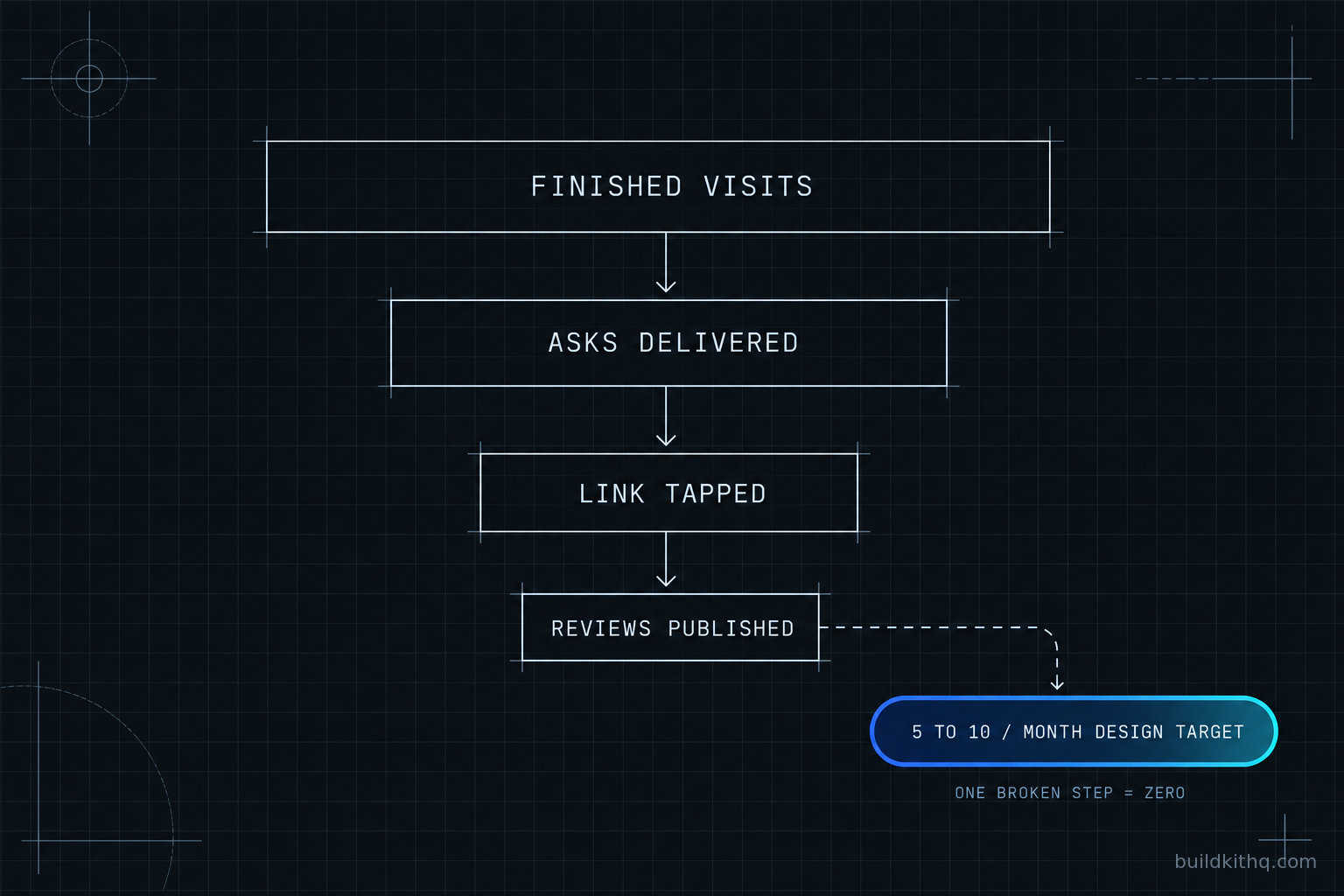
The only performance figure this is allowed to state is the one the build is designed around, and it is a design target, not a measured result: a review automation is built to produce a typical 5 to 10 reviews a month for a local business. Read that as the target the cadence aims at when every upstream step works, not a number anyone can promise you, because the moment one step fails the real number is zero, not merely lower.
Here is the arithmetic, and the point of showing it is that you can put your own numbers in. Say a clinic finishes around 120 patient visits in a month. Not all of those should be asked, because the suppression logic skips anyone who already reviewed and caps repeats, but take the finished visits as the pool the automation draws from. Of the asks that actually reach a live channel, some fraction of people tap the link, and of those a fraction finish the review and clear Google’s filter. Pick your own tap-through from the messages you have sent before. Even a modest slice of a pool that size lands inside the 5 to 10 reviews a month the automation is designed to target. Change the visit count or the tap rate and the shape holds, because the structure is what matters: a wide pool, a paced ask, and a link that resolves. Kill the trigger and the pool is empty. Kill the channel and the ask never lands. Kill the link and the tap goes nowhere. Any single failure turns the monthly target into nothing, which is why a flat profile is almost never a weak offer and almost always a broken step.
Set that against the cost, because the cost is the quiet part of the argument. The automation runs inside the HighLevel account the sub-account lives in, which is $297 a month on HighLevel’s Unlimited plan, the price on HighLevel’s own pricing page confirmed in October 2026. The kit is a one-time price: the chiropractic clinic kit is $1,425. The Google Business Profile is free. So the entire cost of turning anonymous finished visits into a standing monthly review flow is a plan you already pay for and a kit you bought once, and the thing that most often strands all of it is a review link that took five minutes to connect and nobody did. A steady review flow also feeds the same local search ranking the client is paying you to improve, which is why a dead one is worse than it looks: it is not a missing nicety, it is a compounding asset sitting at zero.
The objections worth answering
“The review automation is broken, I want a refund.” Fair first reaction, almost always wrong, and a minute settles it. Send yourself the review request and tap the link on a phone. If it opens the client’s Google review panel, the automation is doing its job and the break is upstream at the trigger or at the profile connection. A snapshot cannot carry a client’s Google Business Profile any more than it can carry their phone number, because the profile is account infrastructure, not kit content. All sales are final once an order is created and the share link is sent, so the honest move on our side is to make the connection easy, which is exactly what the installation support hours are for.
“Can I just buy a few reviews to prime the profile?” No, and this is the one that ends profiles rather than slowing them. Google removes bought and incentivized reviews and can restrict the whole profile when it finds them, and the FTC rule makes purchased and incentivized reviews a civil-penalty matter, not a grey area. A primed profile that gets wiped, or warned on, is strictly worse than a slow one that is real. The automation exists precisely so you never have to fake the thing it is built to earn.
“Why buy a kit if I still have to connect the profile myself?” The strongest objection, and it deserves a straight answer. You would connect the Google Business Profile for any client no matter who built the review flow, including if you wired every step by hand over a weekend. That connection is a property of running a real account, not a cost the kit adds, so it is not fair to count it against the kit. What the kit removes is the build: the completion trigger, the spaced cadence, the suppression that stops you nagging a happy customer, and the message copy, delivered within 24 business hours of purchase confirmation, business hours being 9am to 5pm Central, Monday to Friday, so a Friday afternoon order arrives on Monday. Installation is free with every kit, and it comes with 10 hours of dedicated installation support to be used within 12 days of purchase, which covers connecting the profile and testing the link. You are not paying to skip the Google connection. You are paying to skip building the machine that uses it.
“Can I at least send the one-star people somewhere private first?” This is the sentiment-gate objection and the answer is a flat no, for the reasons in the fifth pattern above. Screening customers by sentiment before deciding who gets asked publicly is review gating, Google treats it as manipulation, and the FTC rule treats suppressing genuine reviews as a violation. Ask everyone the same way. If you want fewer public complaints, the honest lever is fixing the thing people complain about, and a fast call to an unhappy customer does more than any gate ever did.
If you want the review path wired end to end rather than diagnosed after a flat month, that is what Google review automation setup is, and if the send path underneath it needs attention too, a full done-for-you GoHighLevel setup covers the profile, the domain, and the registration together. The FAQ answers the common questions about what installation support does and does not include before you buy, and a kit like the dental practice kit ships the same review cadence tuned for a recall-driven practice if chiropractic is not your niche.
Quick answers
Sent means the workflow handed the ask to a channel, not that a customer tapped the link and Google published a review. Send yourself the request, tap the link on a phone, and confirm it opens the client's Google review panel. If it opens a blank page or the wrong business, the review link was never connected, which is the most common break.
No kit on any platform includes either. The Google Business Profile belongs to the client and is connected per sub-account, and the review link is generated from that connected profile. A kit ships the trigger, the timing, the message and the follow-up cadence. The profile the link points at is set up new for every account.
No. Screening customers by how they feel before deciding who gets asked publicly is review gating. Google's Business Profile policy treats manipulated reviews as fake engagement and can restrict the profile, and the FTC rule in effect since October 2024 bans suppressing genuine negative reviews. Ask everyone the same way and handle an unhappy customer by calling them.
Google filters reviews it distrusts: a new profile that suddenly gets a burst, reviews left on the shop's own device and connection, or reviewers with no account history. The reviews were real, but Google held them. Slow the ramp, ask customers to review from their own phone, and give a new profile time.
A review automation is built to a design target of 5 to 10 reviews a month for a typical local business, and that is a target for the build, not a measured guarantee. The number is only reachable when every upstream step works: the trigger fires on a finished job, the ask reaches a live channel, and the link resolves to the connected profile.
Keep reading
What a finished GoHighLevel account does with a lead
A lead moves through five stages in a finished GoHighLevel account. Here is what each stage is wired to, and the handoffs where a half-built one drops it.
Read itThe AI receptionist in your kit answers, but never books
An imported kit's AI receptionist replies around the clock and books no one. Here is the booking path underneath, the four places it breaks, and the fix.
Read itThe four ways to catch a lead your client's phone missed
A missed call is a lost client. Compare the GoHighLevel AI Receptionist, a human VA, missed-call text-back and voicemail on the eight things that matter.
Read it