Four ways to move a client into GoHighLevel from another tool
A client is on ClickFunnels, Keap, HubSpot or ActiveCampaign and wants GoHighLevel. What crosses the gap, what you rebuild, and four routes on eight tests.
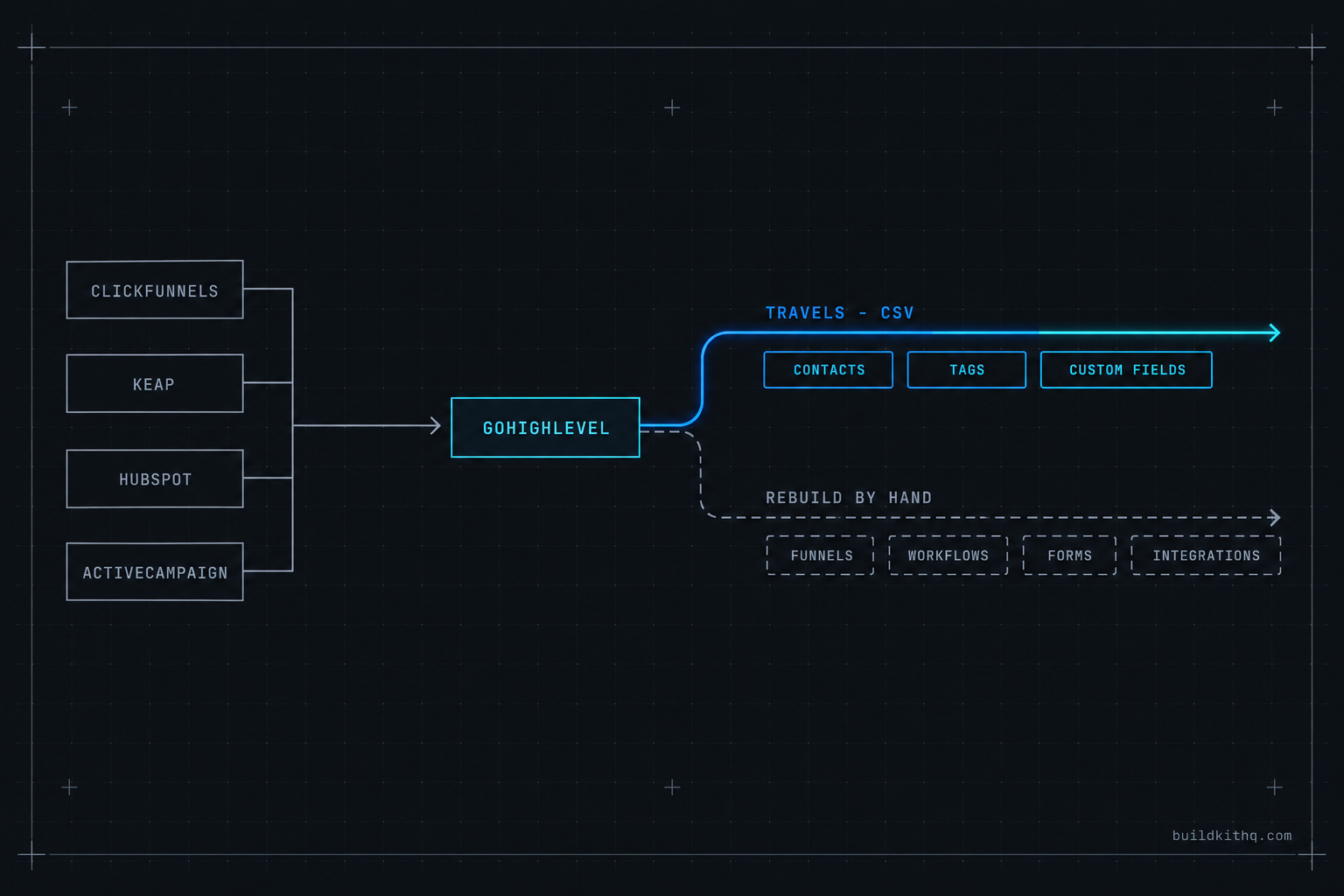
The client sells a coaching program, and for three years they have run it on ClickFunnels for the pages, Mailchimp for the email, and a Google Calendar with a Calendly link taped to the side. They signed with you last week because the three tools do not talk to each other and the monthly total has crept past what any one platform would cost. They want to be on GoHighLevel by the end of the month. They have eleven thousand contacts, a webinar funnel that still converts, and a welcome sequence they are proud of.
So you open ClickFunnels to see what you are working with. The funnel is there. You look for the export button and find that it exports a contact CSV and almost nothing else. The welcome sequence lives in Mailchimp, in a journey builder that has its own logic and its own idea of what a tag is. The calendar is a personal Google account. None of this lifts out as a working system. It lifts out as a spreadsheet of names and a set of screenshots you will be rebuilding from.
The decision in front of you is not “how do I export this.” It is which route gets this coaching client live on GoHighLevel, with their list intact and their best funnel still converting, without a week of dark time where leads fall on the floor. This is a comparison of the four platforms agencies migrate clients off most, what each one actually hands you, and the four routes through the move, written for the person holding the login right now.
What actually crosses the gap, and what you rebuild
Every migration into GoHighLevel runs across the same seam, and almost every bad one comes from not seeing the seam clearly. A marketing platform has two layers, and they travel completely differently.
The first layer is data: the contact records, their tags or lists, the custom fields that hang off them, and in a CRM the companies and deals. This layer is portable. Every tool worth leaving lets you export contacts as a CSV, and GoHighLevel imports a CSV through the Contacts area, where you upload the file and map each column to a field. Practitioner guides on importing contacts into GoHighLevel all describe the same flow: upload, map, tag the batch so you can find it later. One rule bites here and it bites every platform. GoHighLevel wants an email on every contact it takes in, so any record that lived on a phone number alone needs a placeholder address before the file will load clean. Clean the export before it ever touches the import screen: deduplicate, standardise the phone format, and give the fieldless records an address you control.
The second layer is logic, and logic does not travel. Funnels, landing pages, email sequences, campaign builders, forms, surveys and the automations that tie them together are proprietary to the platform that built them. They do not lift out as behaviour. ClickFunnels is the clearest case: GoHighLevel has a URL import tool that can clone a live, publicly reachable page, but as the migration write-ups are careful to say, it captures the visual design only, not the logic, the automation or the integrations behind it. You get a page that looks right and does nothing until you wire it. Keap is blunter still: its Campaign Builder does not export at all, so every sequence and decision branch has to be read in the old tool and rebuilt in the new one. HubSpot is the same story with a corporate finish, where the guides state plainly that workflows do not transfer and are rebuilt manually in GoHighLevel’s own trigger and action model.
Custom values are where the two layers meet inside GoHighLevel, and they are what makes a migrated account hold together instead of sending blanks. A custom value is an account level slot, the company name, the booking link, the main phone number, that every asset reads from instead of hardcoding. A build made well points its funnels and workflows at those slots, so one settings pass fills them and the whole account wakes up pointed at the right place. When you rebuild a client’s funnel by hand, you are deciding in that moment whether the rebuild reads from slots or from literals, and that decision is the difference between a build you can reuse for the next client and one you retype every time.
The screens you will live in are few, and knowing them is most of the job. The old platform’s export screen. A spreadsheet where you clean the file. GoHighLevel’s Contacts import, its Funnels and Websites area where pages get rebuilt or cloned, the Workflow Builder where logic gets recreated, and Phone Numbers and the Trust Center where the number and the A2P 10DLC registration are set up fresh, because those never come across either. Hold the two layer split in your head and the whole move stops being mysterious. Data moves one way, as a file. Logic gets rebuilt the other way, by hand. The four routes below are four different answers to who does the rebuild and how much of it you inherit instead.
ClickFunnels, Keap, HubSpot and ActiveCampaign, on eight tests
The platform a client is leaving changes the shape of the move more than anything else, because each one lets go of its data differently and hides its logic in a different place. Here are the four agencies meet most often, judged on the eight things that actually decide how long you will be at it. Read it by column: pick the client’s platform and read down.
| What decides the move | ClickFunnels | Keap / Infusionsoft | HubSpot | ActiveCampaign |
|---|---|---|---|---|
| Contacts export | CSV, clean | CSV, clean; big lists emailed as a link | CSV, clean | CSV, clean |
| Tags and custom fields | Limited, mostly tags | Tags and fields export well | Lifecycle stages, map to tags | Tags and fields export well |
| Deals or pipeline data | None to speak of | Light | Deals export as CSV, rebuild pipeline | Light |
| Pages and funnels | Clone design only, no logic | Not applicable | Rebuild forms and pages | Not applicable |
| Automations | Rebuild every sequence | Campaign Builder, rebuild all | Workflows, rebuild all | Automations, rebuild all |
| The quiet trap | 2.0 export is thin, plan for a page rebuild | Multi-step campaign logic maps badly | No bulk email template export | List membership is not a native import |
| Who can DIY it | A confident operator, small funnel | Rarely, campaigns are deep | An operator, with patience | An operator, clean lists |
| Realistic timeline | Two to four weeks | Three to eight weeks | Two to six weeks | Two to four weeks |
Timelines in that last row are estimates from agencies that sell the move, so treat them as a shape rather than a quote, and notice they all point the same way. The contacts are never what takes the time. A list of any size loads in an afternoon. What stretches a Keap or an Infusionsoft job to the far end of the range is the Campaign Builder, where years of multi-step sequences with decision branches have to be read out, written down, and rebuilt one workflow at a time before you dare switch the old system off.
Read the verdict by client. If your coaching client is on ClickFunnels with one good funnel, the move is fast and the funnel rebuild is the whole job, so a route that gives you a finished account to drop the funnel into is worth more than a route that saves you a few dollars. If the client is on Keap with a decade of campaigns, the move is an audit project first and a rebuild second, and the thing you are buying is someone’s patience for the inventory. If they are on HubSpot, the data is tidy and the deals matter, so the pipeline rebuild is where the care goes. If they are on ActiveCampaign, the lists and tags are clean and the risk is losing their meaning in translation. The platform sets the job. The route decides who does it.
The four routes through the move
Before the money, the four routes in plain terms, because the names get used loosely and the loose use is what causes the wrong pick.
Lift and rebuild yourself. You export the contacts, clean the file, import it into a blank GoHighLevel sub-account, then rebuild every page and automation by hand from what you documented in the old tool. Total control, total hours, and the hour count is the thing people underestimate. Our write-up on how long a build takes from scratch is the honest version of that clock.
Land the data in a trade built kit. You import a finished build made for the client’s industry into a fresh sub-account, fill the custom values once, and then bring the contacts across by export and import. The funnels, workflows and pipelines arrive already wired for the trade, so your only platform specific work is the settings pass and the data move, plus porting whatever the client genuinely wants to keep. The business coaching kit is the natural landing spot for a coach leaving ClickFunnels, and a real estate team kit does the same job for an agent leaving a patchwork of tools.
Hybrid: kit as the base, port the one thing that converts. The most common sane route. You land the client in a kit so the account is complete on day one, then you rebuild only their proven asset, the webinar funnel the coach is proud of, inside it. You inherit a finished account and spend your rebuild hours on the single piece that earns, not on recreating a welcome email that the kit already ships a better version of.
Hand the move to a migration service. You pay a team to audit the old system, rebuild it, run both in parallel, and own the cutover. That is what our platform migration service is, priced from a set number with a source audit you keep whether or not you continue. It exists because the parts that go wrong are the parts nobody inventoried.
Where the move quietly goes wrong
Every route can leave you holding a part you did not know was missing. Here are the five failures that come up most, what you see when they happen, and how to get out of each.
The cloned page that looks migrated and is dead
You run GoHighLevel’s URL import against the client’s ClickFunnels page, it comes back looking pixel for pixel like the original, and you tick the funnel off your list. Then a lead fills the form and nothing happens, because the clone copied the look and left the logic behind.
What you see: a page that is visually identical to the old one. What is actually wrong: the form is not wired to a workflow, the checkout is not connected to a payment account, and the thank you redirect points nowhere. The fix: treat a cloned page as a picture until you have personally added the form action, connected Stripe, and traced one test submission from the form through to a contact record and a confirmation message. A page that renders is not a page that works, and the gap between the two is exactly the automation that never traveled.
The contact with no email that breaks the import
You export eleven thousand contacts, drop the CSV on the import screen, and the load errors out or silently drops rows. Somewhere in the list are the records that lived on a phone number alone, from a platform that never required an address.
What you see: a row count on the other side that does not match the one you exported. What is actually wrong: GoHighLevel wants an email on every contact, so the fieldless records either fail or vanish depending on how the file is shaped. The fix: before import, run the export through a spreadsheet, find the rows with no email, and give each a placeholder address on a domain you own so you can filter them later. Then reconcile counts on both sides. A migration that cannot prove the same number of contacts arrived is a migration you cannot sign off, and the client will count the list themselves eventually.
The automation you never inventoried
You rebuild the sequences you remember and go live. Three weeks later the client asks why the lapsed member win back email stopped going out, the one that quietly rebooked a dozen people a month, and you realise it was never on your list because nobody mentioned it.
What you see: a working account that is missing a behaviour only the client knew about. What is actually wrong: the old platform’s automations were never fully inventoried, so the rebuild recreated the loud ones and dropped the quiet earner. The fix: before you rebuild anything, open the old tool and write down every live automation, what triggers it, and what it does, including the ones that only fire for one segment. That inventory is the actual product of the first week of any serious migration, and it is why a done for you migration spends a whole week on the audit before touching the rebuild. If you skip the inventory you are not migrating the account, you are rebuilding your memory of it.
The cutover with no parallel run
The new account looks finished, so you cancel the old platform the same afternoon to stop paying for two. That night a workflow you got slightly wrong sends the wrong email to the whole list, and there is no old system to fall back to.
What you see: a clean switch that saves a month of double billing. What is actually wrong: you removed the safety net before you proved the new build under real traffic. The fix: run both systems live for at least a week, point new leads at GoHighLevel while the old tool stays reachable, and compare the two daily. Every migration guide worth reading says the same, and the agencies that skip the parallel run are the ones with the disaster stories. The week of overlap costs one more month of the old subscription. Skipping it costs the client’s trust, which does not come back on a payment plan.
The history you deleted when you cancelled too early
Months later the client asks for the email thread with a customer from last spring, and it is gone, because conversation history does not move between platforms and the old account that held it was closed.
What you see: a clean new account with no past. What is actually wrong: the running record of past messages lived in the old tool, never transferred, and was lost when the account closed. The fix: before cancellation, export whatever the old platform will give you of conversation and email history to storage the client owns, so it stays searchable even though it will not live inside GoHighLevel. Set the expectation out loud that threads start fresh in the new account. Contacts, tags and fields come across. The history is the one piece you have to rescue deliberately, and the window to rescue it closes the moment the old bill stops.
What the move actually costs, on one clock
Price the move as three things on one timeline, not as a single number, because the single number is where the surprise hides. Here is the arithmetic with the assumptions printed, so you can drop your own figures in.
Start with the platform. GoHighLevel’s own plans, read off its pricing page and cross checked against current listings on 26 October 2026, run Starter at $97 a month, Unlimited at $297 a month, and Agency Pro at $497 a month, with a free trial on each. These are HighLevel’s subscription prices and have nothing to do with what any build costs. If you already run an agency account, a new client is another sub-account, not another plan, so the marginal platform cost of this move is often zero. If you are standing up HighLevel for the first time to serve this coach, the plan is a real line and it is monthly, forever, whether the migration goes well or badly.
Then the build, and this is the number the route decides. Rebuilding by hand is “free” in cash and expensive in hours: if the move takes you three focused days and your time is worth the rate you bill clients, multiply it out honestly and the free route is usually the most expensive one on the page. Landing the client in a trade built kit has a published price on the page, from $875 at the low end of the range to the top of it, and the full price list is on one page with every figure shown. A done for you migration carries its own set number, from $3,600 for the audit, rebuild and parallel run, and you keep the source inventory document whether or not you continue past the audit week. Pick the route by which of cash and hours you have less of this month.
Then the overlap, the line nobody quotes. The safe move keeps the old platform live for a week of parallel running, so budget one more month of whatever the client is paying now on top of everything else. If the coach pays for a page builder, an email tool and a scheduler separately, add those three together for that final month. That overlap cost is not waste, it is the insurance premium on not sending the wrong email to eleven thousand people with no way back.
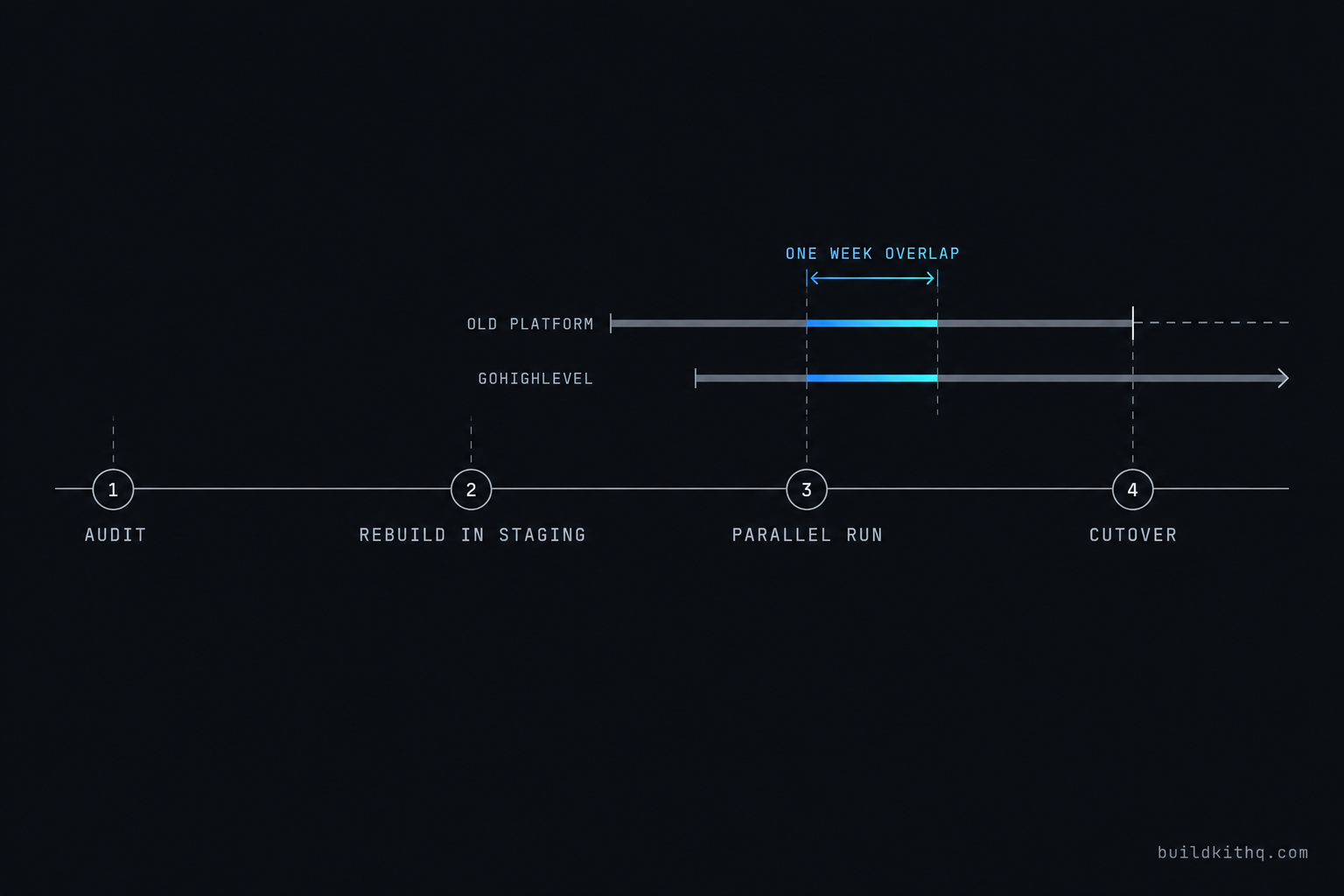
Put it on one clock and the comparison is honest. The hand rebuild looks cheapest and costs the most hours. The kit has a known price and lands the account complete, so the only account specific hours are the settings pass and the one funnel worth porting. The migration service costs the most in cash and the least in your calendar, and it is the only route where someone else owns the cutover. None of this touches the kit floor, which never drops below $850, and none of the HighLevel figures above are kit prices. They are a separate bill for the ground the build stands on.
The objections worth answering
“GoHighLevel has an import tool, so why is this a project at all?” Because the import tool moves the layer that was never the problem. The CSV import handles contacts beautifully, and the URL clone copies a page’s look. Neither one moves a single automation, and the automations are the business. The move is a project because recreating behaviour is manual work by design, and no button changes that. The honest framing for the client is that their data is portable in an afternoon and their system is a rebuild, and anyone who tells them the whole thing is one click is selling them a cloned page that does nothing.
“It is cheaper to leave the client on what they have.” Sometimes, and you should say so when it is true. The case for moving is never that GoHighLevel has a feature the old tool lacks, because for most clients it does not. The case is one bill instead of three and one account you can actually support under your own roof. A coach paying separately for pages, email and scheduling is the clear yes. A client who runs one clean tool they understand, with nothing else bolted on, is the honest no, and talking them into a move that only adds work to your plate is how you lose them in six months. Do the addition of their current stack before you pitch the move, not after.
“A kit is for a fresh start, not for a client who already has a list.” This is the objection that keeps agencies rebuilding by hand for no reason. A kit replaces the logic layer, the funnels and workflows and pipelines, which on a migration you were going to rebuild anyway because none of it transferred. The data layer, the client’s list and tags and the one funnel that converts, you bring across on top. The kit does not fight the migration, it absorbs the ninety percent of it that is generic rebuild work and lets you spend your hours on the ten percent that is specific to this client. If you want to see exactly what you would be verifying after the import either way, our import QA checklist is the list we run before any account meets a client.
“I will just do it myself to keep the margin.” You might, and for a small ClickFunnels move with one funnel that can be the right call. The question is not whether you can, it is what the hours cost against what else those hours could earn. The failure that bankrupts the DIY route is never the contacts or the pages. It is the automation you did not inventory and the parallel run you skipped to save a month, the two failures above that turn a Saturday of work into a client apology. If you take the route, take the whole method with it: inventory first, rebuild second, run both in parallel, cut over last. The method is the part that was worth paying for, whether or not you pay anyone else to run it.
Quick answers
No, not as working logic. Contacts, tags and custom fields export as a CSV and import cleanly. Funnels, email sequences, campaigns and forms do not travel as behaviour. GoHighLevel can clone a live page's visual design through its URL import tool, but the automation behind the page is rebuilt by hand in the Workflow Builder. Plan the move as data one way and logic rebuilt the other.
The trade build plus free installation, and 10 hours of dedicated installation support, to be used within 12 days of purchase. Those hours cover installing the kit, rebranding the site, A2P 10DLC registration and email domain setup in GoHighLevel. Moving the client's existing contacts off the old platform, and any third-party integration, sits outside the hours and is quoted or handled separately.
Practitioner guides put a small, clean list at roughly two to three weeks and a tangled account with many live automations at four to eight. The variable is never the contacts, which move in an afternoon. It is the automation inventory: how many live sequences you have to document in the old tool and rebuild as workflows before you can switch anything off.
Conversation and email history does not transfer between platforms cleanly. Export it to storage the client owns so it stays searchable, and start fresh threads in GoHighLevel. Contacts, tags and custom fields come across. The running record of past messages is the one piece to capture before you cancel anything, because once the old account closes that data is gone.
Sometimes that is the right call, and the piece above says when. The case for moving is one bill instead of several and one account you can support, not a feature the old tool lacks. If the client is paying for a page builder, an email tool and a scheduler separately, the move usually pays for itself. If they run one clean tool they understand, leaving it alone can be the honest answer.
Keep reading
What a finished GoHighLevel account does with a lead
A lead moves through five stages in a finished GoHighLevel account. Here is what each stage is wired to, and the handoffs where a half-built one drops it.
Read itThe AI receptionist in your kit answers, but never books
An imported kit's AI receptionist replies around the clock and books no one. Here is the booking path underneath, the four places it breaks, and the fix.
Read itThe four ways to catch a lead your client's phone missed
A missed call is a lost client. Compare the GoHighLevel AI Receptionist, a human VA, missed-call text-back and voicemail on the eight things that matter.
Read it