What to verify in an imported snapshot before a client sees it
An imported GoHighLevel snapshot looks finished and rarely is. Here is the QA pass that catches the silent breakages before a client ever logs in.
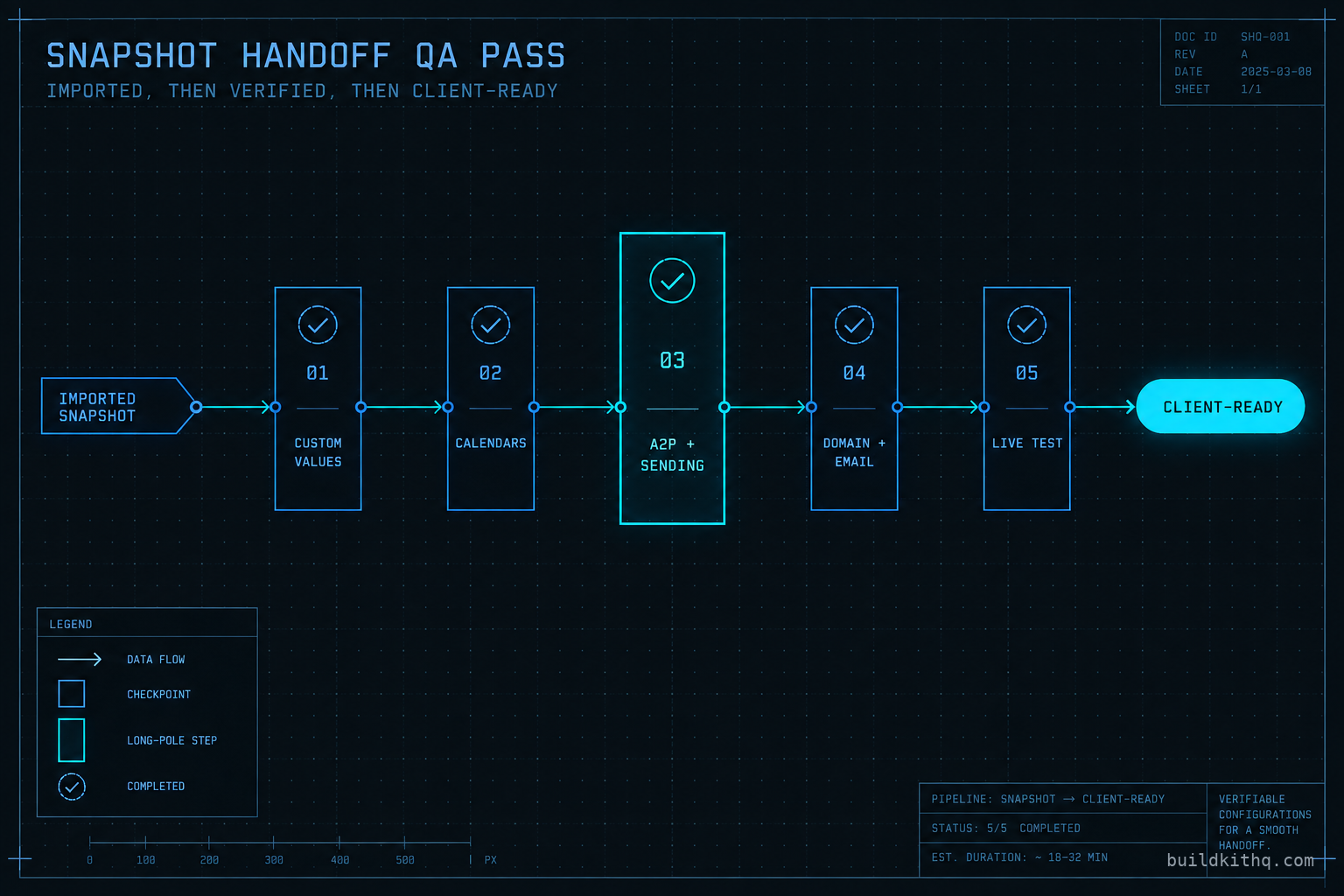
A dental client logged into their new account on a Thursday, two days after we handed it over, and called within the hour. The website was theirs. The pipeline stages read the way their front desk talks. The new patient nurture was live and the workflow history showed it running. And a real enquiry from that morning had booked into a Google Calendar none of them recognised, under a name none of them had ever hired. The appointment was sitting in a stranger’s calendar, because the snapshot’s booking calendar was still pointed at the Google account of whoever built the original template.
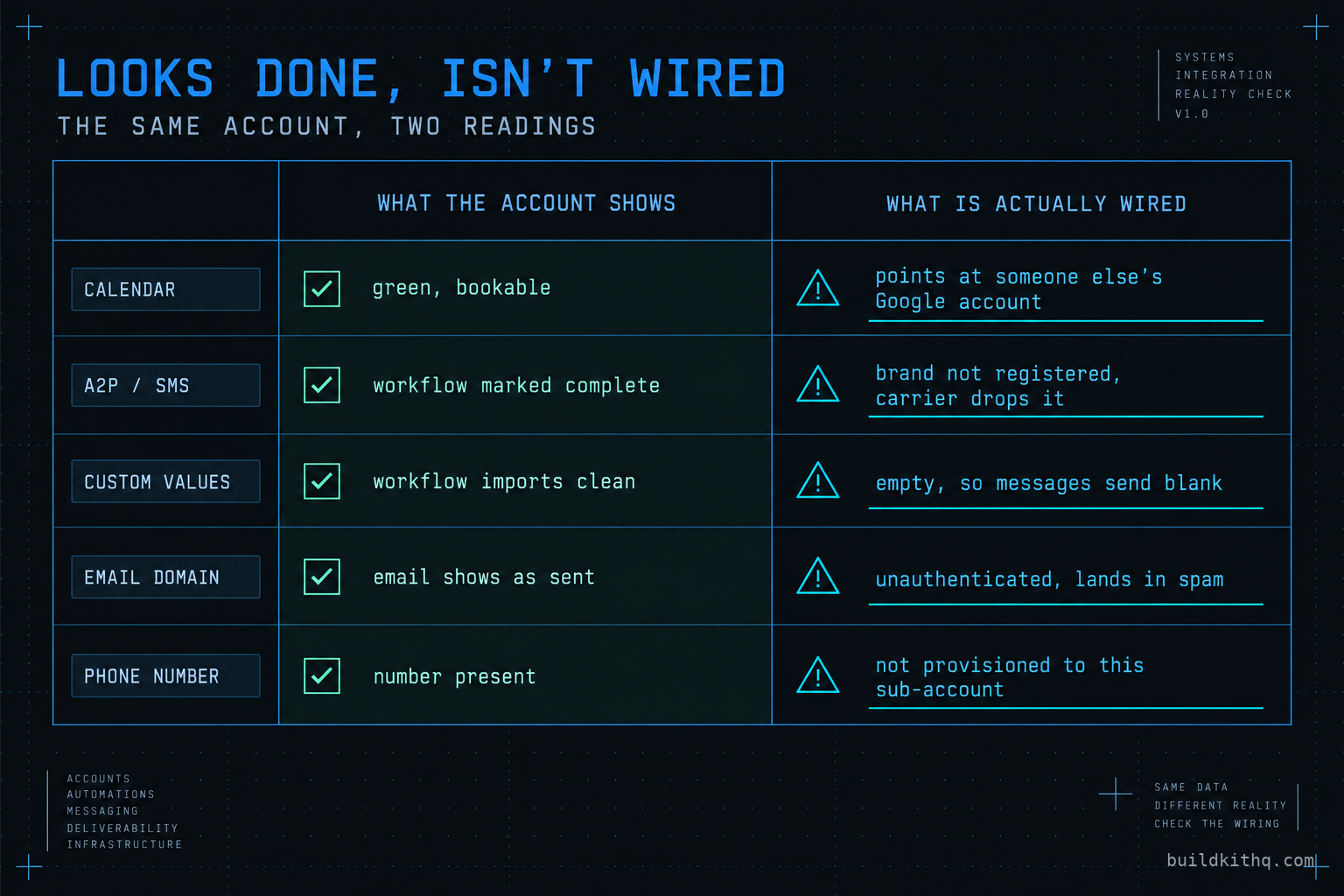
The kit was fine. The logic imported exactly as designed. What had not imported was the one connection that made the calendar real, and nobody had checked it, because the calendar showed as connected and green in the settings. It looked done. It was not wired.
This is the gap that turns a good build into a bad week. An imported snapshot arrives looking finished, passes a glance, and then fails on the first live lead in a way the client sees before you do. The fix is not a better snapshot. It is a QA pass you run every time, in the same order, before a paying client ever gets the keys. This is that pass, and the reasons each item is on it.
A QA pass is a sign-off, not an install
There are good guides on how to import a snapshot into a sub-account, and importing is the easy part. You load the file, you wait a few minutes, and the workflows, funnels, pipelines and messages appear. The import is a copy operation and it almost always succeeds. That success is exactly what lulls people into shipping.
What this pass covers is different. It is the sign-off you run after the import and before the handoff, the gate that decides whether the account is safe to point a real client at. An install guide answers “how do I get the contents in.” A QA pass answers “is this account going to embarrass me on Monday.” Those are different questions with different checklists, and the second one is the one that protects the relationship you are being paid for.
The reason the two come apart is structural. A snapshot carries logic and content. It does not, and cannot, carry the account-level connections that logic depends on. Every one of those connections is created fresh in the destination sub-account and starts empty, no matter how complete the build was. So the QA pass is not a search for a broken kit. It is a walk through the connections the kit assumes exist, confirming that each one actually does in this account, for this client.
Run it as a sign-off with a pass or fail on each line. Not “looks fine.” Pass or fail, proven by looking at the thing itself, because “looks fine” is precisely how the dental calendar shipped.
What “wired” actually means
To QA an account you have to know what the import brought and what it left behind. The line between the two is sharp once you see it, and everything on this pass sits on one side of it.
The snapshot brings the logic, not the connections
A workflow is a set of instructions. Send this message when that trigger fires, wait this long, branch on this field. All of that is snapshot content and it imports cleanly. The instruction “send an SMS from this account’s registered number to the contact” imports perfectly. Whether this account has a number, and whether that number is registered to send, is not in the snapshot. It is account infrastructure, and it is blank until someone sets it up.
The same split runs through everything. A funnel imports its pages and its structure, but the domain those pages serve from is connected per account. A calendar imports its availability rules and its booking form, but the Google or Outlook account it writes appointments into is connected per account. A nurture imports its emails, but the authenticated sending domain those emails go out on is configured per account. The snapshot is the top half of every one of these. The bottom half is yours to connect, and it is where a clean import still leaves a dead account.
The five surfaces that start empty
Strip the account down and the connections a snapshot assumes fall into five surfaces. Custom values and fields, which the messages read from. Calendars, which need a real availability connection. Sending, which needs a registered A2P brand and a live number. The sending domain, which needs email authentication. And the phone number itself, which has to belong to this sub-account. A sixth thing, the workflow triggers, imports with the logic but still has to be confirmed live, because a paused trigger looks identical to a live one until a lead crosses it.
Notice what every one of these has in common. It is invisible in the way a snapshot presents itself. Open the workflow and it reads complete. Open the calendar settings and the connection shows green. Open the email step and it shows a sending domain. The account tells you it is ready. The QA pass exists because the account’s own display is the least reliable witness you have, and the only honest test is to look past it at what is actually connected.
The breakages that survive a clean import
Here are the failures that pass a glance and fail a client, in the order they cost you money. For each one: what you see, what is actually wrong, and the check that settles it.
The calendar books into the builder’s own Google account
What you see is a calendar that shows connected, with a green status and a working booking form. What is actually wrong is that the connection belongs to whoever built the original snapshot, or to nobody at all if the OAuth token expired when the snapshot was exported. A booking made against it lands somewhere the client cannot see, or bounces silently and the lead thinks they booked when they did not.
The check is to open the calendar’s connection settings and confirm the connected Google or Outlook account is one this client owns and can log into. Then book a real test slot and confirm it appears in the client’s own calendar, not just in the account. This matters most on team accounts, where a real estate team has several agents each needing their own calendar connection, and the snapshot only ever carried one. Reconnect each one to the right person before anyone sends traffic at the booking form.
The custom values are empty, so messages go out blank
What you see is a workflow that imported without an error and a message template full of merge fields wrapped in braces. What is actually wrong is that those fields read from custom values that arrived empty. The snapshot brought the placeholder, a merge token like {{custom_values.booking_link}}, but not the value, because the value is the client’s real link and the snapshot never had it. The message sends. It just sends with a blank where the link, the address, the office name or the phone number should be.
On a dental practice kit, for instance, the booking link, the practice address and the recall wording all live in custom values, and all three ship as placeholders the build cannot fill for you. The check is to open the account’s custom values and read down the list for anything still holding a placeholder or sitting empty. Every value a workflow references has to hold this client’s real detail. Send yourself one message from each channel and read it as a lead would. A blank merge field is obvious in a test send and invisible in a settings screen, which is exactly why a live test catches what a review does not.
A2P is unregistered, so SMS leaves and dies
What you see is a workflow whose Send SMS step is marked complete in the execution log. What is actually wrong is that US carriers filter application-to-person traffic from unregistered numbers at the network edge, so the message leaves the platform and never reaches a handset. The log goes green because the platform did its job and handed the message off. The carrier dropped it after that, and the platform log never hears about it. This is the single most common reason a snapshot fires but nothing sends, and it is account infrastructure to the last inch.
The check is to confirm the A2P brand and campaign for this sub-account are registered and approved before any SMS automation runs live. Registration is filed per sub-account against the client’s real business, and it is not something a snapshot can carry. If A2P is not yet handled, that is the A2P 10DLC setup work, and it is the long pole in the whole pass, so it starts first. Read the individual message status inside a contact’s Conversations tab, not the workflow log, because only the Conversations view tells you what the carrier actually did.
The sending domain is unauthenticated, so email lands in spam
What you see is an email step that shows the message as sent, and maybe a sending domain already filled in. What is actually wrong is that the domain is not authenticated for this account, so mailbox providers distrust it and file it in spam or drop it outright. Since February 2024, Google and Yahoo have required bulk senders to authenticate with SPF, DKIM and DMARC, with a DMARC policy in place, or the mail does not get a fair hearing. That requirement is now enforced, and a fresh sub-account meets none of it until you set it up.
The check is to confirm the sending domain is authenticated with the three DNS records and that a DMARC record exists at a policy of none or stronger. Send a test email to a Gmail address, open the message headers, and confirm SPF and DKIM pass and DMARC aligns. An unauthenticated send does not bounce with a loud error. It sends, shows complete, and quietly lands nowhere useful, and the client reports a dead open rate three weeks later.
The phone number is present but not provisioned
What you see is a phone number sitting in the account’s settings. What is actually wrong is that the number was never provisioned to this sub-account, or it belongs to the old account the snapshot came from, so calls and texts have no working origin even before A2P enters the picture. A number in a settings field is not the same as a number this account owns and can send and receive on.
The check is to place a real call to the number and send a real text to it, then confirm both land in this account’s Conversations. Confirm the number is a purchased number on this sub-account and not a leftover reference. Then check any call forwarding or missed-call automation actually routes to a phone the client answers, because a missed-call text back that forwards to a dead extension is worse than none: it tells the lead someone is listening when nobody is.
Sequence it so the long pole starts first
The order you run the pass in matters, because one item takes far longer than the rest and it is not the one people start with. A2P brand and campaign registration is a few minutes of filing and then a wait of a day or two for carrier approval. Everything else, the custom values, the calendar connections, the domain authentication and the live test, is work you finish the same day.
So file A2P first, before you touch anything else, and let it sit in the carrier queue while you work the rest. By the time the account-side checks are done, the registration is usually clearing or clear. Run it the other way, saving A2P for last, and a perfectly built account waits idle for two days on the one step you could have started immediately.
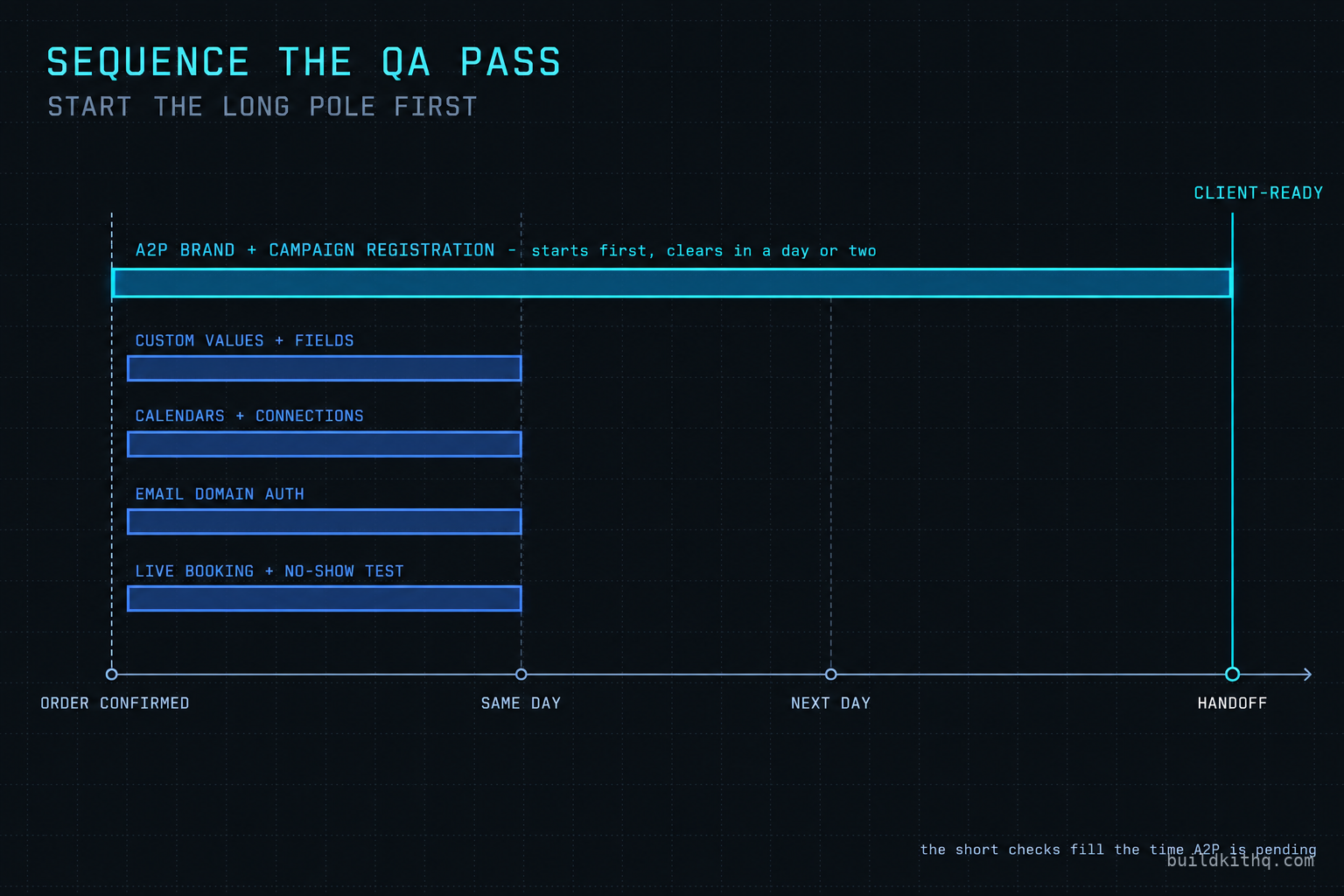
The pass ends the way it should always end, with a live test. Book one real slot and trigger one deliberate no-show, using your own phone number and inbox as the contact. If the confirmation, the reminder and the no-show follow-up all arrive, on the right channel, with the client’s real details filled in, the whole chain behind them is proven. A live test is the only check that exercises every surface at once, which is why it goes last and why it is the one you never skip.
The math on a skipped check
The dollars on this pass fall into two piles, and they are wildly different sizes. On one side is the cost of doing the QA. On the other is the cost of skipping it. Run the arithmetic once and the pass justifies itself for good.
The registration fees are small. A US sole proprietor brand registration is a one-time fee of about $4, a campaign registration is about $15 with a recurring monthly fee in the same range, and carriers add a fraction of a cent to each message segment on top, all of it passed through from the registry and the carriers rather than marked up. Those figures were confirmed this run from search snippets of Twilio’s A2P brand and campaign registration documentation, not from the pages directly, because those pages are not reachable from here. Email authentication costs nothing but the DNS records and the time to set them, and the Google and Yahoo bulk sender rules that make it mandatory kick in around 5,000 messages a day to their inboxes. The whole infrastructure cost of getting an account genuinely ready to send is a rounding error.
Now the other pile. An agency running client sub-accounts is typically billing each one somewhere between $500 and $2,500 a month. Put your own number in. A client you lose in the first week over a dead calendar or a blank text is not a one-time loss, it is that monthly figure gone, times the months they would have stayed, plus the referrals a happy client would have sent and an angry one will not. A single blown handoff on a $1,200 account that would have run a year is not a $1,200 problem. It is the year, and the reputation, and the next three clients that referral never became.
Against that, the QA pass is close to free. It is under an hour of account-side work plus a registration you start and walk away from, and on a purchased kit that hour sits inside installation support you already have. The design targets the build is aiming at, a 70 percent no-show recovery target and a typical 5 to 10 reviews a month, only exist if the account can actually send, so the pass is not overhead on the result. It is the precondition for the result. Skipping it does not save the hour. It spends the client.
The sign-off table
Run the pass as a table with a pass or fail on each row, proven by looking, not by the account’s own status. This is the whole gate on one screen.
| Surface | The check | Passes when |
|---|---|---|
| Custom values and fields | Read the values list, then send one test message per channel | No placeholders or blanks reach a real message |
| Calendars | Open the connection, then book a real test slot | The booking lands in the client’s own calendar |
| A2P and sending | Confirm brand and campaign are registered and approved | SMS reaches a real handset, read in Conversations |
| Sending domain | Check SPF, DKIM and DMARC, then send to a Gmail address | Authentication passes and the mail avoids spam |
| Phone number | Call and text the number, check forwarding | Both land in this account and route to a live phone |
| Workflow triggers | Cross one trigger with a live contact | The automation enrols and runs, not just shows enabled |
If any row reads fail, the account is not ready to hand over, however finished the rest looks. A sign-off with one failing row is not a sign-off. It is a to-do list.
Objections worth answering
There are fair arguments against running a pass this thorough every time. Here are the strongest versions, answered straight, including the one that argues against buying a kit at all.
The kit should just work
It should, and it does, on the axis a kit is responsible for. The logic, the copy, the funnels and the workflows are the kit’s job and a good one imports complete. But no snapshot on any platform can carry a phone number, an A2P registration, a Google Calendar login or a DNS record, because those things live in the destination account and belong to the client, not to the file. Expecting a kit to arrive with them connected is expecting it to carry credentials it has never had. The kit works. The account it lands in still has to be wired, and that is true of every snapshot from every source.
The client can run their own checks
Some can. Most agency clients bought an agency precisely so they would not have to know what a DMARC record is, and a client discovering a blank merge field in a live text to their own lead is the worst possible person to discover it. The QA pass is the difference between you finding the break in a test send and the client finding it in front of a customer. You are being paid to be the one who looks first. Handing the account over unverified moves the discovery to the client and calls it their problem, which is not a position that keeps accounts.
If I still have to QA it, why buy a kit at all
This is the honest one, and the answer is that the kit removes the build, not the wiring, and the build is the large part. Standing up the funnels, the nurture, the pipelines, the review automation and the no-show recovery from scratch is a lost weekend of skilled work. The QA pass is under an hour on top of whatever account you use, bought or built. So buying a kit does not save you the QA, it saves you the days of building that come before the QA, and it hands you a build that is worth QA-ing. If you would rather not run any of it, that is what done-for-you setup exists for, and it includes the wiring this pass checks.
Isn’t this what the free install support covers
On a purchased kit, yes, and it is worth knowing exactly what that is. Installation is free with every kit, and it comes with 10 hours of dedicated installation support, to be used within 12 days of purchase. Those hours cover installing the kit, rebranding the website, A2P and 10DLC registration and setup, email domain setup in HighLevel, and a few extra automations where they are needed, which is most of this pass. What the hours never cover, on any kit, is third-party integrations, third-party software or custom software development, which are quoted separately. The support terms are on the FAQ. The pass is still yours to sign off, but on a kit you are not doing the setup alone or paying extra for the parts that count.
Quick answers
The account-side checks, custom values, calendar ownership, domain authentication and a live booking, take under an hour once you know where to look. A2P registration is the long pole. It is a few minutes of filing and then a wait of a day or two for carrier approval, so start it first and run everything else while it clears.
The surfaces are the same for every trade: custom values, calendars, sending, domain, phone and a live test. What changes is the content behind them. A dental recall runs on different fields than a roofing estimate follow-up, so verify that the values the workflows read are the ones this account actually holds, not the placeholders they shipped with.
Voice and email do not depend on 10DLC, so those paths can work before SMS registration clears. What you should not do is let SMS-driven automations run live to real leads while the brand is unregistered, because the messages leave the platform and quietly fail. Tell the client SMS switches on the day A2P approves, and keep the automations off until then.
Almost never. Nearly every item on this pass is account infrastructure, not snapshot content. A kit ships the workflows, funnels and messages. The connections underneath, the phone number, the sending domain, the calendar's Google link and the A2P brand, are set up new in each sub-account and start empty on every import, however good the build.
Run one real booking and one deliberate no-show through the account with your own phone and inbox as the contact. If the confirmation, the reminder and the no-show follow-up all arrive on the right channel with the right words filled in, the wiring behind them is sound. A live test catches what a settings review misses.
Keep reading
What a finished GoHighLevel account does with a lead
A lead moves through five stages in a finished GoHighLevel account. Here is what each stage is wired to, and the handoffs where a half-built one drops it.
Read itThe AI receptionist in your kit answers, but never books
An imported kit's AI receptionist replies around the clock and books no one. Here is the booking path underneath, the four places it breaks, and the fix.
Read itThe four ways to catch a lead your client's phone missed
A missed call is a lost client. Compare the GoHighLevel AI Receptionist, a human VA, missed-call text-back and voicemail on the eight things that matter.
Read it