The hour count on building a GoHighLevel snapshot from scratch
Building a GoHighLevel snapshot yourself is not free. Here is the honest hour count, part by part, and how to weigh it against a published kit price.
It is Friday afternoon. You have a home-services client starting Monday, a fresh GoHighLevel sub-account open in one tab, and a plan to build the whole thing over the weekend. You have imported other people’s snapshots before and found them half-built, so this time you are doing it properly, by hand, the way you want it. You scribble a list on the back of a quote: website, booking, the missed-call text, reminders, review requests, a nurture sequence. Six lines. A weekend of work, you tell yourself.
By Sunday night the website looks right and the booking calendar takes appointments. The reminders are built. Nothing has actually sent a text, because the number is not registered to send yet, and you did not know that was a separate process with its own queue. The review request fires on a stage change you have not wired to anything. Two of the workflows reference a business name you typed straight into the message, so moving this to the next client means opening every one of them again. Monday is here and the account is a demo, not a delivery.
This is the piece that puts real hours against each of those six lines, so the next time you can decide before you open the tab, not after. It is not a should-you-build-it argument. You already know both options exist. It is the hour count, so you can multiply it by your own rate and know in about two minutes which way the number falls.
What building a snapshot actually is, part by part
A snapshot is a saved copy of a sub-account’s whole structure, so building one from scratch means building that whole structure once, in an account nobody is paying for yet. The demo version of each part is quick. The version you can hand to a paying client, walk away from, and reuse on the next one is the version with the hours in it. Here is where they go.
The website and funnels. A home-services build needs a site that ranks and converts, plus the funnels behind the lead magnets and the booking path. Laying out the pages is the fast part. Writing the copy so it speaks to that trade, wiring every form to the right fields, connecting the domain, and making the whole thing responsive is the better part of two days on its own, and that is if you are fast and not also designing from a blank page.
The custom values layer. This is the part that decides whether you built one snapshot or one client. Custom values are the placeholders, the business name, the booking link, the service area, the hours, that every message pulls from instead of carrying the text itself. Set them up first and the whole build moves to the next account by changing a handful of fields. Set them up last, or not at all, and every workflow, email and page carries a hard-coded name you have to hunt down per client. Done properly this is slow, because it touches everything, and it is the single most skipped part of a weekend build.
The workflows. The reminder-and-recovery set, the missed-call text back, the review request, the database reactivation, the seasonal nurture. Each one is a trigger, a set of conditions, a wait step tuned to the trade, and message copy that reads like a person wrote it. The logic is not hard. Getting the timing right, writing copy that converts, and setting the exit conditions so a booked customer stops getting chased is where the hours hide. The exit conditions especially: a workflow that keeps texting someone who already replied is worse than no workflow.
Pipelines, calendars and forms. The pipeline and its stages have to match how that business actually closes work, not a generic template. The booking calendar has to point at the client’s availability, connect to the right team members, and trigger the pipeline when someone books. The forms and surveys have to map to the fields the workflows read, or the automation downstream has nothing to fire on.
Email, SMS and the AI setup. The templates are writing, and writing is hours. On top of that a modern build carries 1 AI receptionist and 1 AI chatbot, and each needs a prompt, a set of answers, a booking handoff and testing against the questions that trade actually gets asked. A generic prompt gets generic answers, and a client notices within a day.
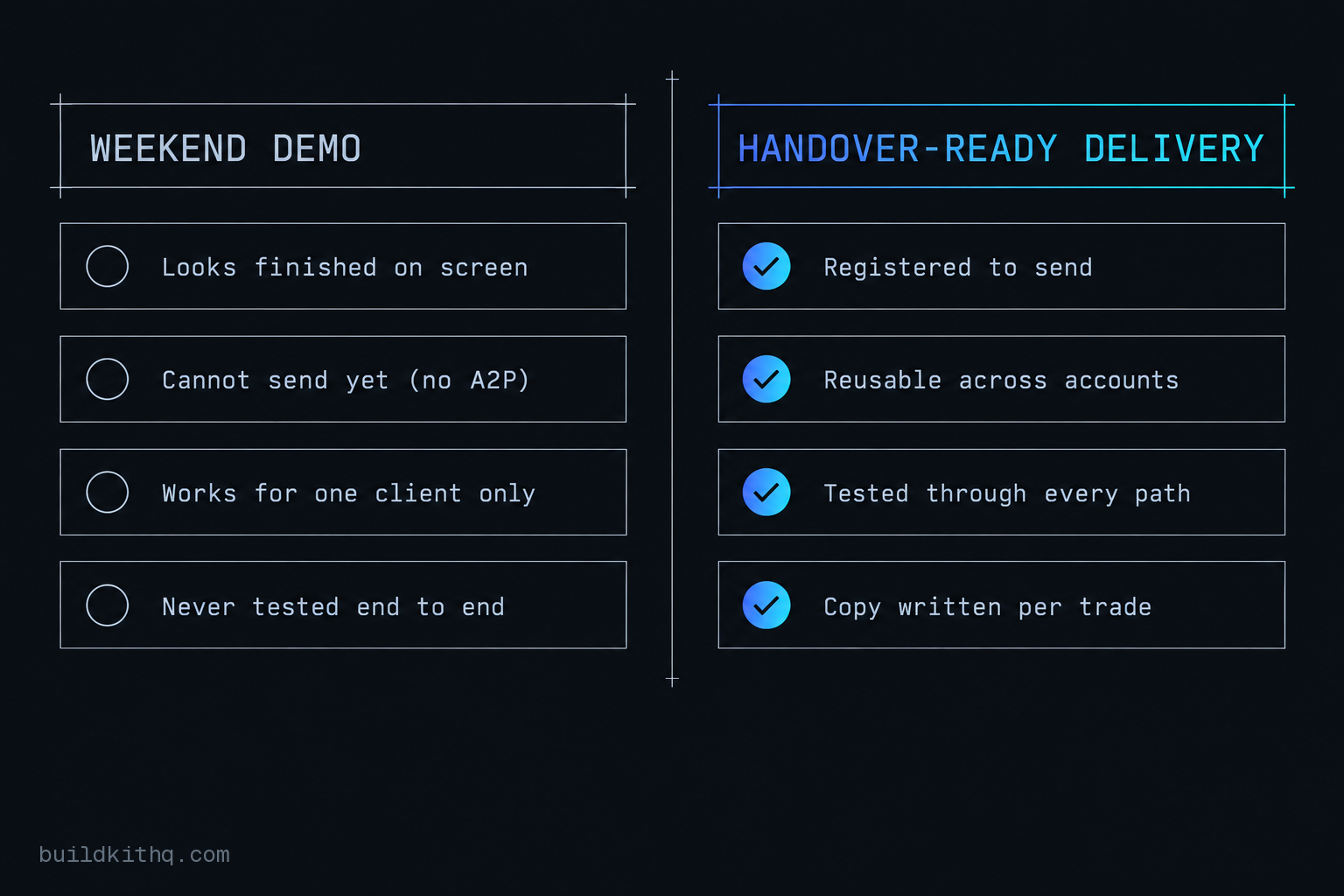
Add A2P 10DLC registration and real testing to that list, both of which get their own section below because both are where DIY builds quietly fail, and you are looking at a build that is measured in days of focused work, not an afternoon. None of these parts is difficult on its own. The total is what surprises people, and the calendar time on top of the work time is what breaks the Monday deadline.
Where the hours go missing
The gap between a weekend estimate and a real build is not one big miss. It is four or five parts that each run several times longer than the plan, and a couple that are not work hours at all but waiting.
Custom values built last instead of first
You see a finished-looking account on Sunday. What is actually wrong is that the business name, the booking link and the service area are typed straight into the messages and pages. The build works for this one client and only this one. When the second client arrives you open the snapshot expecting to change a few fields and instead you are reading every workflow, every email and every page looking for the last client’s name. The fix is to build the custom values layer first and reference it everywhere, which costs a few hours up front and saves that hunt on every future install. Skip it and you have not built a snapshot, you have built one account that happens to be saveable.
A2P 10DLC left until the end
You see a build that is done except it will not send. What is wrong is that sending an SMS from a US number now requires A2P 10DLC registration, and that is not a switch you flip. It is a brand registration and a campaign registration that go to The Campaign Registry and the carriers for review, and the review takes calendar time you do not control. HighLevel is clear that these are passthrough fees with no markup from HighLevel, which also means the timeline is the carriers’ timeline, not yours. The dollars are small and per client: a one-time brand registration of around four dollars plus a campaign vetting fee, then a recurring monthly campaign fee that runs roughly two to ten dollars per active campaign, all set by The Campaign Registry and the carriers rather than the platform. The cost is not what hurts. The queue is. Start it Friday for a Monday launch and you will miss, because approval can land days later. The fix is to register first, before you build a single message, so the queue runs while you work. A weekend build almost always does this backwards.
Testing counted as done when the workflow saved
You see a list of green, saved workflows and call the build finished. What is wrong is that saving a workflow is not the same as watching it send. A build fires but sends nothing for a dozen reasons, an unregistered number, a missing custom value, a broken email domain, a trigger that never matches, and the only way to find them is to run a real contact through every path and confirm the text and the email actually arrive. That is hours of clicking through your own build as if you were the lead, then again as if you were the customer who booked, then again as the one who no-showed. It is the least glamorous part and the one that separates a demo from a delivery.
The website that looks wired but is not
You see a site that renders perfectly. What is wrong sits underneath: the contact form is not mapped to the fields the workflows read, the booking calendar is pointed at your own Google account instead of the client’s, and booking an appointment does not move a card into the pipeline. Everything looks connected and nothing is. Finding this is more testing hours, and fixing it is often a rebuild of the form-to-field mapping you thought you finished on Saturday.
Copy treated as a fill-in, not a task
You see message templates with placeholder text and plan to “polish them later.” What is wrong is that the copy is the product. A reminder that reads like a robot, a review request with no reason to act, a nurture sequence that says nothing a customer would read, these do not convert, and a client judges the whole build by the messages their customers actually receive. Writing sequences that sound human, per trade, is a writing job measured in hours, not a placeholder you swap at the end.
Email that sends but lands in spam
You see emails going out and assume the email side is done. What is wrong shows up a week later when the client asks why their confirmations are in the customer’s junk folder. Sending email from a GoHighLevel account properly means setting up a sending domain, authenticating it so the mailbox providers trust it, and not blasting a cold list from a fresh domain on day one. Skip the domain setup and the account technically sends, it just does not arrive, which is the worst kind of broken because nothing in the build looks red. Getting this right is its own block of hours: the domain records, the verification wait, and a slow enough start that you are not filtered on the first send. On a bought kit the domain email setup is one of the things the installation support hours are spent on, which is why it is worth naming here rather than discovering it in the client’s spam folder.
The arithmetic, with your own rate in it
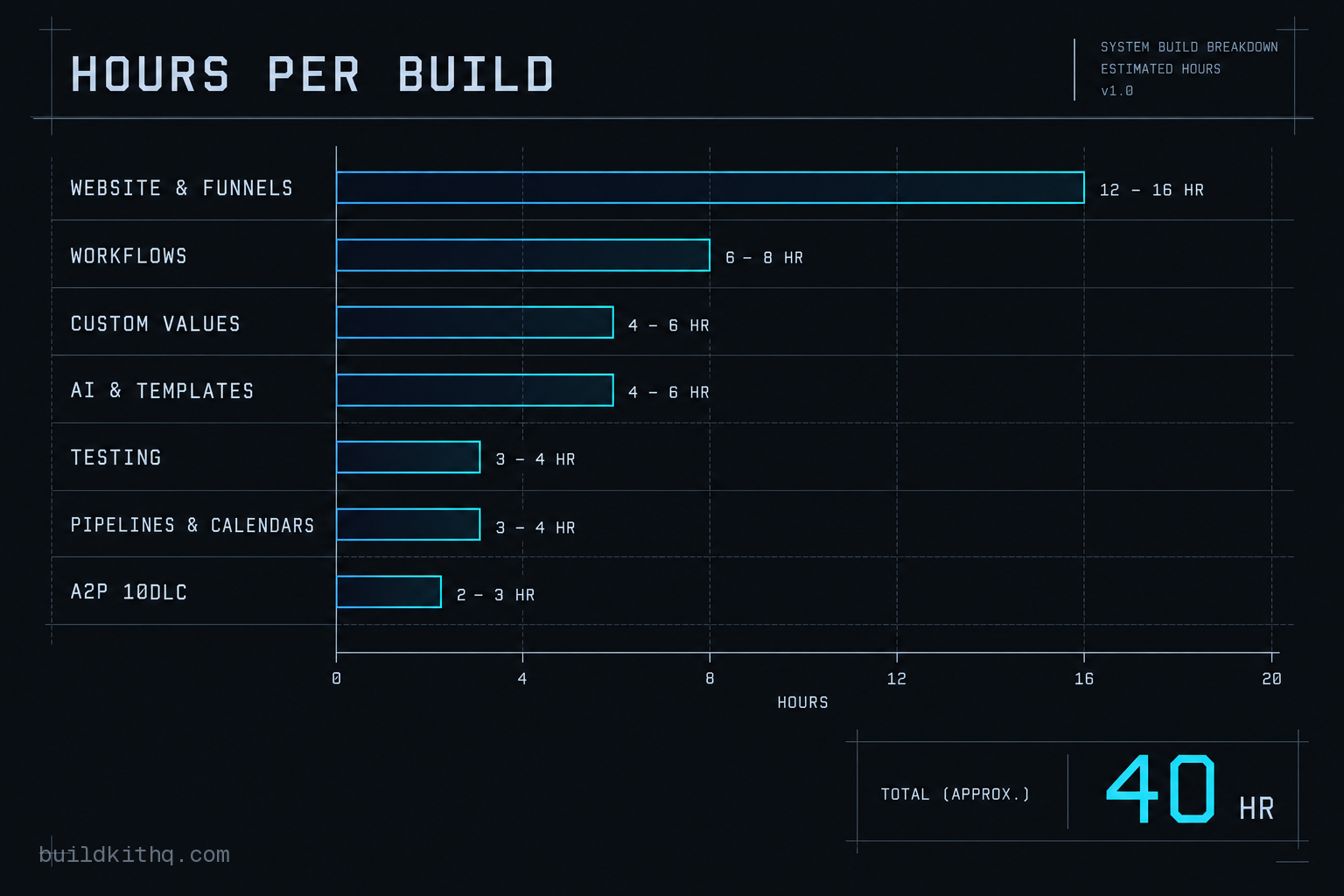
Put honest ranges against the parts and a first build in a new niche lands somewhere around thirty to fifty hours of focused work, plus A2P calendar time you cannot compress. Call it a conservative forty. Here is where those hours sit.
| Build part | Realistic hours | What it involves |
|---|---|---|
| Website and funnels | 12 to 16 hrs | Pages, copy, form wiring, domain, responsive pass |
| Workflows | 6 to 8 hrs | Reminders, recovery, missed-call, reviews, reactivation, nurture |
| Custom values layer | 4 to 6 hrs | The reusable placeholder layer, referenced everywhere |
| Email, SMS and AI setup | 4 to 6 hrs | Message copy, plus 1 AI receptionist and 1 AI chatbot |
| Testing | 3 to 4 hrs | Running real contacts through every send path |
| Pipelines, calendars, forms | 3 to 4 hrs | Stages, booking, field mapping |
| A2P 10DLC | 2 to 3 hrs | Registration work, then days of waiting on carrier review |
Now put your own number against it. The rate that matters is not minimum wage, it is what you bill a client for an hour of your time, because every hour on your own unpaid build is an hour you did not bill. If you charge $100 an hour, a forty hour build is $4,000 of billable time spent on an account nobody paid for. At $75 it is $3,000. At $150 it is $6,000. Those are not soft numbers. They are the invoices you did not send that week.
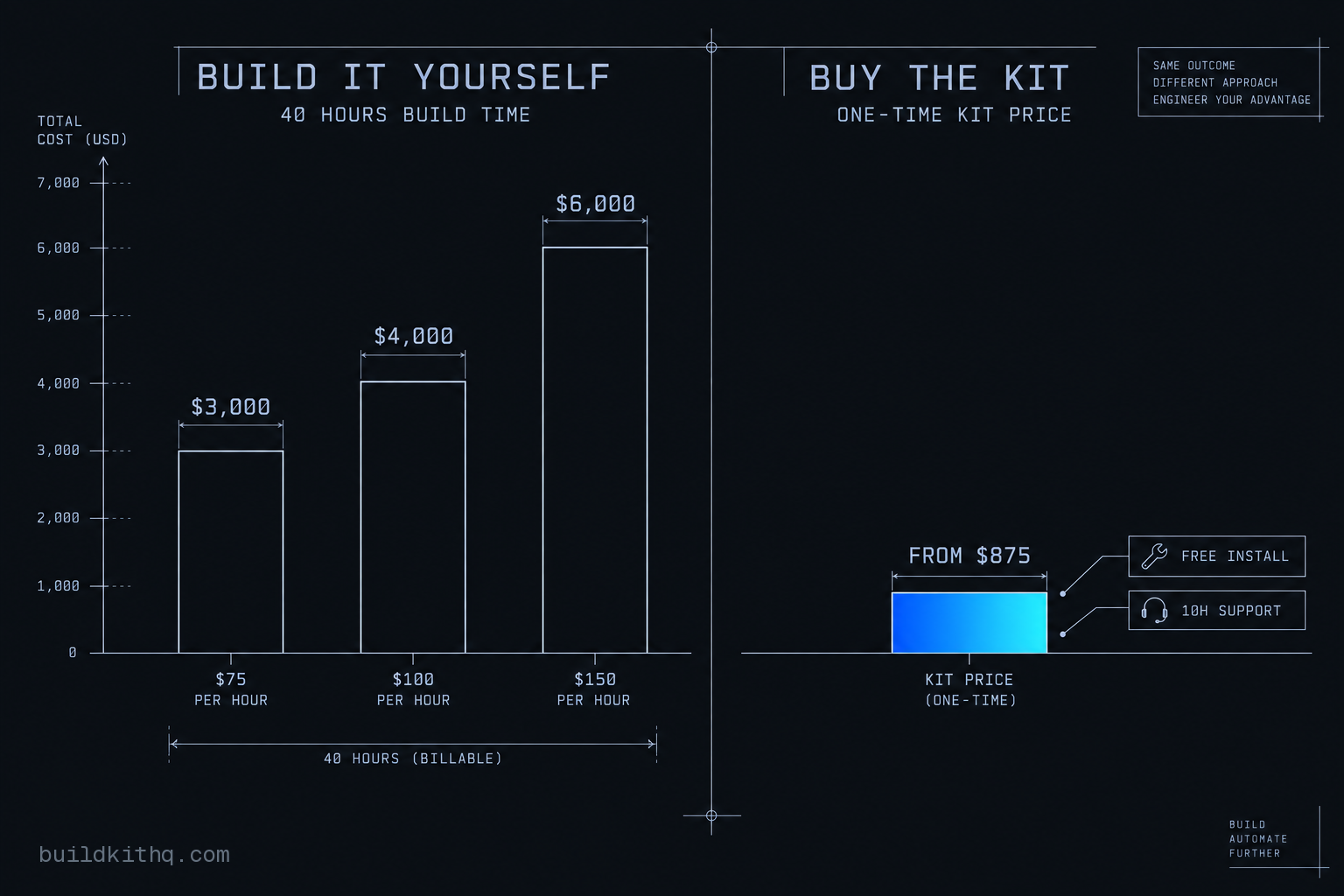
Set that against the other column. A published kit is a fixed, one-time price, listed in full before you pay. On this site the HVAC contractor kit is a complete home-services build, and a lighter trade like the cleaning services kit sits lower again, both of them well under what forty billable hours costs you at any rate above minimum. Installation is free with every kit, and every kit carries 10 hours of dedicated installation support, to be used within 12 days of purchase, which is where the A2P registration, the domain email setup and the rebranding actually get done for you. Delivery is within 24 business hours of purchase confirmation, business hours being 9am to 5pm Central, Monday to Friday, so a Friday order arrives Monday and nothing is delivered at a weekend. That is roughly the same calendar you were going to spend building, except at the end of it you have a delivery instead of a demo. You can see the whole rate card on the pricing page.
The honest read: building wins on cash only if you value your own time at close to zero, and it wins on calendar almost never, because A2P does not care that you are in a hurry. Building wins on ownership, which is the objection worth taking seriously, so here it is.
The objections worth taking seriously
“If I build it once I own it and reuse it for free forever.” This is the real case for building, and it is a good one, with one condition. Reuse only pays back if the build is reusable, which means the custom values layer done first, the exit conditions set on every workflow, and copy written to swap cleanly per client. That is precisely the part a weekend build skips, so the version most people actually build is the version that gets half rebuilt on the second install. Build it properly and the reuse is real. Build it in a weekend and you will pay the hours again, quietly, every time. A bought kit, worth saying, is also reusable across the accounts you operate, so ownership is not unique to the DIY path.
“Your hour estimates are inflated. I have done this in a weekend.” You have built a demo in a weekend, and so have we. The demo is real work and it looks finished. The gap is everything that does not show on screen: the A2P queue that runs on the carriers’ clock, the testing that proves a text actually arrives, the field mapping under a form that renders perfectly, and the reusable layer that turns one account into a snapshot. Time any single one of those and it is short. Time all of them, in a new niche, to a standard you would put your name on, and the weekend is gone by Saturday lunch.
“The catalogue kit will not fit my exact client, so I have to build.” Sometimes true, and it is a fair reason not to buy off the shelf. It is not a reason to build it yourself at your own billable rate on a deadline. A built-to-order snapshot is custom snapshot development, and a straight install of a kit into a live account is done-for-you setup, both of which are someone else’s hours on someone else’s clock instead of yours during a week you could be billing. The build-it-yourself math only makes sense when your time genuinely has nothing better to do, and for an agency owner with a client starting Monday, it almost never does.
What the hour count is really telling you
The number people quote for building a snapshot is the demo number, the one where you lay out a site and wire a few workflows and it looks done. The real number carries the reusable layer, the registration queue, the testing, and the copy, and it lands around a full working week for a first build in a new trade. Multiply that week by the rate you charge clients and compare it to a fixed price you can read in full before you pay. For most agency owners the published kit is cheaper on cash, far cheaper on calendar, and it ends with a delivery instead of a Sunday-night demo that cannot send a text yet. Build when you will reuse it enough to earn the hours back and you will build it to be reusable. Buy when Monday is coming and the account has to send.
Quick answers
A snapshot built to hand to a client, not a demo, runs about thirty to fifty hours for a first one in a new niche. The website and funnels, the custom values layer, the workflows, A2P registration and real testing each take longer than they look. A second build in the same niche is faster because the thinking is done.
Multiply your billable rate by the build hours. If you charge clients $100 an hour, a forty hour build is $4,000 of your time, and that is before A2P and testing. Most published kits sit well under that, so buying is cheaper on cash and far cheaper on calendar. Building wins only if you will reuse the same build many times and you build it to be reusable.
Two parts, and neither is the website. The custom values layer that makes a build reusable is slow because it touches every workflow, and A2P 10DLC registration is calendar time you do not control. Testing the send path is the third, and it is the one people skip, which is why an imported build often fires but sends nothing.
Only if you build it reusable from the start, with custom values instead of hard-coded names and numbers. That is the part a weekend build skips, so the second install ends up half rebuilt. A bought kit is already reusable across the accounts you operate, which is most of the value it carries.
Keep reading
What a finished GoHighLevel account does with a lead
A lead moves through five stages in a finished GoHighLevel account. Here is what each stage is wired to, and the handoffs where a half-built one drops it.
Read itThe AI receptionist in your kit answers, but never books
An imported kit's AI receptionist replies around the clock and books no one. Here is the booking path underneath, the four places it breaks, and the fix.
Read itThe four ways to catch a lead your client's phone missed
A missed call is a lost client. Compare the GoHighLevel AI Receptionist, a human VA, missed-call text-back and voicemail on the eight things that matter.
Read it