You took over a client's GoHighLevel account. Now what?
You inherited a client's messy GoHighLevel account. Migrate it in place, drop in a fresh snapshot kit, rebuild by hand, or buy the move. Four ways on eight tests.
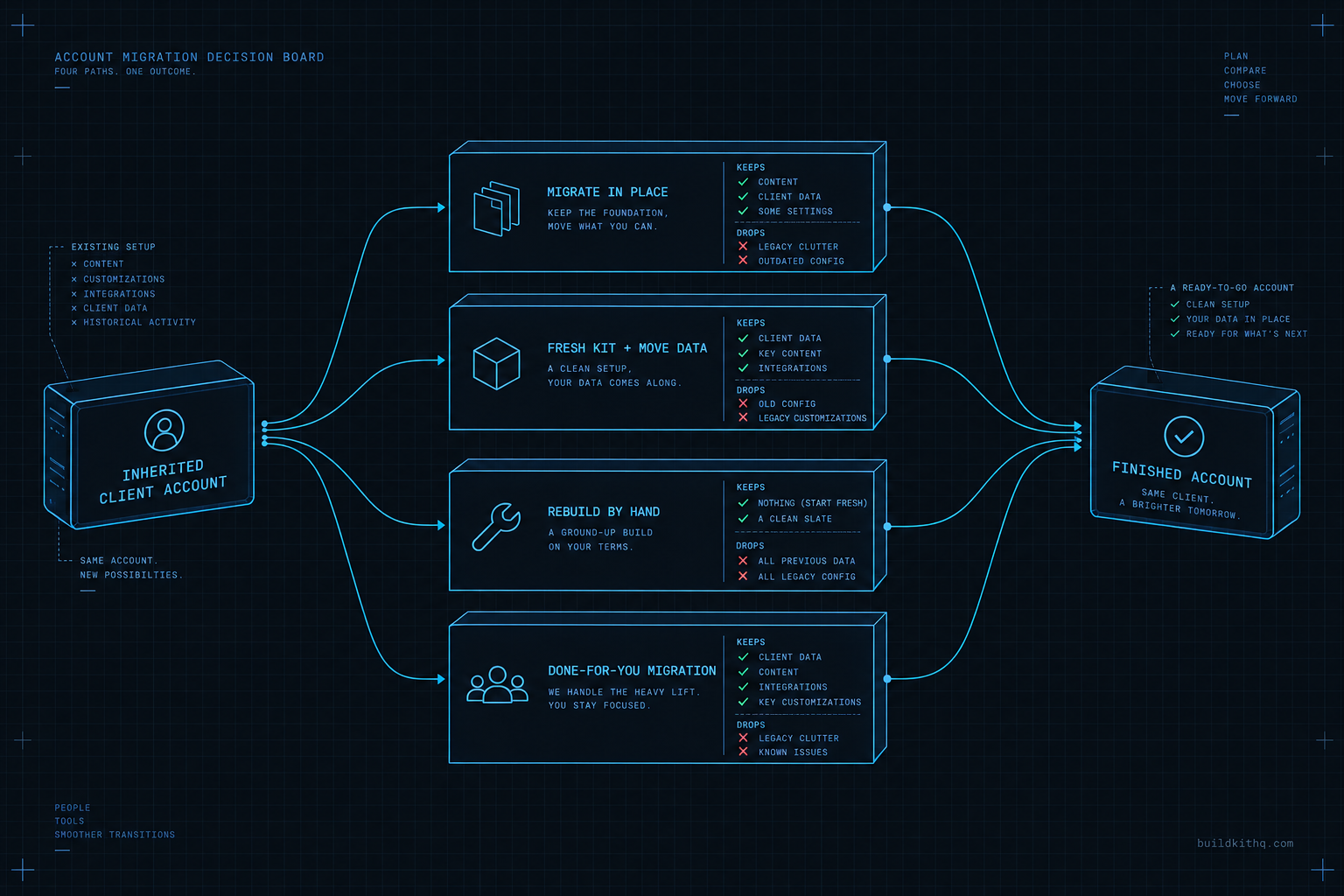
The account was not yours three weeks ago. A new client signed, their last agency handed over a GoHighLevel sub-account, and you got login details and a shrug. It loads. There are funnels in the folders and workflows with confident names. Then a reminder fires at 3am to a contact who booked nothing, from a phone number that bounces, and the client forwards you the angry reply with one word on top: “explain?”
You open the account properly for the first time. The calendar is connected to a Google login that belongs to someone who no longer works there. A workflow references a custom value that is blank, so the confirmation text it sends has a hole where the booking link should be. The A2P registration behind the number was the old agency’s, and it did not come with the keys. Half of this works. The half that does not is the half the client notices.
So you have a decision, and it is not “fix the bug.” It is which route gets this client to a clean, trade-built account you can stand behind: clean up what is here, drop in a fresh snapshot kit and move the data across, rebuild the whole thing by hand, or pay someone to do the move. This is a comparison of those four routes on the eight things that actually decide the outcome, written for the agency owner holding the account right now.
What actually moves between GoHighLevel accounts, and what does not
Before you can choose a route, you have to know what a GoHighLevel account is made of, because the parts travel differently and most bad migrations come from assuming they travel together. They do not.
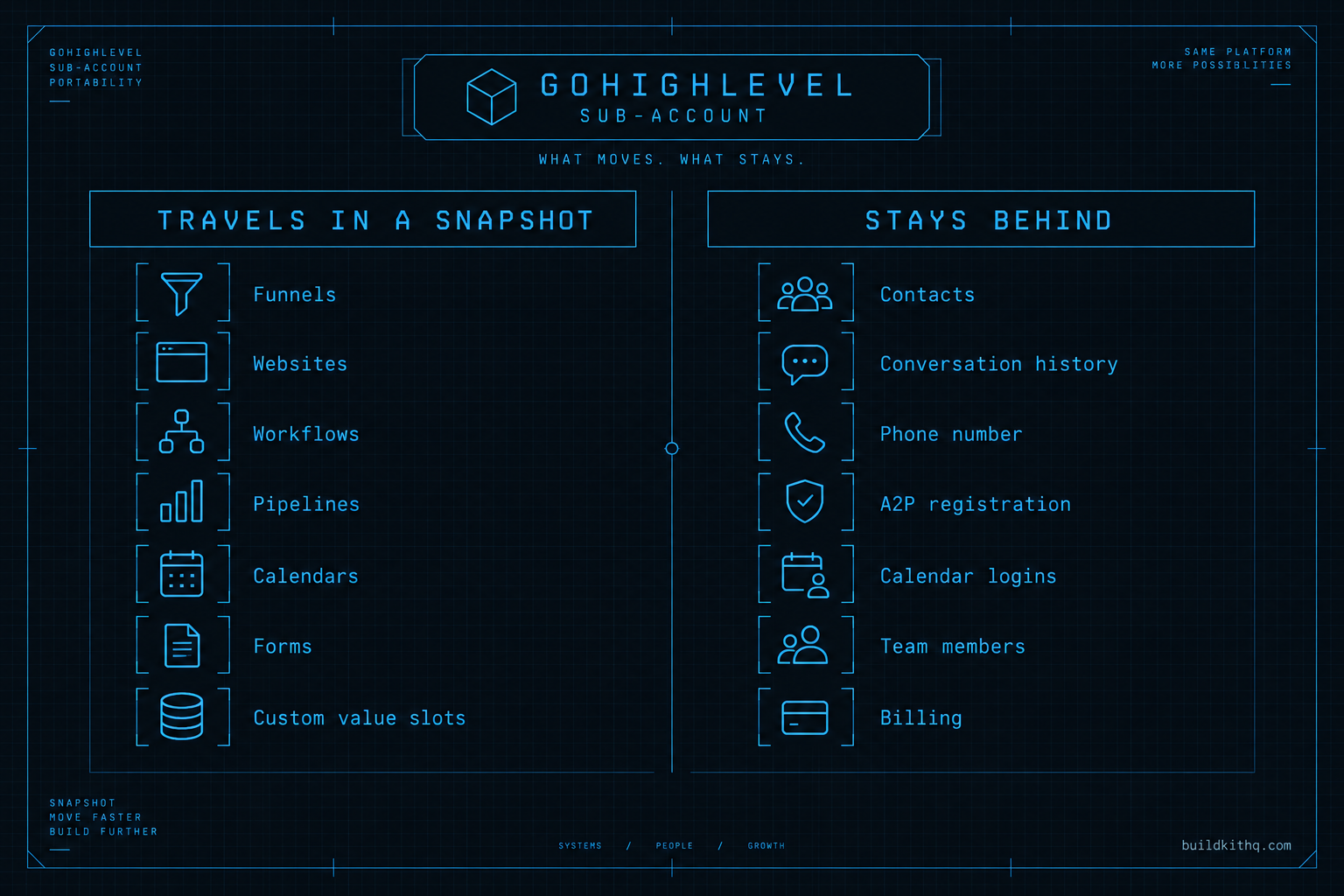
A sub-account has two layers. The first is the build: funnels, websites, workflows, pipelines, calendars, forms, surveys, message copy, custom field definitions and custom value slots. This layer is what a snapshot captures. Export it and it lands in another account as a set of assets. The second layer is the account’s own data and connections: the contact records, the conversation history, the connected phone number, the A2P 10DLC brand and campaign, the Google and email integrations, the team logins and the billing. Independent build guides list this second layer as the part that stays out of a snapshot, and that is the seam every route in this piece has to work across.
Custom values are where the two layers meet, and where imports break quietly. A custom value is an account-level slot, something like the company name, the booking link or the main phone number, that every asset reads from instead of hardcoding. Build a snapshot well and the funnels and workflows all point at {{custom_values.booking_link}} rather than a literal URL. That is what makes a kit reusable: one settings pass per client fills the slots and the whole build wakes up pointed at the right place. Build it badly, or inherit one built badly, and the assets point at slots that are empty or that never came across, so they send blank. GoHighLevel’s own community has a standing report that phone-number fields on the Call Transfer action will not even accept a custom value, which means some references have to be set by hand in every account no matter how clean the snapshot is.
The four routes are four different ways of handling that seam. Migrating in place keeps both layers where they sit and repairs the references. A fresh kit replaces the build layer and asks you to carry the data layer over yourself. A rebuild recreates the build layer by hand and, again, carries the data separately. A done-for-you migration pays a team to do the whole lift and own the seam for you. Hold that split in your head and the rest of the decision stops being mysterious. You are always moving a build one way and data another, and the routes differ only in who does which and how much survives.
The screens you will live in are the same across all four: the Agency view where sub-accounts are created, the Snapshots area where builds are loaded or captured, Phone Numbers and the Trust Center where numbers and A2P sit, and the Custom Values panel inside the sub-account settings where the slots get filled. Knowing that map is most of the job. The rest is choosing the route.
The four routes to a finished client account
Here is each route in plain terms before the table weighs them, because the names get used loosely and the loose use is what causes the wrong pick.
Migrate in place. You keep the client’s existing sub-account and finish it where it stands. You audit every workflow, reconnect the calendars to the client’s own logins, fill the empty custom values, register a fresh A2P brand under the client, and delete the dead assets. Nothing moves. You are a mechanic under the hood of a running car.
Drop in a fresh snapshot kit and move the data across. You spin up a new sub-account, import a build made for the client’s trade, fill the custom values once, and then bring the client’s contacts, tags and pipeline position over by export and import. The real estate team kit and the insurance agency kit are examples of a build that arrives already wired for the industry, so the only account-specific work is the settings pass and the data move.
Rebuild by hand. New sub-account, blank, and you build every funnel, workflow and pipeline yourself to the client’s spec. Total control, total hours. This is the route a purist defends and a calendar punishes. The honest hour count for it is its own long story, and we wrote it as how long it takes to build a snapshot from scratch.
Hand the move to a done-for-you migration. You pay a team to take the account from where it is to where it should be, build and data both, and to own the broken references so you do not have to find them one at a time. On this site that is the GoHighLevel migration service, and it exists precisely because the seam is the slow, unglamorous part.
Those are the four. None is correct in the abstract. The correct one depends on the eight things below.
The eight tests that separate the four routes
Price is one column and it is the one everyone looks at first and regrets. Here are the eight that actually decide whether the client ends the week on a working account.
| What matters | Migrate in place | Fresh kit, move data | Rebuild by hand | Done-for-you migration |
|---|---|---|---|---|
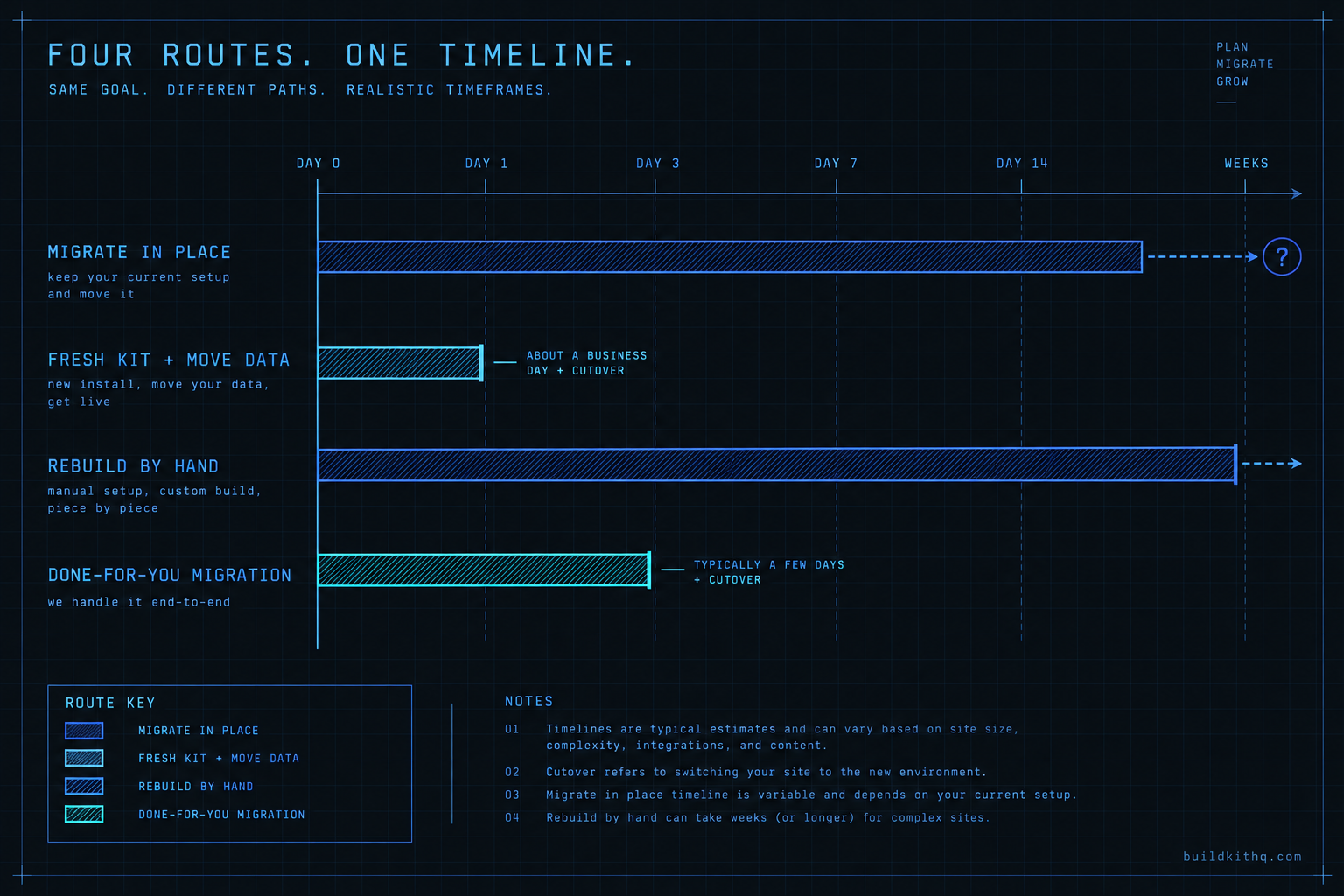
| Time to a correct account | Unknown until you dig | About a business day plus the data move | Weeks | Days, off your plate |
| Risk to running automations | High, it is live while you work | Low, the kit is built in a new account | Low, new account | Low, handled in staging |
| What client data survives | All of it, it never moved | Contacts and pipeline if you move them | Contacts and pipeline if you move them | Handled for you |
| Phone and A2P continuity | Re-register under the client | New number, new A2P brand | New number, new A2P brand | Set up as part of the job |
| Cost | Your hours, open-ended | Kit price plus a short data move | Your hours, the most of any route | From a set service price |
| Client-visible downtime | None if careful, chaos if not | A planned cutover you control | A planned cutover you control | A planned cutover they run |
| Trade fit of the result | Only as good as what you inherited | Built for the industry out of the box | Whatever you have time to build | Built or ported to spec |
| Repeatable for the next client | No, every account is its own mess | Yes, same kit, same path | No, you build it again | Partly, the team learns your pattern |
Read it down the columns. Migrating in place wins the data column outright, because nothing moves, and loses the time and repeatability columns because every inherited account is a fresh archaeology dig. The fresh kit route is the only column where trade fit, repeatability and a known time to live all line up, at the cost of a deliberate data move and a new number. The rebuild wins nothing except control, which is why it survives mostly as a point of pride. The done-for-you route trades money for the one thing an overloaded agency is actually short of, which is its own attention.
The trap in this table is the cost row, because it is the only one you can read before you start work, so it pulls the eye. The time row is the one that bills you later. An account you migrate in place can look free and then eat three days you did not price. A kit has a number on the page and an install path that ends. Which matters more depends on how much you can see inside the account you inherited, and you usually cannot see much.
Where each route quietly fails you
Every route can leave you holding a part nobody warned you about. These are the failures that come up most, what you see when they hit, and how to get out.
You migrated in place, and you never actually owned the account
You spent a day cleaning the client’s existing sub-account and it looks great. Then a workflow you did not build changes behaviour, or the number stops sending, and you discover the account still sits inside the previous agency’s agency view. They can still edit it. They still get the billing signals. You were working inside a house you are renting from a competitor. What you see is unexplained changes and access you cannot fully control. The fix is to verify ownership before you touch anything: the sub-account has to be moved under your agency or the client’s own, and until it is, migrating in place is building on someone else’s foundation. If the account cannot be moved to you cleanly, the in-place route is already dead and you did not know it.
You imported a fresh kit on top of a live account and now everything fires twice
Under time pressure, someone imports a trade kit straight into the client’s existing sub-account instead of a clean one, hoping to overlay the good build on the bad. Now there are duplicate workflows, the old ones and the new ones, both live, both triggering on the same contact actions. The client gets two confirmation texts and a reminder they already had. What you see is doubled sends and a contact sitting in the old pipeline and the new one at the same time. The fix is the rule: a kit goes into a new, empty sub-account, never on top of a running one. If the kit is already in and doubling, you pause every imported workflow, reconcile against the old ones one trigger at a time, and only then switch the new set on. An overlay import is the fastest way to turn one broken account into two.
The number moved but the A2P brand did not, so SMS goes dark
You ported the client’s phone number across, tested a call, heard it ring, and called the migration done. Days later the client says texts are not arriving. The number carried, the A2P 10DLC registration behind it did not, because A2P is account-level data and does not travel in a snapshot or follow a number automatically. What you see is calls working and SMS silently failing, with no error loud enough to notice. The fix is to treat A2P as its own task on every move, started early because it has the longest lead time of anything in the account, and never assumed to have come along for the ride. On a kit install here, that registration sits inside the free 10 hours of dedicated installation support, which is one reason the fresh-kit route is cleaner than it looks: the slowest piece is already accounted for.
The contacts came over but the pipeline position did not
You exported the client’s contacts and imported them into the new account and the count matched, so you moved on. Then the client opens their pipeline and every deal is sitting in the first stage, because a contact export carries the record and the tags but not where that contact sat in a pipeline or what their conversation history was. What you see is a client who says “where did all my live deals go,” looking at a board that forgot its own state. The fix is to map pipeline position deliberately as part of the move, usually by tagging contacts with their stage before export and rebuilding the board position from those tags after import, and to tell the client up front that threaded conversation history is the one thing that rarely survives a cutover so they screenshot anything they need to keep.
Surviving workflows still point at custom values that no longer exist
This one hits the migrate-in-place and the rebuild routes most. You kept or recreated a set of workflows, but they reference custom values from the old build that you cleaned out or never recreated, so the slots are empty. The workflow fires, the logic runs, and the message goes out with a blank where the booking link, the company name or the address should be. What you see is sends that look fine in the builder and arrive broken in the client’s pocket. The fix is to walk every custom value reference before you call any account finished, fill or repoint each one, and send a real test to your own phone, because the builder will never show you the hole. A reference to an empty slot is the single most common reason a migrated account embarrasses the agency that migrated it.
The arithmetic nobody does before they start
Do the sums before the work, not during it, because the route that feels cheap is usually the one whose hours you have not counted yet.
Start with what runs no matter which route you pick: the HighLevel platform bill. The client is on a plan whichever way this goes, and HighLevel publishes three agency tiers, confirmed by search snippets rather than fetched directly this run: Starter at $97 a month, Unlimited at $297 a month, and the top reseller tier at $497 a month, with a 14-day trial on each. That cost is a constant across all four routes, so it drops out of the comparison. What varies is the work to get the account right.
Price your own time honestly. Say you bill at $125 an hour. A migrate-in-place job on an account you can actually read might take a focused day, eight hours, call it $1,000 of your time. The same job on an account that hides its breakage can run two or three days as you find each empty custom value and dead integration one at a time, which is sixteen to twenty-four hours, or $2,000 to $3,000, and you did not know which account you had until you were already inside it. That uncertainty is the real cost of the in-place route, not the hourly rate.
Now the fresh-kit route. A trade build has a published number. The real estate team kit sits toward the upper middle of the range and the full price list is on one page, with the lowest kit at $875 and the highest at $2,395. Installation is free with every kit, and the price includes 10 hours of dedicated installation support, to be used within 12 days of purchase, which covers installing the kit, rebranding the site, the A2P 10DLC registration and email domain setup. The account-specific work that falls to you is the data move: exporting the client’s contacts and tags and bringing them in, which on a normal client list is a few hours. So the real-estate route might be the kit price plus roughly four hours of your time at $125, or about $500, for a build that is already made for the trade and whose slowest compliance step is inside the included hours. Set that beside an open-ended in-place bill and the kit stops looking like the expensive option.
The done-for-you migration is the simplest line to read because it is a set number. On this site it starts from $3,600, and it buys the whole seam handled: build and data both, A2P set up, references walked, and the broken parts found by someone whose job is to find them. Whether that beats doing it yourself is pure arithmetic. If your own time to do the move safely is more than $3,600, or if the hours you would spend are hours you cannot spare from selling, the service is cheaper than it looks. If you have the time and the account is small, it is not.
One number you cannot put in this table is a promised result, and we will not. The only performance figures this site states are design targets, not measured outcomes: a build is wired to aim at recovering 70 percent of no-shows and at producing 5 to 10 reviews a month, and both are targets the account is built toward, never a number we claim it hit for a past client. Any route that quotes you a guaranteed lift is quoting a number it cannot stand behind.
The objections worth answering honestly
“Migrating in place is obviously cheapest, so why would I ever start fresh?” Because cheapest is a guess until you can see inside the account, and inherited accounts are built to hide their own breakage. In place is genuinely cheapest on a small, well-documented account you can read in an hour. It is the most expensive route on an account that drip-feeds you broken references across three days. The fresh kit wins not because it is always cheaper but because its cost is knowable before you commit, and a knowable cost is worth paying a little more for when your week is already full.
“Why buy a kit at all when I can just clone my best existing client account?” This is the strongest argument against buying from us, so here is the straight answer. Cloning your own best account is a real option and sometimes the right one, if that account is clean, built on custom values, and genuinely matches the new client’s trade. The catch is that most agencies’ “best account” is best for the trade it was built for, and cloning it for a different industry means rewording every funnel, re-sequencing the pipeline and rewriting the message copy, which is most of a rebuild wearing a shortcut’s clothes. A kit is worth buying when the trade is different from anything you have built well, or when you cannot spare the hours to adapt a clone. When you already own a clean, on-trade account to copy, copy it.
“The migration service costs more than the kit, which makes no sense.” It makes sense once you separate the build from the move. The kit is the build layer, priced on the page. The migration service is the labour of carrying a live client across the seam without dropping their data, their number or their A2P registration, which is work whether or not a kit is involved. They are not the same purchase. Plenty of agencies buy the kit and do the move themselves, and plenty buy the service precisely so they never have to find a blank custom value in a client’s pocket again. The higher number is buying your attention back, not a bigger pile of assets.
“Won’t moving the client to a fresh account upset them?” Only if they notice it as a loss. A planned cutover that keeps their contacts, keeps their pipeline position and warns them which conversation history to screenshot reads as an upgrade, not a disruption. The version that upsets a client is the silent one where deals reset to stage one and old texts vanish. Downtime is a function of planning, not of the route, and the fresh-kit and service routes both let you stage the whole thing in a new account and flip it live on a schedule the client agreed to.
Which route fits which agency
The honest answer is that the right route depends on how many clients like this one you expect to handle, so here is the verdict by the shape of your agency.
If you are a solo operator with one or two sub-accounts and plenty of hands-on time, migrating in place is often right for an account you can actually read, and a fresh kit is right the moment the account stops being legible or the trade is new to you. You have the hours; spend them where they are knowable.
If you run a small roster and onboard a few clients a month, the fresh-kit route is usually your default, because repeatability is worth more to you than saving a few hours on any single account. The same kit and the same data-move path for every client in a trade turns onboarding into a process instead of an investigation. Keep the in-place route for the rare account that is already clean. If you would rather not do it yourself, done-for-you setup and the migration service take the work off your plate entirely.
If you are a reseller moving at white-label volume, you cannot afford archaeology. Standardise on fresh builds and a documented move, and buy out the migrations you do not have attention for. The mortgage broker kit and the rest of the catalogue exist so that a new client in a known trade is a repeatable install, not a bespoke project, and the migration service exists so that the ones who arrive with a running account are someone else’s seam to work. The rebuild-by-hand route has no place at volume, and the in-place route is a favour you do a single important client, not a model you scale.
Whatever you pick, pick it before you open the account’s twentieth broken workflow, not after. The decision is cheap now and expensive later, which is the one thing every route in this piece agrees on.
Quick answers
No. A snapshot carries assets like funnels, workflows and pipelines. It does not carry the sub-account's own data: contacts, conversation history, the connected phone number, the A2P registration, calendar logins or billing. Those are tied to the account you built them in, so moving a client means moving the build one way and the data another.
Sometimes, and only if you can see what is in it. A migrate-in-place job is cheap when the account is small and documented, and expensive when it hides broken references you find one at a time. A fresh trade-built kit has a known price on the page and a known install path, which is why agencies reach for it once the existing account stops being legible.
Only if you skip the data move. The build and the data travel separately: you import the kit into a new sub-account, then bring the contacts, tags and pipeline position across by export and import. Conversation history is the one piece that rarely survives a move cleanly, so capture it before you switch anything live.
The trade build plus free installation, and 10 hours of dedicated installation support, to be used within 12 days of purchase. Those hours cover installing the kit, rebranding the site, A2P 10DLC registration and email domain setup in GoHighLevel. Moving the client's existing contacts and third-party integrations sits outside the hours and is quoted or handled separately.
Keep reading
What a finished GoHighLevel account does with a lead
A lead moves through five stages in a finished GoHighLevel account. Here is what each stage is wired to, and the handoffs where a half-built one drops it.
Read itThe AI receptionist in your kit answers, but never books
An imported kit's AI receptionist replies around the clock and books no one. Here is the booking path underneath, the four places it breaks, and the fix.
Read itThe four ways to catch a lead your client's phone missed
A missed call is a lost client. Compare the GoHighLevel AI Receptionist, a human VA, missed-call text-back and voicemail on the eight things that matter.
Read it