A blank sub-account, and four ways to fill it by Monday
You just signed a client and opened a blank GoHighLevel sub-account. Four ways to fill it, compared on time, completeness, A2P and the per-client rebuild.
The dental client signed on Friday afternoon. By the time the paperwork cleared you had a new sub-account open in your agency view, and it was empty. The Business Profile had a name in it and nothing else. No phone number. No funnels. The workflow folder was a single line of grey text saying there was nothing here yet. The calendar list was blank. Somewhere a Monday deadline was already forming, because you told them you would have something to look at after the weekend.
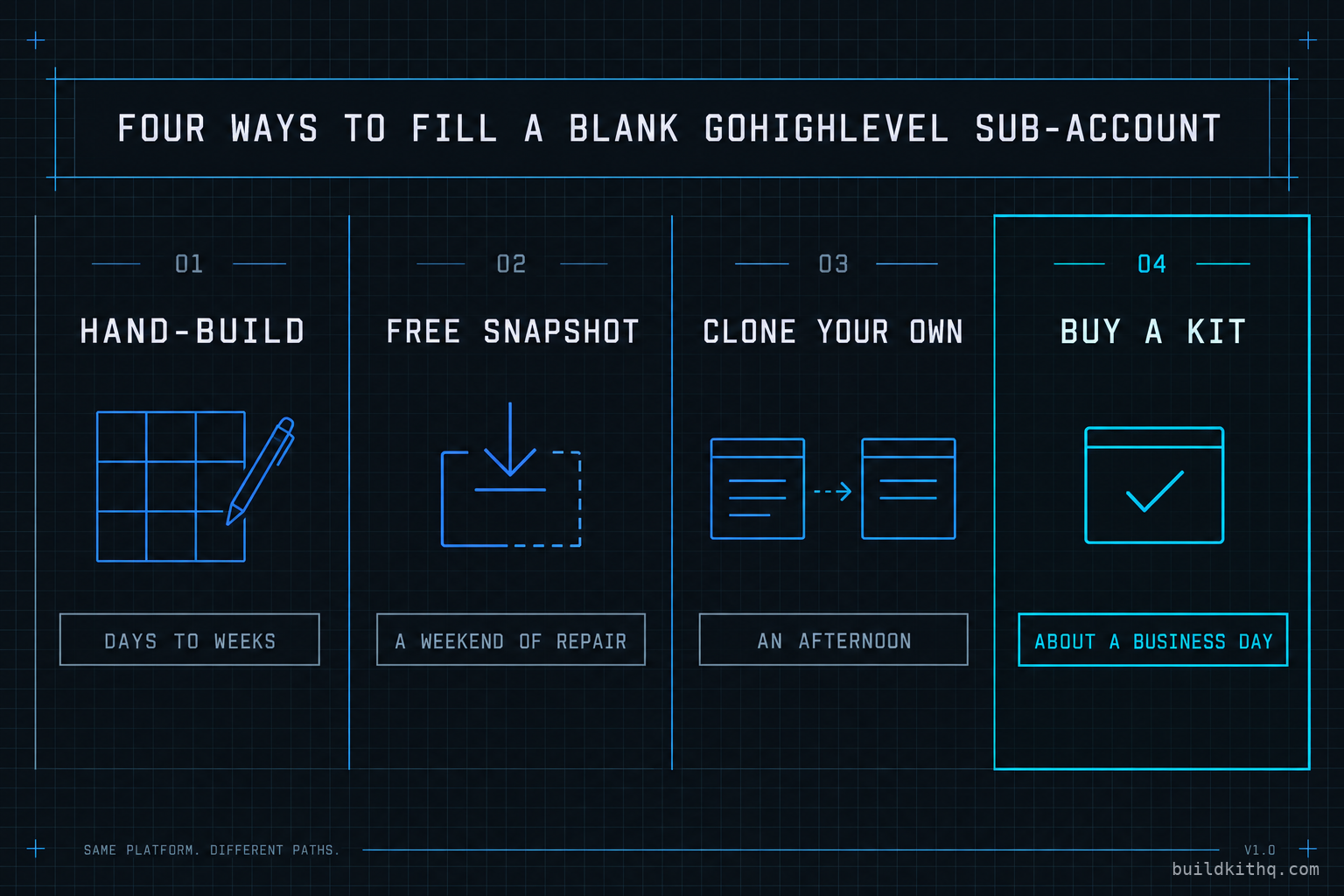
So you did the thing every agency owner does. You opened four tabs. One was the blank funnel builder, cursor blinking. One was a free dental snapshot a Facebook group swore by, download link and all. One was your own best account, the chiropractor you built last spring that actually works. One was a storefront selling a dental practice build for a set price with the contents listed underneath. Four ways to fill the same empty account. They do not cost the same, they do not take the same time, and they do not leave you holding the same problem on Monday morning.
This is not the same question as where to buy a build. We wrote that one already, and it compares the places a snapshot comes from. This one is narrower and more practical: you have a blank sub-account in front of you right now, and you have to decide how to fill it for this client. Here are the four honest methods, what each one actually does to that account, and which agency each one is right for.
What a sub-account really is before you fill it
A GoHighLevel sub-account, which HighLevel also calls a location, is a container. On its own it holds almost nothing. What makes it a working account is everything you pour into it, and that everything splits cleanly into two layers that behave very differently.
The first layer is the build. The funnels and their pages. The workflows that fire on a tag or a form submission. The pipelines and their stages. The calendars and their booking logic. The custom fields, the forms and surveys, the email and text templates, the AI receptionist and AI chatbot. This layer is configuration, and configuration is portable. It is the part a snapshot can copy, because it is made of settings and logic rather than live connections.
The second layer is account-bound, and it is the one that breaks weekends. Custom value contents, not the fields but what they hold. The Google or Outlook account a calendar reads availability from. The registered A2P brand and campaign that let the account text at all. The authenticated email domain. The phone number itself. Payment and third-party connections. None of this travels in a snapshot, and HighLevel is explicit that connections are set per account: a calendar only has availability once each user connects their own Google calendar to it. A snapshot that carries the booking logic still lands with no connected user behind it.
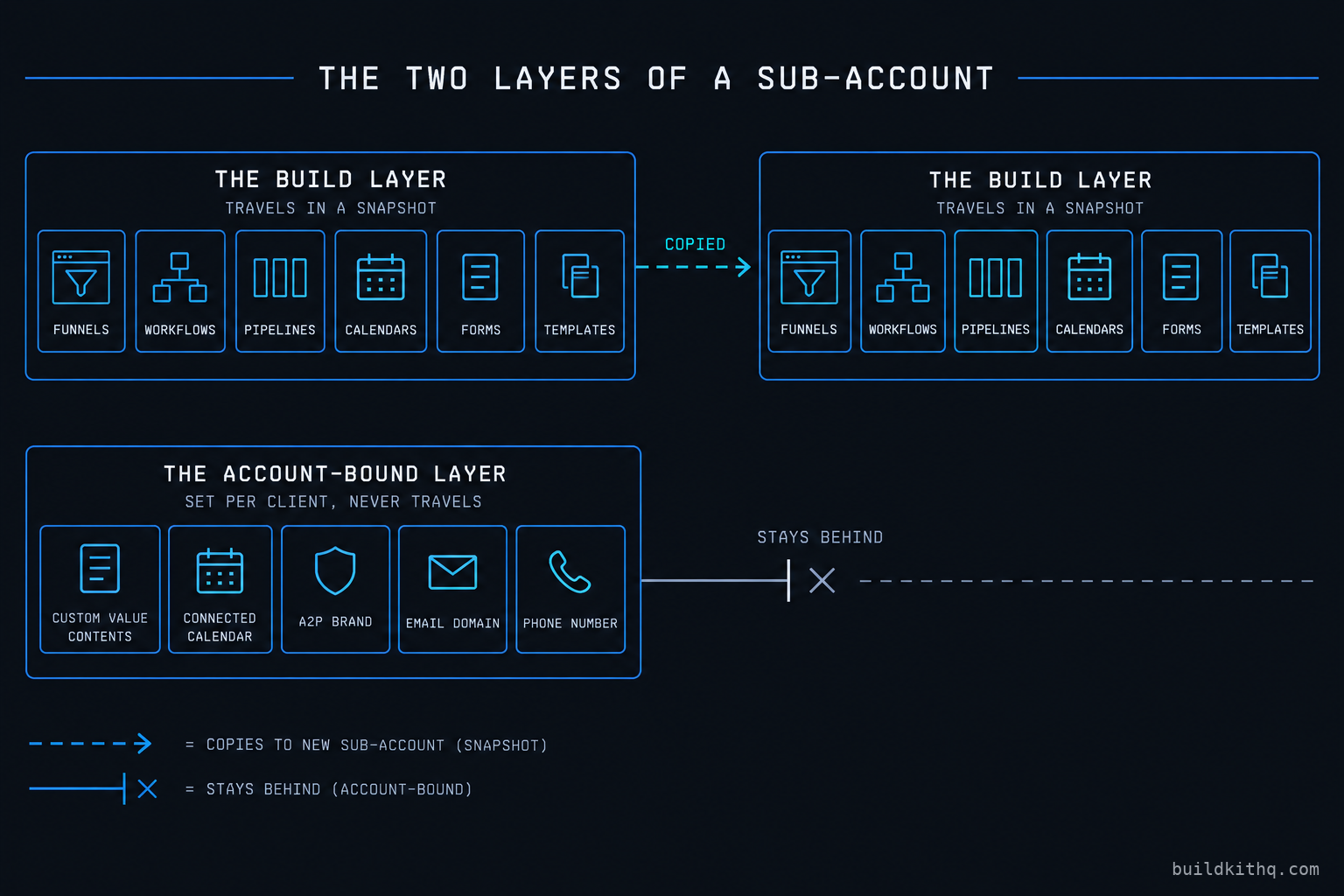
Hold that split in your head, because it is the thing all four methods have in common. Whichever route you pick, the build layer is the part that differs, and the account-bound layer is the part you do by hand every single time. The methods are really a question about the first layer only. Nobody sells you out of the second.
The mechanics of loading are the same across every method too. You create the sub-account from the agency view, then you load a snapshot into it, or you build inside it, or you leave it blank and start typing. If you load a snapshot into an account that already has assets, HighLevel runs a conflict step so you choose what wins. After the assets are in, the real sequence starts: fill the custom values, reconnect the calendar and integrations, register the A2P brand, authenticate the email domain, point the funnel at a real domain the way HighLevel documents for launching a funnel, then test the whole path with a real handset. Skip that sequence and the account looks finished in the builder and does nothing in the world. That is true of a hand-build and a bought kit alike.
The four ways to fill it
Hand-build from scratch
You start in the empty account and you build every piece yourself. Nobody sells you anything, and the account ends up exactly as good as the hours you put in.
This is the right move in one situation and the wrong move in most others. It is right when the trade is new to you and the hours are billable to the client as setup, because then you are being paid to learn a build you will reuse later. It is also right when the client’s process is genuinely unusual and no existing build fits it. Outside those cases, hand-building a known system is paying your own hourly rate to retype work you have already done or could buy. The account owner who does this to save money is usually spending the most expensive thing they own, which is their own week.
Import a free marketplace snapshot
HighLevel has a built-in marketplace, and around it is an informal economy of free snapshots traded in groups and affiliate bonuses. You import a share link and the assets land.
What you are buying is nothing in cash, and that is the tell. Snapshots carry configuration, not data, so even a good free one lands as a build with the account-bound layer stripped out by definition. A bad one lands worse: workflows that reference custom values the author never shipped, calendars pointed at a login that is not yours, an A2P brand that was theirs and does not travel. For a single lead form this is fine and genuinely fast. For a full niche account it is a project wearing the costume of a download, and the repair is the cost nobody put on the page.
Clone your own best account
Once you have built one account in a trade that actually works, you can snapshot it and load that into every new client in the same trade. This is the quietly correct answer for a lot of agencies, and it is free after the first build.
The limit is the account-bound layer again, plus one extra hazard. A clone is only as complete as the source, and it only covers trades you have already built well. Sign a client in a trade you have never done and the clone gives you nothing, so you are back to hand-building or buying. The extra hazard is leakage: a cloned account carries the last client’s branding in the message copy, their business name baked into a workflow, their calendar connection, their A2P brand. Load it carelessly and the new client gets texts signed with the previous client’s name. The clone saves the build and still demands a full rebrand pass before anyone sees it.
Buy a complete niche kit
A published-price storefront sells one finished build per trade and lists what is inside before you reach the button. This is what BuildKitHQ is, so read this knowing that. You import the kit the same way you import any snapshot, and what lands is the whole build layer made for that industry: the funnels, the workflows, the pipelines, the calendars, the forms and surveys, the custom values, the message copy, and an AI receptionist and chatbot, wired together for the trade rather than for nobody in particular.
The HVAC contractor build is a set number on the page. The salon and barber build sits at the bottom of the range and the mortgage broker build at the top, with the full price list on one page. On this site installation is free with every kit, and the price includes 10 hours of dedicated installation support, to be used within 12 days of purchase, which is the layer that covers the account-bound work: installing the kit, rebranding the website, A2P 10DLC registration and setup, and email domain setup in GoHighLevel. Third-party integrations and custom software development are never in those hours and are quoted separately. What the kit removes is the build layer as a problem. What it does not remove, because nothing can, is the per-client wiring underneath.
The eight things that actually decide between them
Price is one column and it is the one that decides least. Here is the comparison that matters when you are staring at a blank account with a Monday deadline. Read the rows, not the bottom line.
| What decides it | Hand-build from scratch | Free marketplace snapshot | Clone your own account | Buy a niche kit |
|---|---|---|---|---|
| Time to a working account | Days to weeks | A weekend of repair | An afternoon, if clean | About a business day |
| Complete out of the box | Only what you build | A shell, usually | As complete as the source | The full build, per trade |
| Built for the client’s trade | If you know the trade | Rarely the right trade | Only trades you have built | Yes, one build per industry |
| Per-client rebuild still needed | All of it | The broken half, plus wiring | The account-bound layer | The account-bound layer |
| A2P and deliverability | You register it yourself | Never travels | New brand per client | Covered in the install hours |
| Upfront cost | Your billable hours | Nothing in cash | Nothing after the first | A one-time price, from $875 |
| Recurring cost | None beyond the platform | None beyond the platform | None beyond the platform | None beyond the platform |
| Where it breaks later | The scope you skipped | Missing custom values | Last client’s details leak | Wiring left undone, not building |
The rows that cluster are the point. Every method lands you at the same place on the last three: no method carries A2P into the account, none of them adds a recurring cost beyond HighLevel’s own, and every one of them breaks in the account-bound layer rather than the build layer. The methods differ almost entirely on the top four rows, which are all really one question: how much of the build is done before you start, and how well does it fit this trade.
Where each method actually fails
A comparison table shows you the happy path. The decision is made in the failure modes, because that is where your Monday goes wrong. Here are the four that recur, one per method, plus the one that catches everybody.
The free snapshot that imports a shell
You load the free dental snapshot and the builder fills with folders. It looks like a finished account. Then you open the appointment confirmation text and it reads Hi {{contact.first_name}}, your appointment at {{custom_values.practice_name}} is confirmed, and the second token is empty because the author shipped the field but never shipped its contents. You see a confirmation that greets the patient by name and then names nobody. What is wrong is that custom value contents are account-bound and do not travel, so the workflow fires into a half-written sentence. The fix is to walk every custom value and every merge field before go-live and fill the account-bound ones. There is no shortcut, because the snapshot genuinely does not contain them. This is the hidden half of the free route: the import is free and the repair is the job.
The clone that leaks the last client
You snapshot your working chiropractor account and load it into the dental client to save the build. It loads perfectly, because it was complete at the source. Then the first test booking lands in the chiropractor’s Google calendar, because the calendar connection came along for the ride. A nurture text goes out signed with the chiropractor’s business name, because it was typed into the workflow rather than pulled from a custom value. You see a new client’s account quietly behaving as the old one. What is wrong is that a clone copies the account-bound layer’s pointers without copying the new client’s reality. The fix is a disciplined rebrand pass: disconnect and reconnect every integration under the new client, replace every hardcoded name with a custom value, and register a fresh A2P brand, because an A2P brand is tied to one legal business and reusing it across clients is not allowed and will get the number filtered. A clone is a head start that demands a careful cleanup, not a finished account.
The hand-build that runs out of weekend
You decide to build the dental account yourself because you know GoHighLevel and how hard can a dental practice be. You build the booking funnel Saturday morning. It looks great. Then you realise the account needs the reminder cadence, the no-show recovery, the review requests, the reactivation sequence and the intake forms, and it is Sunday night and you have a funnel with nothing behind it. You see a demo that impresses the client for ten minutes and then does nothing when a real lead arrives Tuesday. What is wrong is scope: the visible part of a build is a fraction of the working part, and the working part is where the hours hide. The fix is to scope honestly before you promise a date, or to accept that the build layer is exactly what a kit or a clone removes. We put the real hour count on building a snapshot from scratch in a separate piece because the number surprises people every time.
The A2P gap that catches all four
This one does not care which method you chose. You finish the account, you fire a test workflow, and the GoHighLevel activity log shows the message sent. Your own phone never buzzes. You see a send that the platform swears happened and a handset that received nothing. What is wrong is that the sub-account has no registered A2P brand and campaign behind its number, so United States carriers filter the message before it arrives, silently, with the platform reporting success because it handed the message off correctly. The fix is to register the brand and the campaign, wait for approval, and only then test with a real handset rather than the activity log. We wrote the full diagnosis of this exact trap in workflows fire but nothing sends, because it is the single most common reason a brand-new account looks done and is not. Every one of the four methods lands you here, which is why A2P setup is in the install hours on a kit rather than left as an exercise.
The pattern across all four is the same. The method decides how good the build layer is. The account-bound layer decides whether the account works at all, and no method does that part for you unless someone is paid to. That is the honest shape of standing up a sub-account, and it is why a disciplined QA pass over the account-bound layer, before the client ever sees the account, is not optional on any of the four.
The numbers, and where they actually land
The costs of standing up an account live in three places, and only one of them is the build.
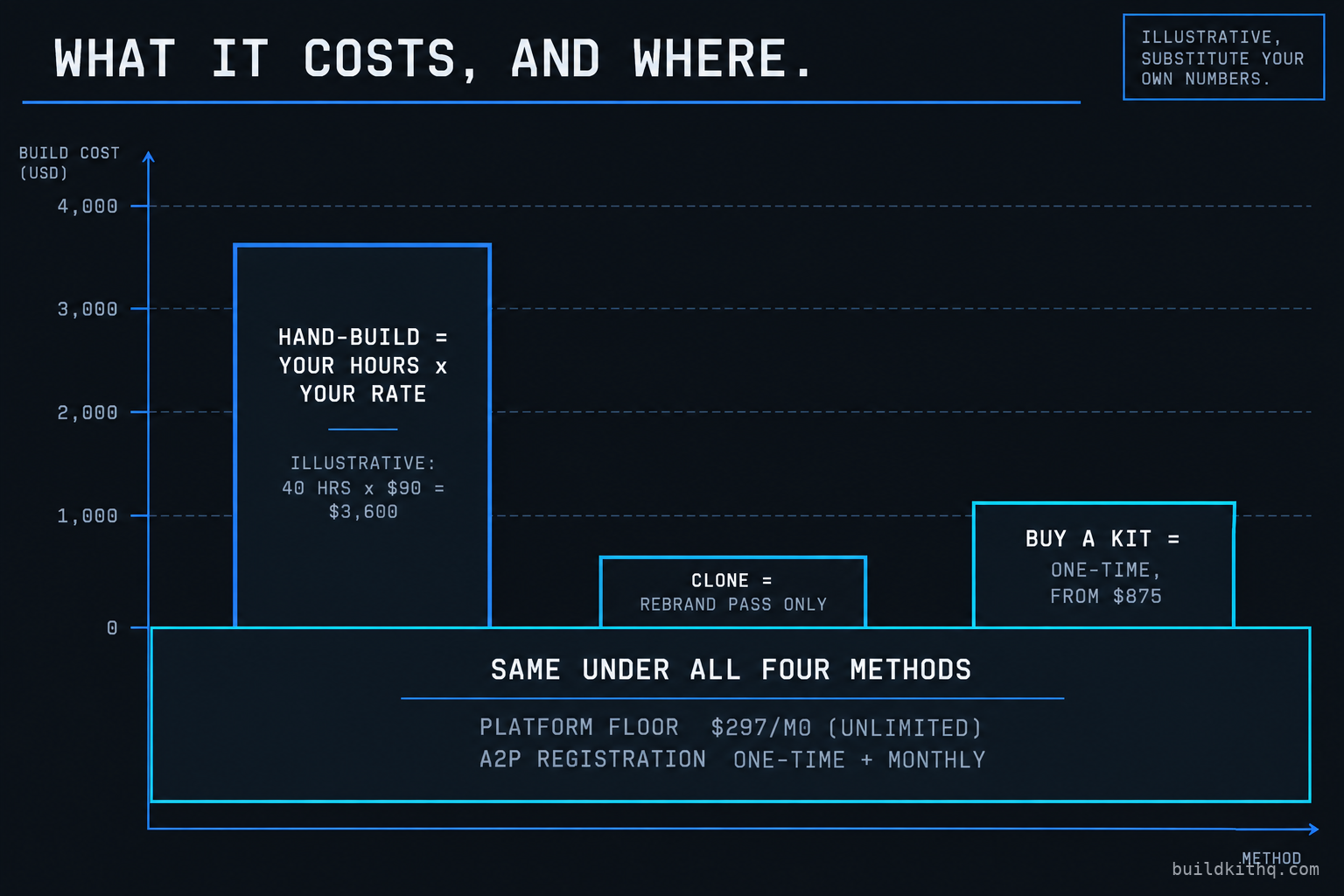
The first is the platform, and it is the same floor under all four methods. HighLevel publishes three plans, and for an agency running client sub-accounts the working tier is Unlimited at $297 a month, which removes the sub-account cap, with Agency Pro at $497 a month adding rebilling with markup and SaaS mode, and Starter at $97 a month beneath them. There is a 14-day trial on each. Those figures were confirmed against HighLevel’s published pricing through search this run rather than fetched directly, so read them as off the pricing page, not quoted from an invoice. This is a third party’s subscription price for the platform your build runs on. It is not what a kit costs, and it does not move between the four methods, which is exactly why it should not decide between them.
The second is A2P registration, and it too is inherited by every method. The brand and campaign fees are set by The Campaign Registry and the carriers and passed through by the messaging layer that powers GoHighLevel. On Twilio’s published schedule, confirmed via search snippet this run and not fetched directly, a one-time brand registration runs about $4.50 for a sole proprietor or low-volume brand and $46 for a standard brand, a one-time campaign vetting fee of $15 applies per campaign, and a monthly campaign fee of roughly $1.50 to $10 depending on the use case sits on top, plus a per-message carrier pass-through billed per segment. Check your own LeadConnector account before you quote a client, because these change and your reseller markup may differ. The point for this decision is that A2P is a cost and a lead time on every method, never a thing a snapshot hands you.
The third is the build, and this is the only number the four methods actually disagree on. Price it against your own blended rate. Take your rate and the hours a full niche account takes you, and the hand-build cost is rate times hours. As an illustrative scenario with the assumptions printed so you can drop in your own: if a complete niche build takes you a working week and you bill your time at $90 an hour, that is 40 hours times $90, or $3,600 of your own time, whether or not you invoice it. That number is illustrative and nothing more, because your hours and your rate are yours. Against it, a clone of an account you already own costs the rebrand pass alone, and a kit from this catalogue is a one-time price from $875 at the floor to $2,395 at the top, delivered within 24 business hours of purchase confirmation, with installation free and the account-bound wiring covered by the install hours. If you would rather not touch the build at all, a done-for-you setup carries it for you from a fixed starting price. The only comparison that means anything is the one-time build cost of each method against your own rate times the hours it saves. Do that division before the weekend, not during it.
The objections worth answering
“Cloning my own account is free, so why would I ever buy anything?” You should clone, when you have an account worth cloning in the trade the client is in. It is the best-value route in that exact case and we just said so. The catch is the word trade. A clone only covers industries you have already built well, and the first great account in each trade still has to come from somewhere. Sign a client in a niche you have never done and the clone gives you an empty hand, so you are back to building it from scratch or buying it built. Buying a kit for a new niche is really buying your own future clone, finished, for less than a week of your time.
“A free snapshot is good enough to start with.” For a single landing page or a lead form, yes, and we would not pretend otherwise. For a full niche account the free snapshot is a shell by definition, because configuration travels and connections and custom value contents do not, so what you import is the easy half and what you rebuild is the half that makes it work. The free route is not cheaper. It moves the cost from your card to your weekend, and a weekend of an agency owner’s time is not free. If the repair is the job, it is worth asking whether buying the build done is the actual bargain.
“I know GoHighLevel. Why would I pay you to build what I can build myself?” If the trade is new to you and the client is paying for setup time, build it, bank the hours, and keep the account as your clone for next time. That is a genuinely good call and we are not going to argue you out of it. The kit is for the other case: a trade you will do again, a weekend you would rather keep, and a build you can read in full before you pay for it because the contents are listed on the page. We are not selling you a skill you lack. We are selling you back the week, and listing exactly what is in the box so you can judge whether the week is worth the price. For some agencies it plainly is not, and those agencies should build. For the ones signing clients faster than they can build, it is the whole game.
The blank account does not care which method you pick. It cares that by Monday the funnel captures, the calendar books into the right place, and the first text actually arrives on a human’s phone. Three of the four methods can get you there. Only one of them gets you there without spending the one resource an agency owner can never buy more of, and the honest answer to which is right is the one that counts your own hours as the real money. They are.
Quick answers
Importing a complete niche kit is the fastest route to a working account, because the funnels, workflows, pipelines and message copy all land already wired for the trade. You still have to do the account-bound layer: rebrand, reconnect the calendar, register the A2P brand and verify the email domain. On a kit that part is covered by the install hours, so a clean build can be live in about a business day.
No. A snapshot carries configuration, not connections. Funnels, workflows, pipelines, calendars, custom fields and templates travel. Custom value contents, the connected Google or Outlook calendar, the A2P brand, the email domain and the phone number do not. That account-bound layer is set per client no matter how you built the rest, which is why the first test text so often fails.
Build from scratch when the trade is new to you and the hours are billable to the client. Import a snapshot when you have done this trade before, either your own account or a kit made for it, because rebuilding a known system by hand is paying your own rate to retype work you already have. Price the two against your blended hourly rate before you decide.
You can clone your own best account into a snapshot and load it for each new client in the same trade, and it is a strong move once you have one account worth copying. What you cannot reuse is the account-bound layer. Every client needs its own A2P brand, its own connected calendar and its own branding, so a clone still leaves a rebuild pass before go-live.
The platform is the floor. HighLevel's Unlimited plan is $297 a month and removes the sub-account cap, with Agency Pro at $497 a month for rebilling and SaaS mode. On top sit the A2P registration fees and usage-based message and call credits. None of that is the cost of the build itself, which is either your hours or a one-time kit price.
Keep reading
What a finished GoHighLevel account does with a lead
A lead moves through five stages in a finished GoHighLevel account. Here is what each stage is wired to, and the handoffs where a half-built one drops it.
Read itThe AI receptionist in your kit answers, but never books
An imported kit's AI receptionist replies around the clock and books no one. Here is the booking path underneath, the four places it breaks, and the fix.
Read itThe four ways to catch a lead your client's phone missed
A missed call is a lost client. Compare the GoHighLevel AI Receptionist, a human VA, missed-call text-back and voicemail on the eight things that matter.
Read it