Your kit's funnel renders, and captures nobody
An imported kit's funnel pages load fine, then capture no one. The form fires into nothing, the domain is wrong, the checkout is dead. Here is why, and the fix.
On a Friday you import the gym and fitness kit into a clean sub-account for a new client, a boutique studio running a January free-week campaign. You open Sites and the funnel is right there: a landing page that reads the way the studio talks, an opt-in for the free week, a thank-you page with a booking step, an offer for the founding-member plan. You preview it on your phone. It looks finished. You send the studio their login and the funnel link, and you close the laptop.
Monday the studio owner calls. Their ad ran over the weekend and the reporting says forty people clicked it. Not one of them shows up as a contact. The “Start my free week” button on the thank-you page goes to a page that is not there. The founding-member checkout throws an error the moment a real person tries to pay. And the whole funnel is serving on a long HighLevel preview URL, not the studio’s own address, so the ad sent paying traffic to a page that does not carry the studio’s name.
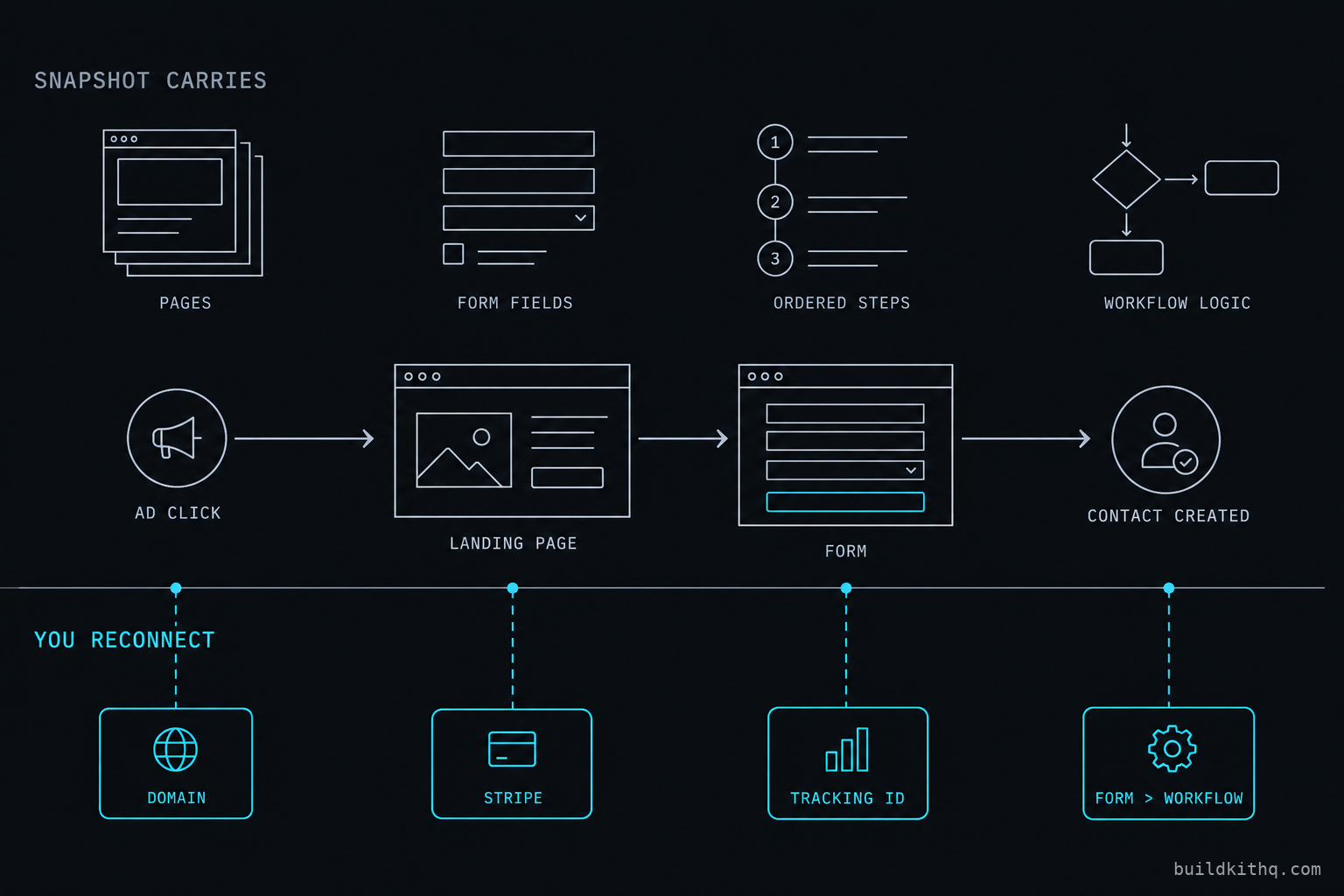
Nothing is broken, exactly. The pages imported. The form imported. The steps imported in the right order. What did not import is every connection that turns a set of pages into something that captures a person: the domain the pages serve from, the payment account that takes the money, the workflow that is supposed to hear the form and act on it, and the tracking that tells the ad it worked. A funnel is not the pages. It is what happens when a stranger lands on them, and that part is wired to the account it lands in, not to the snapshot.
This is the reference for that wiring. What a funnel actually is inside GoHighLevel, what the snapshot carries and where it stops, the four ways an imported funnel captures nothing while looking perfect, and the reconnect pass that makes it live before a client is the one who finds the gap.
What a funnel actually is in GoHighLevel
A funnel in GoHighLevel is a set of ordered pages that a visitor moves through, built under Sites then Funnels in the sub-account. Each page is a layout of sections and elements. That much is what you see in the builder, and it is the part everyone means when they say the funnel “looks done.” Any operator can drag a hero, a headline and a button onto a page. The pages are not the product.
What makes a funnel capture anything is everything attached to those pages, and none of it is visible on the canvas. A page carries a form or an order form, and a form is the thing that turns an anonymous visitor into a contact record. A funnel is served from a domain, and the domain is what puts the pages on the client’s own address instead of a shared HighLevel URL. A checkout step carries products and prices, and behind those sits a payment account that actually moves the money. Every page can hold tracking code, and that code is what reports a conversion back to the ad platform that paid for the click. And a submitted form is an event a workflow can listen for, which is how a lead becomes a text, a task and a nurture instead of a row nobody reads.
Take a lead-heavy trade to see how much rides on those attachments. The mortgage broker kit ships a rate-enquiry funnel: a landing page, a qualifying form that asks loan amount and timeline, a thank-you page that books a call, and a workflow that fires the second the form is submitted so a hot enquiry gets a text back before the visitor closes the tab. The pages are the least of it. The value is the form asking the right questions, the workflow catching the submit, and the booking step that turns an enquiry into a slot on the calendar. A business coaching kit is built the same way around a masterclass opt-in and a paid strategy session. In both, the funnel is a capture path, and the path only works when every attachment along it is connected to this account.
HighLevel documents the click path for launching a funnel and connecting its domain, and the fact that domain connection is a separate step from building the pages is the whole point. The pages travel in a snapshot. The connections do not.
What the snapshot carries, and where it stops
There is a clean line running through every funnel, and a snapshot is honest on one side of it and silent on the other. Above the line is content: the pages, the sections, the copy, the form fields, the step order, the products listed on the checkout, and the workflow logic meant to run on submit. A good kit ships all of that built for the trade, and it imports intact. Below the line is connection: the domain that serves the pages, the payment account behind the checkout, the tracking IDs that report conversions, and the live binding between a form and the workflow that answers it. None of that travels, and HighLevel says so plainly.
HighLevel’s own snapshots overview lists what a snapshot does not include, and the list is the bottom half of that line: contacts, appointments, conversations, Stripe connections and integrations do not transfer. Read that against a funnel and the failures write themselves. Stripe is a connection, so the checkout arrives with no account behind it. Integrations are connections, so the tracking and the third-party pieces arrive pointing nowhere, or pointing at wherever the snapshot was built. The pages made the trip. The wiring stayed home.
This is not a knock on snapshots. It is what a snapshot is. A file cannot carry a domain any more than it can carry a phone number or a bank account, because those things live in the destination account and belong to the client. The trouble is that the funnel does not tell you which half you are looking at. Open the builder and the pages read complete. Preview the funnel and it renders. The account presents the top half and stays quiet about the bottom, and a clean-looking import is exactly how a dead capture path reaches a client.
The four ways an imported funnel captures nothing
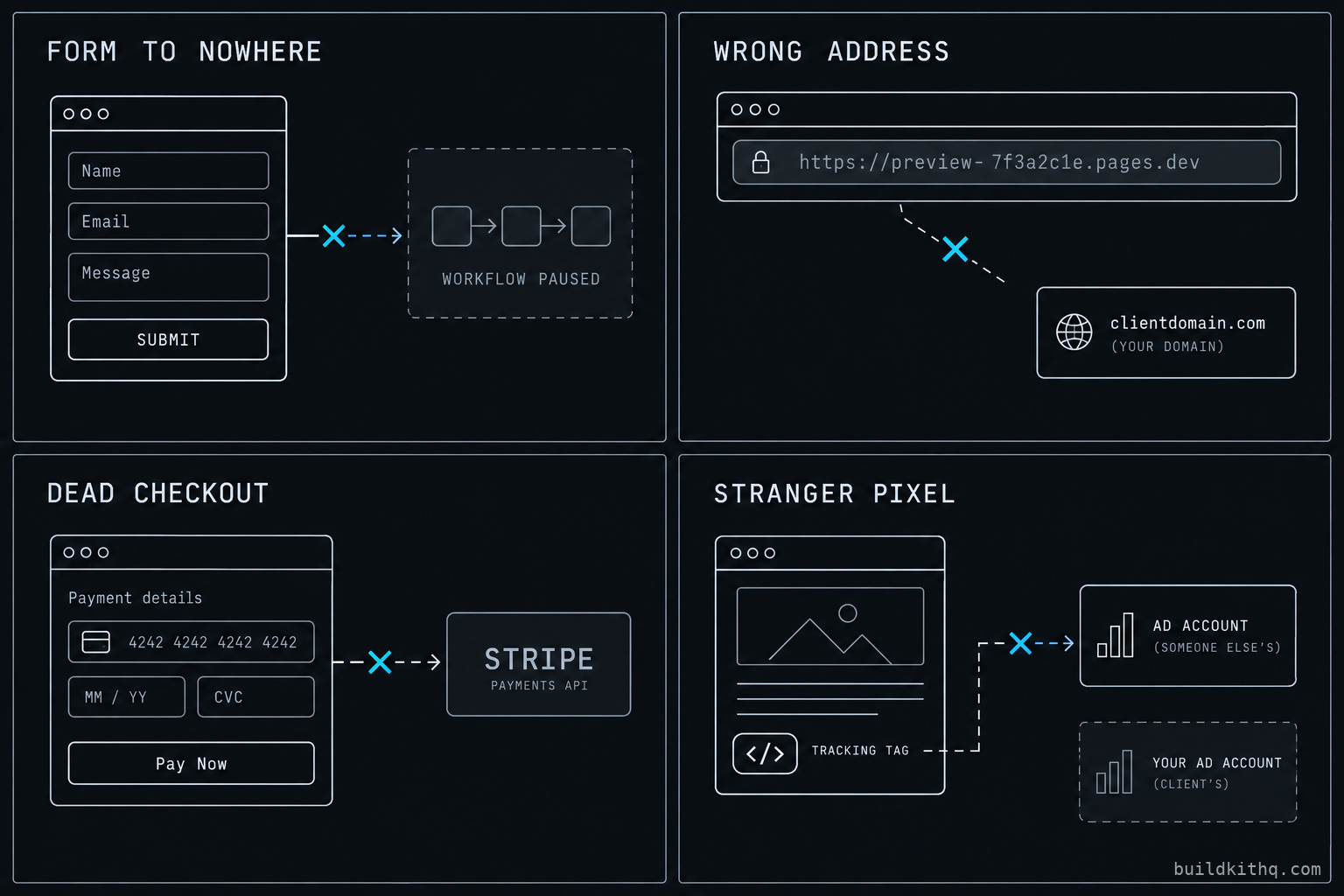
A funnel imports clean and goes quiet at the connections. The connections are always the same four, and each one shows up to the client as a different flavour of the same complaint: I paid for traffic and got nothing back. Here is what the client sees, what is actually wrong underneath, and the fix.
One: the form submits into nothing
What the client sees is a form that submits without an error and a confirmation message that appears, and then silence. No text back to the lead, no notification to the front desk, no nurture, and as far as the studio can tell, no lead at all. What is actually wrong is subtler than a dead form, which is why it fools people. A funnel form creates the contact record natively, so the person usually does exist in the account. What went missing is everything the workflow was meant to do the instant that form was submitted.
That workflow runs on a Form Submitted trigger, and the trigger is filtered to a specific form. HighLevel’s Form Submitted trigger matches on the form you name in the filter. Two things break that match across an import. The workflow can arrive paused, because a good kit ships some workflows off so they do not fire on test data during setup, and a paused workflow looks identical to a live one until a lead crosses it. Or the trigger’s form filter can end up pointing at a form that no longer carries the ID it expects, so the trigger matches nothing and stays quiet. Either way the contact lands and nobody is told, which to a client is the same as no lead. The fix is to open every workflow the funnel is meant to start, confirm each Form Submitted trigger names the form that is actually on the page, set the workflow live, and submit the form yourself while you watch the workflow log record it.
Two: the funnel serves on the wrong address
What the client sees is their funnel living at a long HighLevel preview URL, something no ad should ever point at, and their own domain showing nothing or an error. What is actually wrong is that the snapshot carried the pages but not the domain connection, because a domain is a set of DNS records aimed at an account, and the snapshot has neither the domain nor the right to those records. Until you connect the client’s domain in the sub-account and set the funnel as its path, the pages have no home but the default URL.
HighLevel’s guide to setting a root domain or subdomain for funnels and websites is the click path, and it is quick once the DNS is right. The part people miss is what happens after the domain is connected. Every hard-coded link inside the funnel, the thank-you redirect, the button that jumps to the offer page, an embedded booking link, was built against the domain the snapshot came from. Reconnect the client’s domain and those links still point at the old address, which is why the “Start my free week” button lands on a page that is not there. The fix is to connect the domain, then walk every button, redirect and link in the funnel and repoint it at the new address, and click each one on the live site to confirm it lands.
Three: the checkout is a shell
What the client sees is a checkout page that looks like a real store, with the founding-member plan priced and a pay button, and an error the moment a card is entered, or a “success” that never shows up as money. What is actually wrong is named directly in HighLevel’s snapshot documentation: Stripe connections do not transfer. The checkout step imports with its products and its prices intact, because those are content, but the payment account that would actually charge a card is a connection, and it stayed in the account the kit was built in.
There is a second trap on top of the dead payment account, and it is a reporting one. HighLevel draws a line between the Order Form Submission and Order Submitted triggers: one fires when the order form is submitted whether or not a payment cleared, and the other fires only on a real transaction. A kit wires the fulfilment workflow, the receipt, the onboarding, the access grant, to the trigger that means money actually moved. With no payment account connected, that trigger never fires even in a test, so the funnel looks doubly dead. The fix is to connect this client’s Stripe in the sub-account, confirm the products and prices carried across correctly, and run a real low-value test charge through to watch both the payment and the order workflow complete. Reconnecting a payment provider is a third-party integration, so on our kits it sits outside the free installation hours and is quoted as work or handed to a VA, rather than pretended to be part of the import.
Four: the tracking reports to a stranger
What the client sees is, at first, nothing wrong at all, which is what makes this the most expensive of the four. The pages load, the form works, the checkout takes money. Then the ad platform reports zero conversions on a campaign that is plainly converting, and the client cannot understand why the numbers on the funnel and the numbers in the ad account disagree. What is actually wrong is that the tracking code embedded in the funnel, a pixel, a conversion tag, a snippet in the page head, imported carrying the IDs from the account the snapshot was built in. Every conversion the client pays to generate is reporting into somebody else’s ad account, and the client is optimising a live campaign against data that will never reach them.
Tracking code is an integration in the sense HighLevel means, and integrations do not transfer as connections, but a hard-coded ID pasted into a page head is content, so it makes the trip and points at the wrong place. That is the worst combination: the mechanism travels, the destination is wrong, and nothing errors. The fix is to open the funnel and page-level settings, find every tracking snippet and custom head code, and replace each ID with this client’s own, then fire a test conversion and confirm it lands in the client’s ad account and not a ghost’s. This is the one an agency most often ships without noticing, because a funnel with a stranger’s pixel behaves perfectly for the visitor and quietly robs the client’s reporting.
The numbers: what a dead funnel costs the ad budget
Every one of these funnels rides on a GoHighLevel account, and that account is a flat cost no matter how many client funnels you stack onto it. On the pricing HighLevel publishes, which we re-checked in September 2026, the Unlimited plan is $297 a month or $2,970 a year and Agency Pro is $497 a month or $4,970 a year, each with a free trial. Those figures were confirmed against HighLevel’s published pricing through search this run rather than fetched directly, so treat them as read off the pricing page, not quoted from an invoice. That platform bill does not move whether you run four client accounts or forty, which is the entire reason an agency loads account after account onto one plan.
The kit is the other number, and it is a one-time one. The gym and fitness kit is $1,195, and the catalogue runs from $875 up, each price listed in full on the pricing page before you buy. But the number that actually stings on a dead funnel is neither of those. It is the ad spend a broken capture path burns while looking fine.
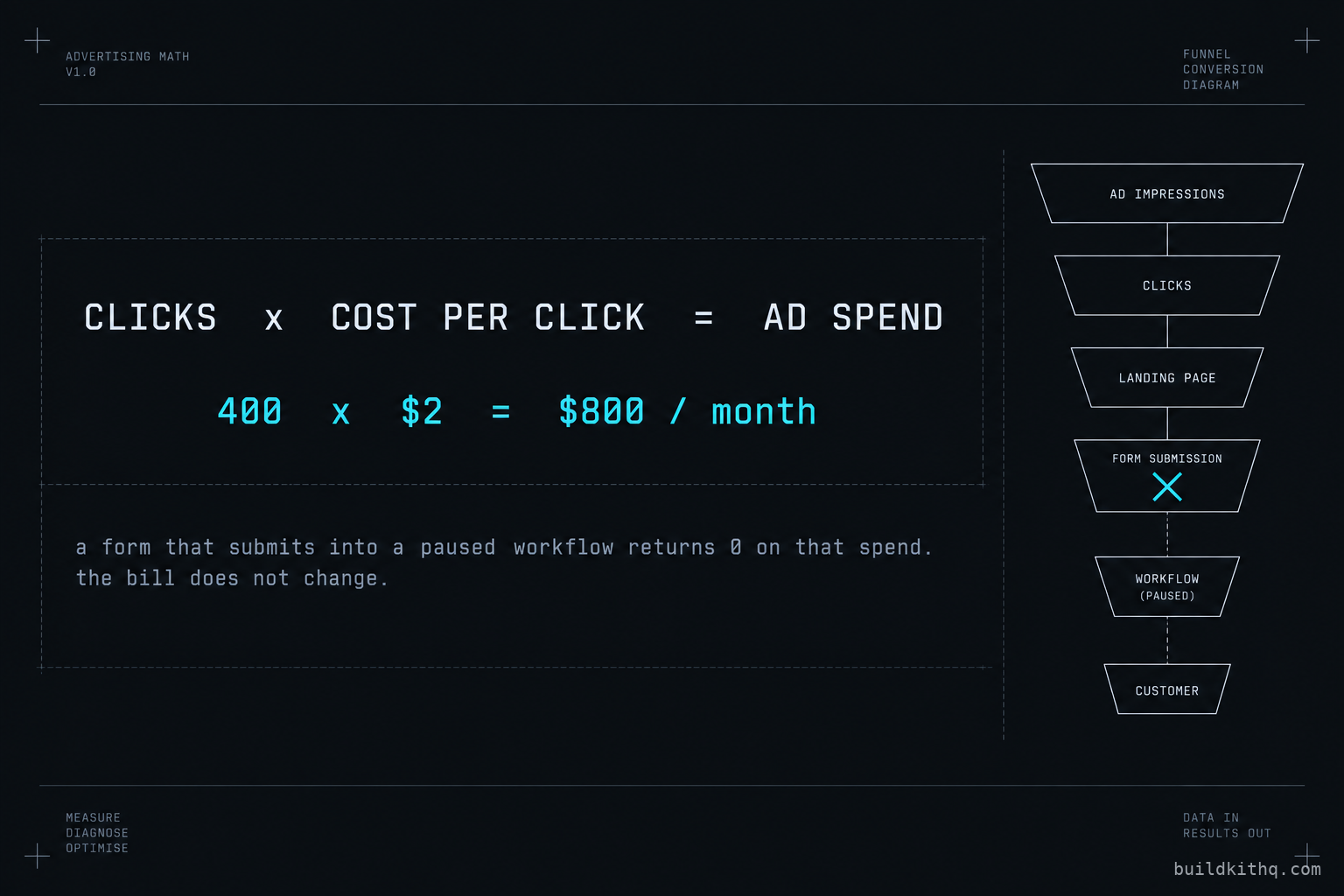
Put your own figures against it, because the point is the method, not our example. Call the clicks a campaign buys in a month C, and the cost of each click K, so the campaign spends C times K to fill the top of the funnel. Now suppose the form submits into a paused workflow, so the contacts land but nobody is ever told, and the studio never works a single lead. The spend is not reduced by the breakage. It is the same C times K, and the return on it is zero. A studio driving 400 clicks a month at a 2 dollar click is spending 800 dollars to fill a funnel that captures people into a silence, and the loss is not the 800 dollars alone, it is the 800 plus every membership those leads would have become. On the mortgage side the arithmetic is worse, because a single closed loan dwarfs a month of clicks, so one enquiry that submitted into nothing can cost more than the entire ad budget that produced it.
The kit is built to two targets the client states, and that we only ever write as targets, never as measured results: a 70 percent no-show recovery target, and five to ten reviews a month once the review automation is live. Both depend entirely on the capture path working end to end. A no-show recovery sequence recovers nothing from a lead who never entered the funnel because the form fired into a paused workflow, and a review request produces nothing from a member who never bought because the checkout was a shell. The targets are real, and they are worth exactly zero until the four connections above are made.
The reconnect pass that makes a funnel live
None of this is hard. It is a fixed pass you run once per resale, before the client ever sees the link, and it is the difference between a funnel that renders and one that captures. Run it in the same order every time and it takes minutes, not the afternoon rebuilding the pages would cost.
Connect the domain first, because everything else you test needs a real address to test on. Point the client’s domain at the account, set the funnel as its path, then walk every button, redirect and embedded link in the funnel and repoint each at the new domain, clicking each one on the live site. Next, set every workflow the funnel starts to live and confirm each Form Submitted trigger names the form that is actually on the page. Then reconnect the payment account and run a real low-value test charge through the checkout, watching both the payment and the order workflow complete. Last, replace every tracking ID and head snippet with this client’s own, and fire a test conversion to confirm it reports into the client’s ad account. Then do the thing that catches what a settings review misses: open the funnel on the live domain, submit the form as a stranger would, pay as a stranger would, and read every message that comes back on the channel it comes back on.
Four connections, one order, every account. It is the same discipline as the wider snapshot QA pass before a client handoff, narrowed to the one object a client points ad money at on day one. If you would rather not run it by hand on every account, reconnecting the form-to-workflow bindings is exactly what workflow automation covers, and standing an account up from a fresh import, domain, email and the automations included, is GoHighLevel setup. The pass is the same whether the funnel is a studio’s free-week opt-in, a broker’s rate enquiry, or a coach’s masterclass registration.
The objections worth answering
I will just rebuild the funnel per client from scratch. You can, and for the pages alone it is an afternoon you could spend. But the pages are the cheap part. The value is the funnel logic, the form asking the right questions for the trade, the workflow wired to catch the submit, the checkout steps and the copy written for the industry rather than filled with placeholder. Rebuild that per client and you are redoing the work the kit already did, under time pressure, on a live account. The reconnect pass above is the part that is genuinely per client. The build is the part worth buying once and reusing across every client in that trade.
If the form creates the contact anyway, does the broken workflow really matter? It matters more than the contact does. A contact record nobody is told about is a lead you paid to generate and then ignored. The workflow is what texts the lead back while they are still warm, tags them so the reporting is honest, alerts the person whose job is to work them, and starts the nurture that carries the ones who do not book on the first pass. A studio owner does not check the contacts list every hour. They rely on the funnel to reach out the moment someone raises a hand. A form that captures into silence is, in every way that pays, a form that captured nothing.
If I have to reconnect the domain, the payment and the tracking on every client anyway, why buy the kit? This is the fair one, and the honest answer is that the reconnect is real and the kit does not pretend otherwise. The domain, the Stripe account and the tracking IDs are account credentials, and no snapshot on any platform carries account credentials, the same way none of them carry your A2P registration or your sending number. HighLevel names those exclusions itself. What the kit carries is everything above that line: the pages, the funnel logic, the form built to qualify the trade’s leads, the workflow wired to the form, and the checkout steps and messages written for the industry. You buy the kit for the build you skip, not for the reconnect you still owe. The gym and fitness kit draws the line exactly where every kit in the catalogue does, and this guide is the map of what sits on each side of it. If a shop tells you their snapshot funnel arrives with the domain live and the payments taking money, they are describing something a snapshot cannot be, and you should ask whose account those connections were pointing at when it was built.
Quick answers
The snapshot ships the funnel itself: the pages, the steps in order, the form and its fields, the products on the checkout step and the workflow meant to fire on submit. What it cannot carry is the account-level wiring underneath, the connected domain, the Stripe account, the tracking IDs and the live link from the form to the workflow. You import the funnel and reconnect those in the sub-account it lands in.
A funnel form creates the contact natively, so the record usually exists in the account. What goes missing is everything the workflow was supposed to do on submit: the internal notification, the tag, the nurture. That workflow is filtered to a specific form, and after an import it can point at a form that no longer carries that ID, or it imported paused. Repoint the Form Submitted trigger and publish the workflow live.
A snapshot carries the funnel pages but not the domain connection, because a domain belongs to the account and the DNS records point at it, not at the file. Until you connect the client's domain and set the funnel as its path, the pages serve on the default HighLevel URL. Connect the domain in the sub-account, then repoint every in-funnel link and redirect at the new address.
No. HighLevel's own documentation lists Stripe connections among the things a snapshot does not include, so the checkout step imports with its products and prices but no payment account behind it. A real card either errors or charges nothing until you connect this client's Stripe in the sub-account. Reconnecting a payment provider is a third-party integration, so on our kits it is quoted separately rather than covered by the free installation hours.
Rebuilding the pages is an afternoon you can spend, but the pages are the cheap part. The value is the funnel logic, the form wired to the workflow, the checkout steps and the copy written for the trade. The reconnect, domain, payment and tracking, is genuinely per client and it is true of any snapshot on any platform, because no file carries an account's credentials.
Keep reading
What a finished GoHighLevel account does with a lead
A lead moves through five stages in a finished GoHighLevel account. Here is what each stage is wired to, and the handoffs where a half-built one drops it.
Read itThe AI receptionist in your kit answers, but never books
An imported kit's AI receptionist replies around the clock and books no one. Here is the booking path underneath, the four places it breaks, and the fix.
Read itThe four ways to catch a lead your client's phone missed
A missed call is a lost client. Compare the GoHighLevel AI Receptionist, a human VA, missed-call text-back and voicemail on the eight things that matter.
Read it