You pushed a snapshot update and the client account broke
You improved your master snapshot, pushed it to a live client account, and something broke. Here is what a snapshot load overwrites, and how to push one safely.
Tuesday, 9am. You spent the weekend improving your master dental snapshot. The nurture reads better, the no-show recovery got tighter, you fixed a tag that was firing a day late. Good work, and your live clients should have it. So you open the first client’s sub-account, click through to load the snapshot, and push.
By 11am the client calls. Every new lead who fills in the form is getting two welcome texts, forty seconds apart, word for word the same. The booking link in their confirmation email points at a calendar they have never seen. A pipeline stage they added themselves last month, the one their front desk actually uses, is gone.
Nothing in the account is on fire. Contacts are intact, conversations are intact, the money is intact. But the client is watching their leads get double-texted in real time, and you are the one who did it, on purpose, an hour ago. This is the push that goes wrong, and it goes wrong the same way every time once you see what a snapshot load is actually doing underneath the button.
Loading into a new account is not loading into a live one
The word “snapshot” makes people picture a clean restore. You have a saved copy of a good account, you drop it onto a client, the client now has the good account. That is close to true the very first time, when the sub-account is empty. It stops being true the moment the account has a history.
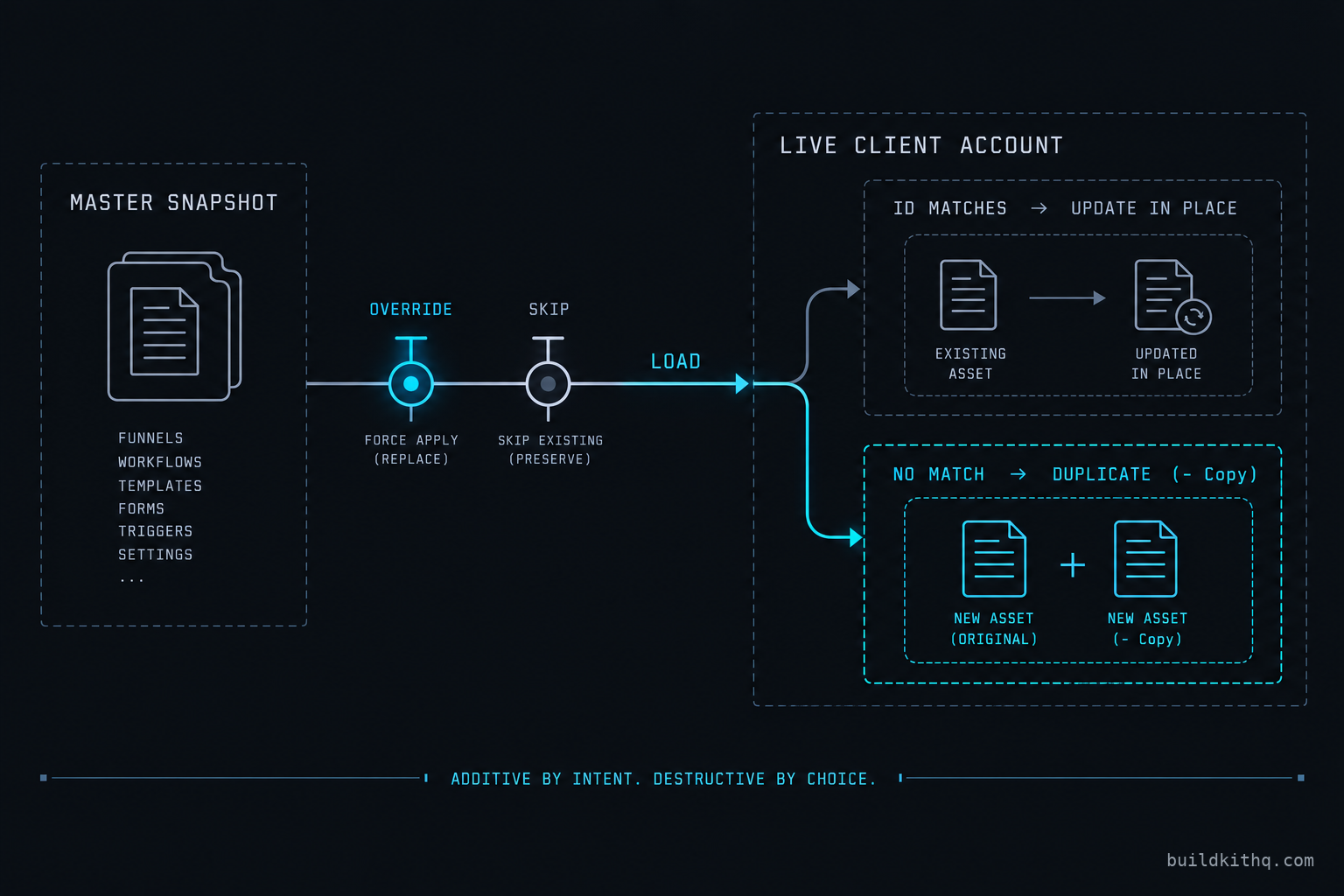
Loading a snapshot into an existing sub-account is a different operation from spinning up a new one. HighLevel’s own help article is plain about the intent: loading into a live account is meant to add selected assets while preserving the client’s existing data. It is additive by design. The trouble is that “add these assets” has to answer a question every single time: what happens when an asset in the snapshot looks like one that is already here?
That question is the whole story, and the account answers it with a conflict screen.
How the account decides an asset is the same one
Here is the part that catches everyone. GoHighLevel does not match a snapshot workflow to an existing workflow by name. It matches by an internal id that rides along inside the asset. When an account received a workflow from this snapshot before, that workflow carries the id, and a new push recognises it: same id, same asset, update it in place. That is the path you want, and when it works, a push feels safe.
When the id does not match, the account has no way to know your new “Welcome sequence” is a better version of the client’s existing “Welcome sequence.” The names are identical and it does not care. It treats your incoming asset as something brand new, and it adds it beside the old one. You now have the old welcome sequence and the new welcome sequence, both live, both listening to the same trigger. The snapshot basics article describes the mechanism in the same terms: a snapshot is a package of assets, and loading reconciles that package against whatever is already there.
So the real variable is not your snapshot. It is the account’s history. An account that has only ever been touched by this snapshot will update cleanly. An account that was built by hand, or loaded from a different snapshot, or edited by the client, has assets with no matching id, and those are the ones that duplicate.
The three answers on the conflict screen
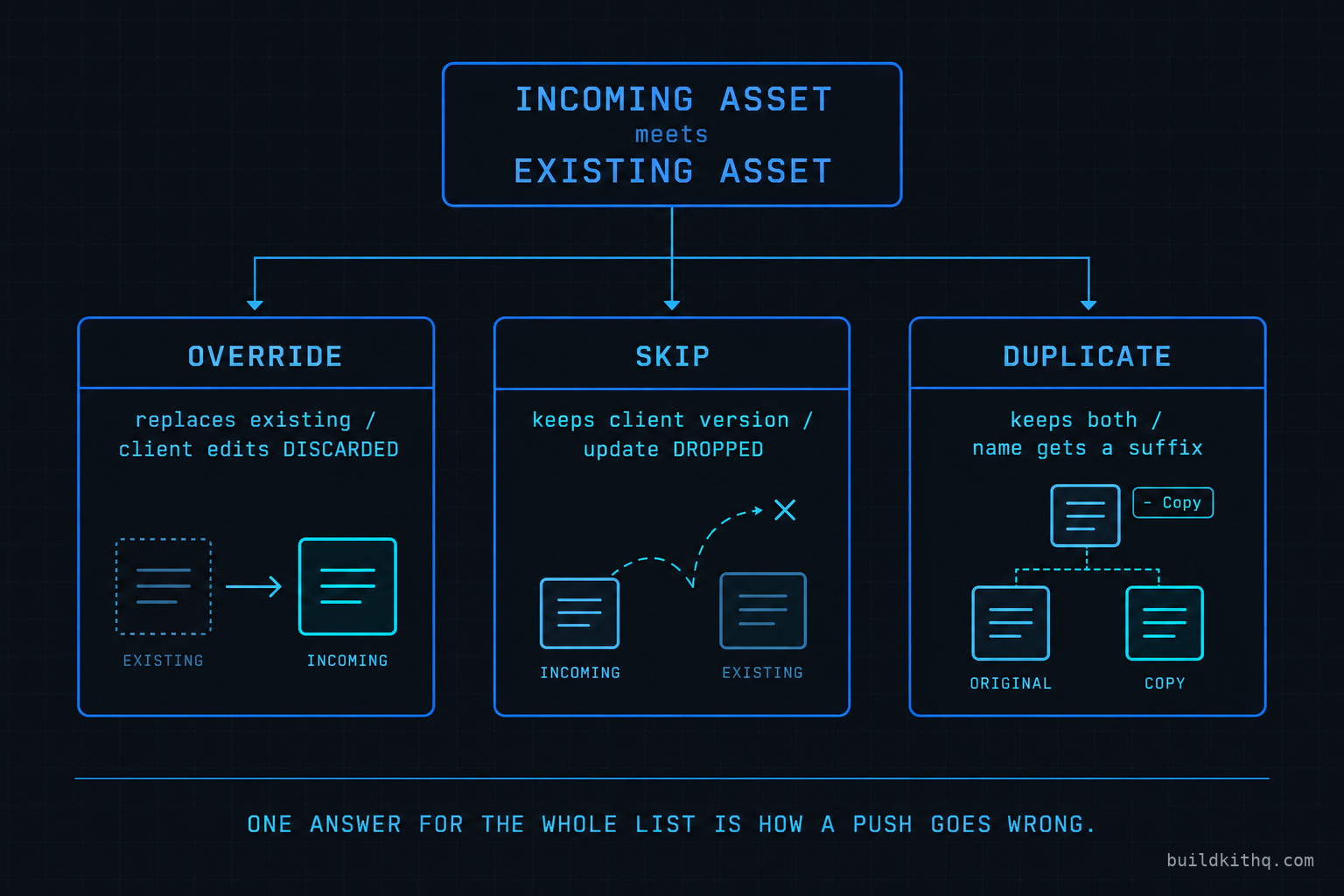
When the load does find a clash, it stops and asks. For each conflicting asset you get three answers, and they do exactly what they say.
Override replaces the existing asset with the one from the snapshot. The old version is gone, including anything the client changed about it. Skip keeps the existing asset and ignores the incoming one, so your improvement does not land on that asset at all. For some asset types a third answer appears, a duplicate, which keeps both and marks the new arrival with a suffix so you can tell them apart.
None of these is wrong on its own. The damage is in picking one answer for the whole list. Agencies in a hurry reach for the bulk path, and the bulk “Link and Load” flow leans toward Override so the push finishes in one click. One click is also how you replace an asset the client spent a week tuning.
The brand layer is a stack of custom values
The last piece of mechanism is the one that produces the angriest phone call. A good snapshot does not hardcode the client’s booking link, business phone, address or sender name into every email. It puts them in custom values, and the emails and workflows reference the custom value. That is correct build practice, and it is what lets one snapshot serve many clients.
But custom values are assets too, and they sit on the same conflict screen. Your master snapshot carries a custom value called “Booking URL” with a placeholder in it, because the master is nobody’s real account. The client’s copy of “Booking URL” holds their real calendar link. Override that custom value and you have just pointed every confirmation email in the account at a placeholder, or worse, at your own demo calendar. The workflows did not break. They are doing exactly what they are told, which is to send people to whatever “Booking URL” now says.
The four ways the push goes wrong
Every broken push is a version of one of these. Each one has a thing you see, a thing that is actually wrong, and a fix.
You see the client getting double messages
The symptom is the loudest one. A lead comes in and gets the same text or email twice, a short gap apart. The client thinks the account has gone haywire.
What is actually wrong is a duplicate. The incoming automation did not match an id, so the load added it beside the old one and gave it a suffix like “Copy” or a version tag. Both are published, both watch the same trigger, both run. Nothing is malfunctioning. There are simply two of them now.
The fix is to find the copies and remove one side cleanly. Sort the workflow list by name and the pairs sit next to each other, the suffix giving them away. Decide which version is correct, the old one or the one you just pushed, unpublish the loser before you delete it so you can confirm the sends stop, then delete it. Do the same sweep in email templates and forms, because the same duplication happened there and it is quieter. If you plan to push to this account again, the surviving asset needs to be the one that now carries the snapshot’s id, or the next push duplicates all over again.
The order you clean in matters too. Unpublish before you delete, every time, because a deleted automation that was mid-send can leave a contact stuck between steps, and you want the sends to stop first and the record to go second. Work one asset type at a time rather than jumping between workflows and forms, so you can see the whole list of pairs before you touch any of them. And before you start deleting, check whether the client was actually enrolled in the copy or the original, because the version that is holding live contacts is the one you keep, regardless of which one you pushed this morning. A duplicate you delete without checking enrolment is how a lead goes silent halfway through a sequence.
You see leads routed to the wrong calendar
The client says their new enquiries are booking into a calendar nobody at their office owns, or the confirmation link is dead. You check the workflow and it looks perfect.
What is wrong is an overwritten custom value. On the conflict screen, the brand-layer values got Override along with everything else, so the client’s real booking link was replaced by the master snapshot’s placeholder. The automations are faithfully sending people to a value that no longer points anywhere useful.
The fix is to restore the custom values the client owns and then never touch them again on a push. Open the sub-account’s custom values, find the handful that hold real client specifics, the booking URL, the business phone, the sender name, the address, and set them back to the client’s true values. Then write those values down somewhere outside the account. On the next push, these are the assets you Skip without thinking. The client’s brand layer is theirs, not the snapshot’s, and a master snapshot should only ever carry placeholders in those slots.
You see a client customisation vanish
This one is slower to surface because only the client notices. A pipeline stage they added, a workflow step they asked you for, a form field their intake depends on, is simply not there after the push. The front desk works around it for a day before anyone mentions it.
What is wrong is an Override on an asset the client had edited. The incoming version from the snapshot does not contain the client’s change, because the master snapshot never had it, so replacing the asset wholesale erased the edit. There is no merge. Override is all or nothing at the asset level.
The fix going forward is Skip on anything the client has touched, and the discipline to know what that is. Before a push, the assets that carry client-specific edits should be a known list, not a surprise. Rebuild the lost customisation by hand, because it is gone from the account and it was never in the snapshot to restore. Then record it as a Skip for next time. This is the failure that argues hardest for keeping a written note of which assets in each client account have drifted from the master.
You see new automations firing on empty
The subtlest one. A workflow you pushed is running, but it sends with a blank where a name or an appointment time should be, or it stalls at a step that references something that is not there.
What is wrong is a partial load. You selected the new workflows to push but not the custom fields or custom values they lean on, so the automation arrived and its dependencies did not. The workflow references a field the account does not have, and a reference to nothing renders as nothing.
The fix is to load the dependency layer, not just the headline assets. When you push a set of automations, push the custom fields, custom values and tags they read from in the same load. If you are deliberately pushing a slice, walk the slice first and list what it reads, then include those. A snapshot is a web of references, and a half-loaded web has holes exactly where the new work was supposed to go.
What a bad push actually costs
The push itself is free. The account around it is not, and the cleanup is where the real money sits.
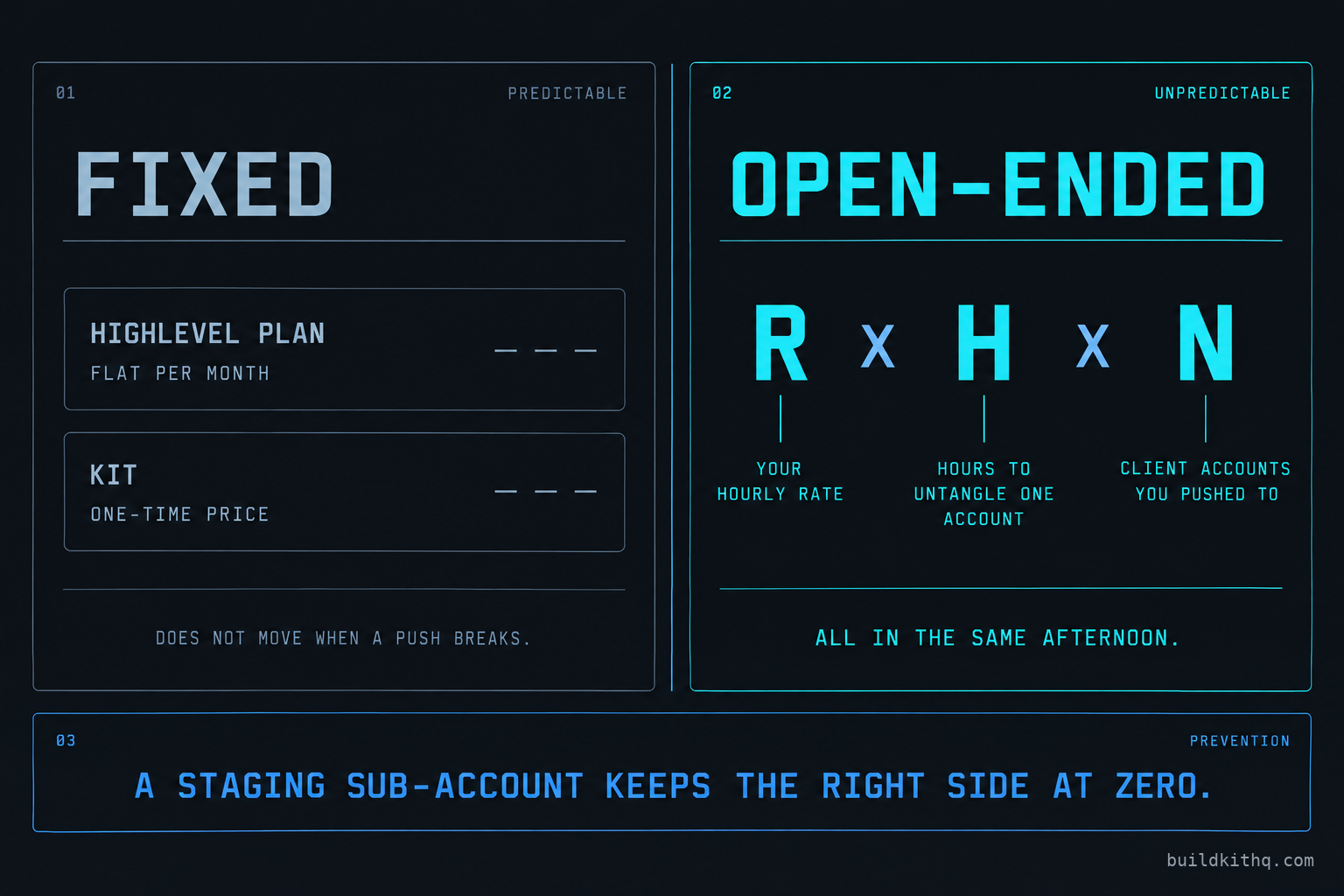
Start with the platform, because it is the only fixed number here. You load snapshots from an agency account, and the plan is flat regardless of how often you push. HighLevel’s published pricing, read on 16 October 2026, is Starter at $97 a month or $970 a year, Unlimited at $297 a month or $2,970 a year, and Agency Pro at $497 a month or $4,970 a year, each with a 14 day trial. Starter caps you at a handful of sub-accounts, so an agency pushing to a book of clients is on Unlimited or Agency Pro. That fee does not move when a push goes wrong. The cost that moves is your time.
Put your own number on it. If you bill your time at R dollars an hour, and untangling one broken account takes H hours, the bill for a single account is R times H. Clearing duplicate automations, restoring overwritten custom values and rebuilding a wiped customisation is rarely a ten minute job once you include finding every copy and confirming the sends stopped. Now multiply by the part that hurts: you did not push to one client, you pushed to the whole book. If the same bad Override hit N accounts, the cost is R times H times N, and it all lands in the same afternoon, because you ran the same push on all of them.
Set that against the thing you were protecting. A kit from this catalogue is a one-time price. The dental practice kit runs $1,595 today, paid once, and the account it builds is meant to be pushed to and improved over time. The arithmetic only turns bad when a careless push converts a one-time asset into a recurring cleanup. The fix is not to stop pushing. It is to make the push boring, so that R times H times N stays at zero. A staging sub-account you test every push in first, before it touches a live book, is the cheapest insurance in this whole model, and it costs nothing but the ten minutes it takes to watch the conflict list scroll by.
Every number a client’s account can earn still depends on the build doing what it was designed to do. A kit is built to a 70 percent no-show recovery target and a typical 5 to 10 reviews a month, and both of those are design targets the automations have to actually run to approach. A duplicated or half-loaded push is how a sound build quietly stops reaching them.
The objections worth answering
“Fine, I just will not push updates to live clients, then.” Tempting, and wrong. The entire reason to run a master snapshot is that one improvement reaches every client. Freeze the accounts and you are back to editing each one by hand, which is slower and drifts worse. The answer is not to stop pushing, it is to push with the conflict list open and a Skip discipline for the brand layer and anything the client edited. A controlled push is a feature. A blanket Override is the thing to stop doing.
“Doesn’t this prove a kit is riskier than building each client by hand?” It is the fair objection, so here is the straight answer. Hand building avoids the duplicate-on-push problem because there is no master to push from, but you pay for that every single time with full build hours per client and no shared improvement path. A kit trades that for a different task, which is learning to load and update it cleanly. The load mechanics are identical whether the snapshot is ours or one you built, so this is not a reason to avoid kits, it is a reason to get good at the push. If anything, a well-named kit with its custom values documented, like the ones in our catalogue, is easier to push safely than a snapshot you threw together, because you can see exactly which values are the brand layer to Skip.
“Can’t I just test on a staging sub-account and be done worrying?” You should, and it catches most of this, but know its one limit. A staging account only shows you the conflicts that staging account has. A real client account has its own edit history, so its conflict list will differ. Staging tells you the push is structurally sound and the dependencies are complete. It does not tell you which custom values a specific client changed last Tuesday. That part still needs the per-client note. Use staging to prove the load, use the note to protect the client.
“My client’s data was preserved, so what is the fuss?” Preserved data is the floor, not the finish. Contacts and conversations surviving is table stakes, and loading is built to keep them. The breakage sits one layer up, in the automations, the custom values and the client’s own edits, and that layer is exactly what a client judges you on. “We kept all your contacts” is not much comfort to a front desk watching every new lead get texted twice. The win is a push nobody notices, because the only thing that changed is the part you meant to change.
If you would rather not own the master snapshot and its push discipline at all, that is a real option too, and it is custom snapshot development: we hold the master, you get the improvements. Either way, the rule is the same. A snapshot load is additive by intent and destructive by choice, and the choice is yours on every conflict. Read the list before you confirm it. The questions people ask most about safe pushes are answered below, and the full pre-handoff pass lives in our snapshot QA checklist.
Quick answers
Loading is built to add selected assets, not wipe the account, so contacts, conversations and opportunities stay put. The damage comes from the conflict choices you make on the way in. Pick Override on an asset the client edited and you replace their version with the snapshot's. The data loss is per asset, and it is a choice, not a default.
GoHighLevel matches a snapshot asset to an existing one by an internal id, not by name. If the client account never carried that asset from this snapshot, there is no id to match, so the load adds a fresh copy beside the old one and appends a suffix to the name. Two of the same automation now fire on the same trigger.
Yes, but not with a blanket Override. Review the conflict list, Skip the assets the client changed, Override only the ones you own end to end, and never Override the custom values that hold the client's own booking link and phone number. Test the push on a spare sub-account first so you see the conflict list before it is live.
No. A kit is a snapshot, and a snapshot loads the same way whether it is yours or ours. The break is in the load choices and the account's history, not the build. A well-named kit with its custom values documented is easier to push safely, but the conflict screen still asks you to decide Override or Skip on every clash.
You load snapshots from an agency account on HighLevel Unlimited or Agency Pro, since those carry the sub-accounts you push into. Starter caps you at a handful of sub-accounts. The load feature itself is not a paid add-on, it is the cost of the account around it, which is a flat monthly fee no matter how many times you push.
Keep reading
What a finished GoHighLevel account does with a lead
A lead moves through five stages in a finished GoHighLevel account. Here is what each stage is wired to, and the handoffs where a half-built one drops it.
Read itThe AI receptionist in your kit answers, but never books
An imported kit's AI receptionist replies around the clock and books no one. Here is the booking path underneath, the four places it breaks, and the fix.
Read itThe four ways to catch a lead your client's phone missed
A missed call is a lost client. Compare the GoHighLevel AI Receptionist, a human VA, missed-call text-back and voicemail on the eight things that matter.
Read it