The pipeline your kit ships, and where it quietly breaks
An imported kit ships a pipeline already wired to your automations. Here is how it is built, the four ways it rots when you resell it, and how to keep it honest.
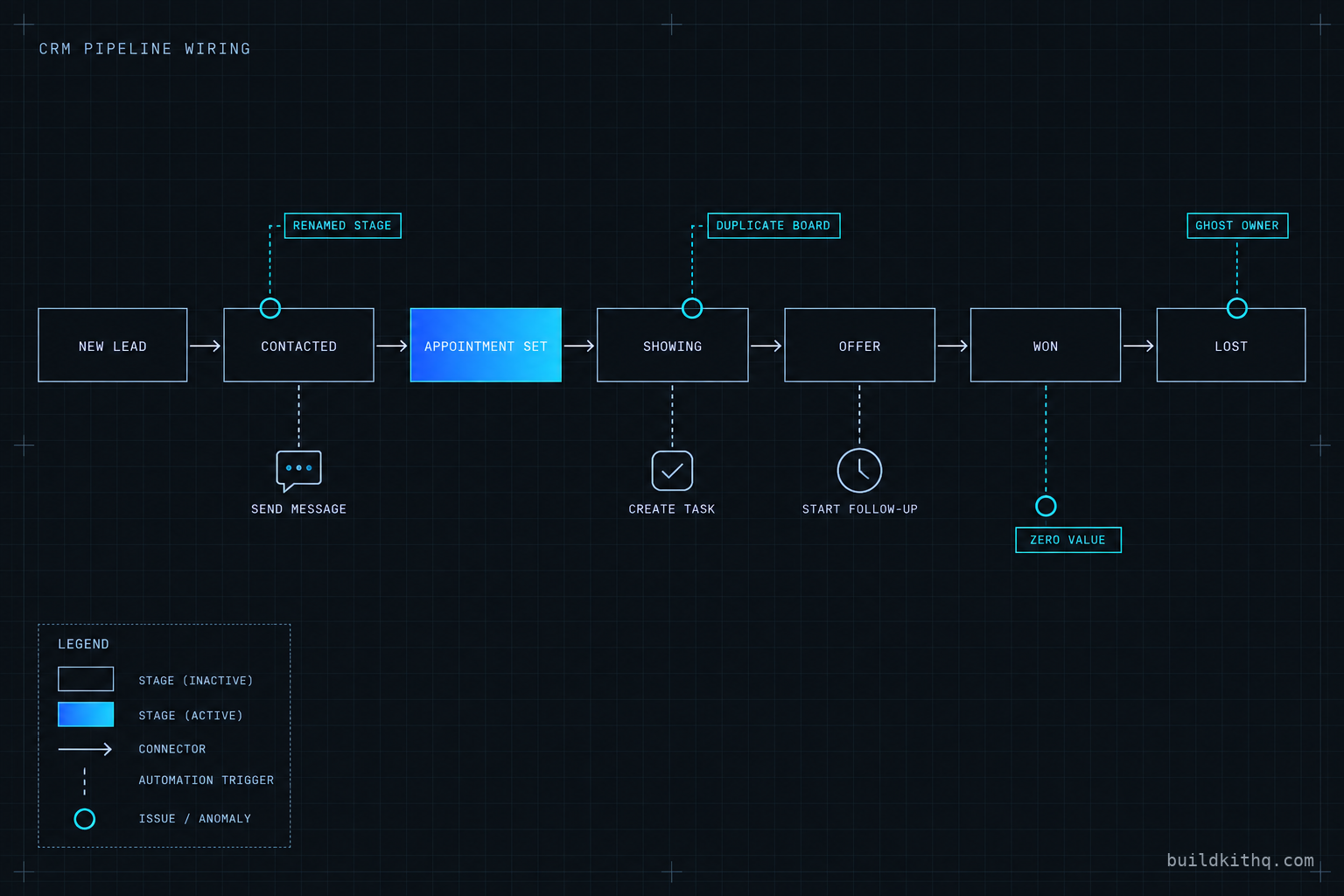
On a Friday you import the real estate team kit into a fresh sub-account. The board is right there when you open Opportunities: New lead, Contacted, Appointment set, Showing, Offer, Won, Lost. It looks finished. You send the client their login and close the laptop.
Tuesday the client calls. Three deals are sitting in Won and not one of them got the review request the kit is supposed to fire on a close. The pipeline dashboard reads zero dollars for the month, even though two of those closes were real listings. And the agent who was meant to get a task the moment a lead hit Appointment set never got one, so a serious buyer sat untouched for four days.
Nothing is broken, exactly. The board imported. The stages imported. The workflows imported. What did not survive the import is every thread that tied the board to the work: the stage a trigger was watching for, the dollar value the dashboard reads, the user a task gets handed to. A pipeline is not the row of boxes on the screen. It is what happens when an opportunity moves between them, and that part is wired to the account it lands in, not to the snapshot.
This is the reference for that wiring. What the pipeline actually is inside GoHighLevel, how a kit ties it to everything else, the four ways it rots the moment you resell it, and the short pass that keeps it honest before a client is the one who finds the gap.
What a pipeline actually is in GoHighLevel
An opportunity in GoHighLevel is a deal in progress: one contact, on one board, sitting at one stage, carrying a dollar value and an owner. A pipeline is the board those opportunities move across, and a stage is a column on it. You reach all of it from Opportunities in the sub-account sidebar, and you build a board under Opportunities then Pipelines, naming each stage in the order a deal travels through it. HighLevel’s own walkthrough covers the click path for creating a pipeline and its stages.
That much is cosmetic. Any agency owner can drag seven columns onto a screen in ten minutes. The board is not the product.
What makes a pipeline worth shipping is everything hanging off it. Each stage is a name that a workflow can watch. Each opportunity carries a value the dashboard sums. Each move from one column to the next is an event that can fire a trigger. A kit built for a trade wires all of that in advance: the estimate-sent stage is where the follow-up sequence starts, the Won stage is where the review request and the onboarding hand-off begin, the Lost stage is where the long nurture picks the contact back up months later. The board is a map, and the automations are the roads. Import a kit and you get both drawn. The trouble is that some of the roads were drawn against a different account.
How the kit wires the board to everything else
Three connections carry the weight, and every one of them is a place a kit either saves you a weekend or quietly hands you a Tuesday phone call.
The stage-change trigger
The engine of a wired pipeline is a single workflow trigger: Pipeline Stage Changed. You give it a pipeline and a stage, and it fires the moment an opportunity lands in that stage. That is how a kit turns a salesperson dragging a card into a text going out, a task appearing, and a timer starting. HighLevel documents the Pipeline Stage Changed trigger and the filters it takes.
Two filter choices decide whether the whole thing behaves. The first is which stage the trigger watches, and it watches by name, not by position. The second is whether it fires the first time an opportunity enters the stage or every time. A review request wants first time only, or a deal nudged out of Won and back in sends the client a second review link. A stalled-deal alert might want every time. A kit ships those choices already made for the trade. It cannot ship the guarantee that you will not rename the stage they point at.
A stage name also lives in more than one place, which is why a single rename can break a workflow twice. The Pipeline Stage Changed trigger is one reference. An if-and-else condition partway through a longer workflow is another: the kind that checks whether an opportunity is still in Estimate sent before it sends the third follow-up, or splits a nurture depending on whether the deal reached Showing. Rename the stage and both go stale, and the second one is the one you miss, because the workflow still starts. It just branches the wrong way halfway down and sends nothing, or sends the wrong thing, with no error to catch your eye. GoHighLevel exposes the underlying pipeline, stage and opportunity IDs precisely because names are the fragile handle: wire anything through the API and you match on the ID, which a rename leaves alone, while inside the workflow builder you are matching on the name, which a rename does not.
Opportunity value and the dashboard
The pipeline dashboard is the number an agency owner actually looks at: how much is in the board, how much is in each stage, how much closed this month. It does not count cards. It sums the value field on each opportunity. A kit ships opportunities and stages with a default value that is deliberately zero or blank, because no honest snapshot invents a client’s deal sizes for them. That is the correct default and it is also the reason a brand-new board reports zero while deals close on it.
The fix is one setting the reseller owns: a default lead value, set on the stage or written into the create-opportunity action inside the intake workflow, so every new deal lands carrying a realistic figure the client can refine. Skip it and the dashboard is decoration. Set it and the board starts forecasting.
Owner, source and the round-robin
Every opportunity has an owner, and the owner is who gets the task, the notification and the assigned conversation. A kit’s intake workflow creates the opportunity and assigns it, often through a round-robin so leads spread across a team. The round-robin points at users. Users are the single most account-specific thing in GoHighLevel: they are real people with real logins, and they do not travel in a snapshot. So the assignment logic imports pointing at whoever was in the account the kit was built in, which in a fresh sub-account is nobody.
Source is the quieter cousin of owner. A kit tags each opportunity with where it came from so the dashboard can show which funnel or ad is filling the board. That survives the import fine. Owner does not, and owner is the one that leaves a buyer sitting untouched.
The four ways it rots when you resell it
A kit imports clean. It rots at the seams, and the seams are always the same four. Here is what the client sees, what is actually wrong underneath, and the fix.
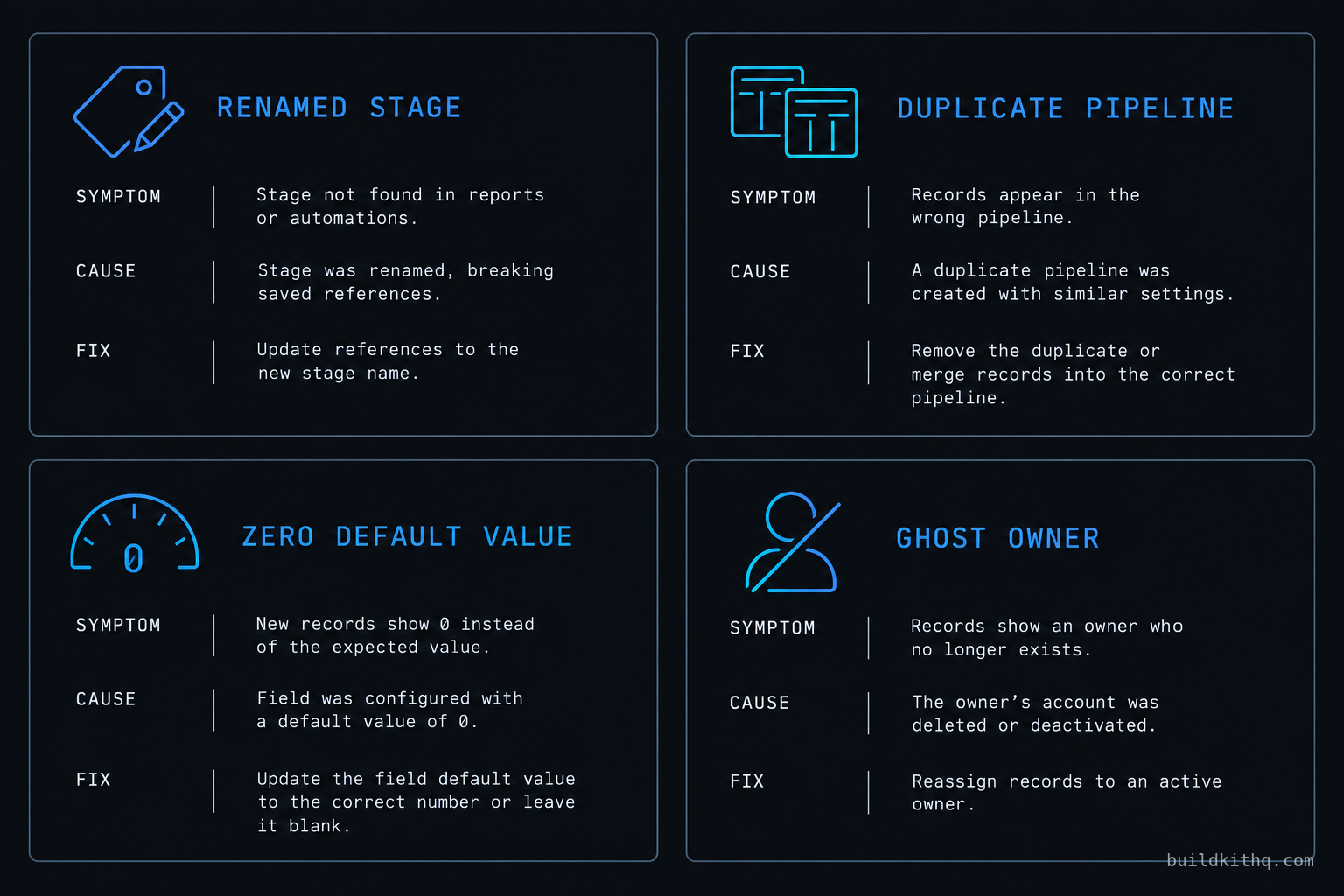
One: the renamed stage orphans a trigger. The client, or you, decides Won should read Closed, or Appointment set should read Booked. You rename the column. The board still looks perfect. But the Pipeline Stage Changed trigger is filtered to the old name, and a filter that points at a stage that no longer exists matches nothing. The review request goes quiet, the onboarding hand-off never starts, and there is no error anywhere because nothing failed. Nothing ran. The fix is to open every workflow that reads the pipeline, repoint each stage filter at the current name, and confirm it with a real opportunity dragged across the board while you watch the workflow log.
Two: the duplicate pipeline splits the board. Import a kit into an account that already has a pipeline, or import it twice, and you get two boards with similar stage names. Opportunities created by the intake workflow land on the one the workflow names, while a salesperson working by hand drags deals across the other. The dashboard sums each separately, so the number is always low and always wrong, and half the automations watch a board that half the deals never touch. The fix is to pick one pipeline as the live one, move or delete the stray, and make sure every create-opportunity action and every stage trigger names the survivor.
Three: the zero default value flattens the dashboard. Covered above as a setting, it belongs here as a failure because of how it presents. The client does not say the value field is blank. The client says the reporting is broken and the kit oversold them. The board is full, deals are closing, and the dashboard reads zero because nothing set a value. The fix is a default lead value on the stage or in the intake action, plus a five-minute pass to backfill value on the deals already sitting in the board so this month’s number is not a lie by omission.
Four: the round-robin points at a ghost. The intake workflow assigns each new opportunity to a user through a round-robin that imported pointing at users from the source account. In the new sub-account those users do not exist, so the assignment either fails silently or lands on the agency owner’s login, and either way the person who was supposed to work the lead never hears about it. Tasks pile up under nobody. The fix is to open the assignment step in the intake workflow, rebuild the round-robin against the real users in this account, and send a test lead through to confirm a human gets the notification.
There is a fifth that is really a sharper version of the first: a stage-change trigger left on every time when it should be first time only. Move a Won deal out and back, reopen a closed case, drag a card the wrong way and correct it, and an every-time trigger fires the close sequence again. The client gets a second review request, or a second welcome text, and now they think the automation is spam. It is a one-checkbox fix and it is worth a look on every trigger the kit ships, because the default that is right for a stalled-deal alert is wrong for anything a contact receives.
The numbers: what the board is worth when it works
Every one of these boards rides on a GoHighLevel account, and that account is a flat cost no matter how many clients you stack onto it. On the pricing HighLevel publishes, and that we re-checked in September 2026, the Unlimited plan is $297 a month or $2,970 a year and Agency Pro is $497 a month or $4,970 a year, each with a 14-day trial. Whether you run four sub-accounts or forty, that platform bill does not move, which is the entire reason an agency loads client after client onto one account. Those figures were confirmed against HighLevel’s published pricing via search this run rather than fetched directly, so treat them as read from the pricing page, not quoted from an invoice.
The kit is the other number, and it is a one-time one. The real estate team kit is $1,795, and the catalogue runs from $875 up, each price listed in full on the pricing page before you buy. Set that against the platform bill it rides on and the board it saves you building, and the arithmetic is a reseller’s, not a consumer’s.
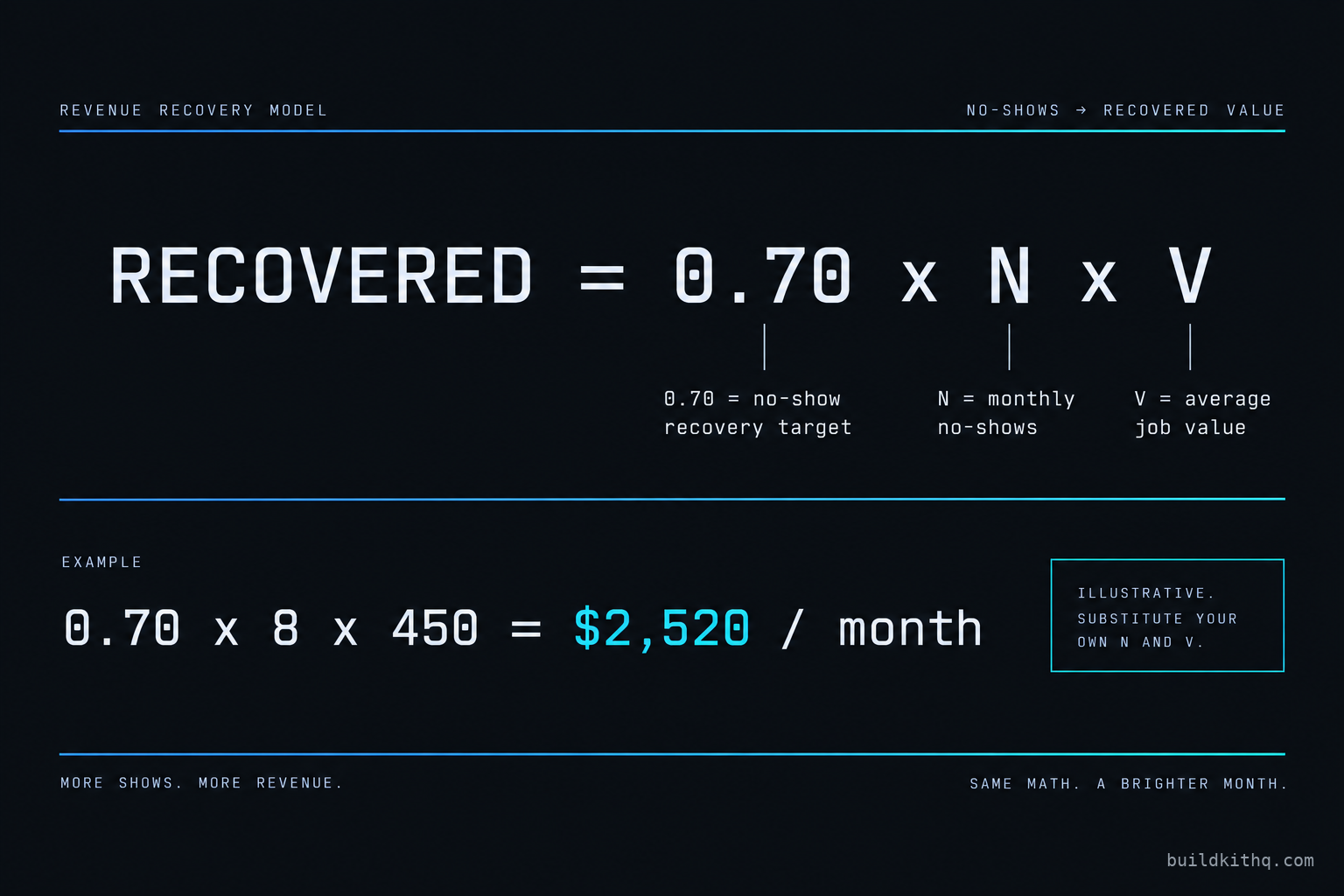
The kit is built to two targets the client states, and that we only ever write as targets, never as measured results: a 70 percent no-show recovery target, and five to ten reviews a month once the review automation is live. Both of those depend entirely on the pipeline firing. A no-show recovery sequence that never triggers because someone renamed a stage recovers zero percent, not seventy, and a review request that fires on a dead stage filter produces zero reviews, not five.
Put your own figures against it, because the point is the method, not our example. Call the appointments an account loses to no-shows each month N, and your average job value V. If the no-show recovery sequence hits its 70 percent design target, the revenue it puts back is 0.70 times N times V. An account losing eight bookings a month at a 450 dollar average job value is 0.70 times 8 times 450, which is 2,520 dollars a month the board is quietly defending, on an account whose platform share is a slice of one flat 297 dollar bill. Swap in your own N and V and the shape holds. Then notice that all of it collapses to nothing the moment a stage-change trigger is watching a stage name that no longer exists, which is exactly why the wiring is worth more attention than the board.
The maintenance pass that keeps it honest
None of this is hard. It is a fixed pass you run once per resale, before the client ever logs in, and it is the difference between a kit that looks done and one that is client-ready. Do it in the same order every time and it takes minutes.
Walk the stage names first. Open the pipeline, write down the exact stage names, then open every workflow the kit ships that touches the board and confirm each Pipeline Stage Changed trigger and each stage filter points at a name that still exists, spelled the way the board spells it. Then set the default opportunity value, on the stage or in the intake action, and backfill value on any deals already sitting there. Then rebuild the owner assignment: open the round-robin, point it at the real users in this account, and send one test lead through to watch a human get the notification. Last, sweep every stage-change trigger for the first-time versus every-time checkbox and set each to what the sequence actually wants.
Five things, one order, every account. It is the same discipline as the wider snapshot QA pass before a client handoff, narrowed to the one object that most often looks fine and behaves broken. If you would rather not run it by hand on every account, that relinking is exactly what workflow automation covers, and it is the same pass whether it is a real estate board, a roofing contractor’s estimate pipeline, or a law firm’s intake pipeline with its own stage names and its own close sequence.
The objections worth answering
I will just rebuild the pipeline per client from scratch. You can, and for the board alone it is an hour you could spend. But the board is the cheap part. The value is the stage logic, the triggers filtered to the right stages, the intake workflow that creates and routes the opportunity, and the close sequence wired to the Won stage. Rebuild that per client and you are doing the weekend the kit already did, and doing it under time pressure on a live account. The relink pass above is the part that is genuinely per-client. The wiring is the part worth buying once and reusing.
Can I not skip pipelines and run everything off tags? Tags tell you a contact’s state, and they are useful next to a pipeline. They do not give you a board a salesperson can drag a deal across, a value forecast, or stage-based reporting, and they do not give a stage-change trigger anything to fire on. The dashboard an agency owner checks every morning reads the pipeline, not the tag list. Run a service business on tags alone and you have a contact database, not a sales process. The pipeline is the process.
If I have to re-wire owner and value on every client anyway, why buy the kit? This is the fair one, and the honest answer is that the re-wire is real and the kit does not pretend otherwise. The owner, the round-robin and the default value are account infrastructure, and no snapshot on any platform carries account infrastructure, the same way none of them carry your A2P registration or your sending domain. What the kit carries is everything above that line: the board, the stage design tuned to the trade, the triggers, the intake and close workflows, and the messages inside them written for the industry rather than filled with placeholder. You buy the kit for the weekend of build you skip, not for the ten minutes of relinking you still owe. If a shop tells you a snapshot ships with the users and the values already set, it is either wrong or it is about to import someone else’s people into your client’s account. The real estate team kit draws the line exactly where every other kit does, and this guide is the map of what sits on each side of it.
Quick answers
A kit ships the pipeline pre-built: the board, the stage names, the stage-change triggers and the workflows that read them. What it cannot carry is the account-level wiring underneath, the assigned users, the round-robin and the default opportunity value, because those point at the account the snapshot lands in. You import the board and relink those three things per client.
The dashboard reads the opportunity value field, not the count of cards. A kit ships opportunities with a zero or blank default value so it never invents a client's numbers, so a board can be full of closed deals and still report zero. Set a default lead value on the stage or in the create-opportunity action, and the dashboard starts reporting.
The workflow trigger that watches for a close is filtered to a stage by name. Rename Won to Closed and the filter still points at Won, which no longer exists, so nothing matches and nothing fires. Open the Pipeline Stage Changed trigger, repoint it at the current stage name, and test with a real opportunity move.
Tags tell you a contact's state, but they do not give you stage-based reporting, a value forecast, or a board a salesperson can drag a deal across. The pipeline is what the dashboard reads and what a stage-change trigger fires on. Tags are useful alongside a pipeline, not a replacement for one.
The board itself needs no rebuild, so the work is the account-level pass: reassign the owner and round-robin to real users, set the default opportunity value, and confirm every stage-change trigger points at a stage name that still exists. On a clean import that is minutes, not the weekend the board itself would have cost you to build.
Keep reading
What a finished GoHighLevel account does with a lead
A lead moves through five stages in a finished GoHighLevel account. Here is what each stage is wired to, and the handoffs where a half-built one drops it.
Read itThe AI receptionist in your kit answers, but never books
An imported kit's AI receptionist replies around the clock and books no one. Here is the booking path underneath, the four places it breaks, and the fix.
Read itThe four ways to catch a lead your client's phone missed
A missed call is a lost client. Compare the GoHighLevel AI Receptionist, a human VA, missed-call text-back and voicemail on the eight things that matter.
Read it