Field service call handling
An HVAC or roofing office can tag a caller Hot lead, log the job value and book the visit in three taps while still on the phone.
Try an industry, a service, or something you are stuck on. For example,, or.
Nothing matched that. Ask us directly and we will answer the same day.
Part CZ-06In Kit Builder and up, from $499
Most contact work is the same three clicks: add a tag, update a field, start a workflow. The actions bar puts those on a floating bar on every contact, so your team taps once.
Out of the box
Assembled
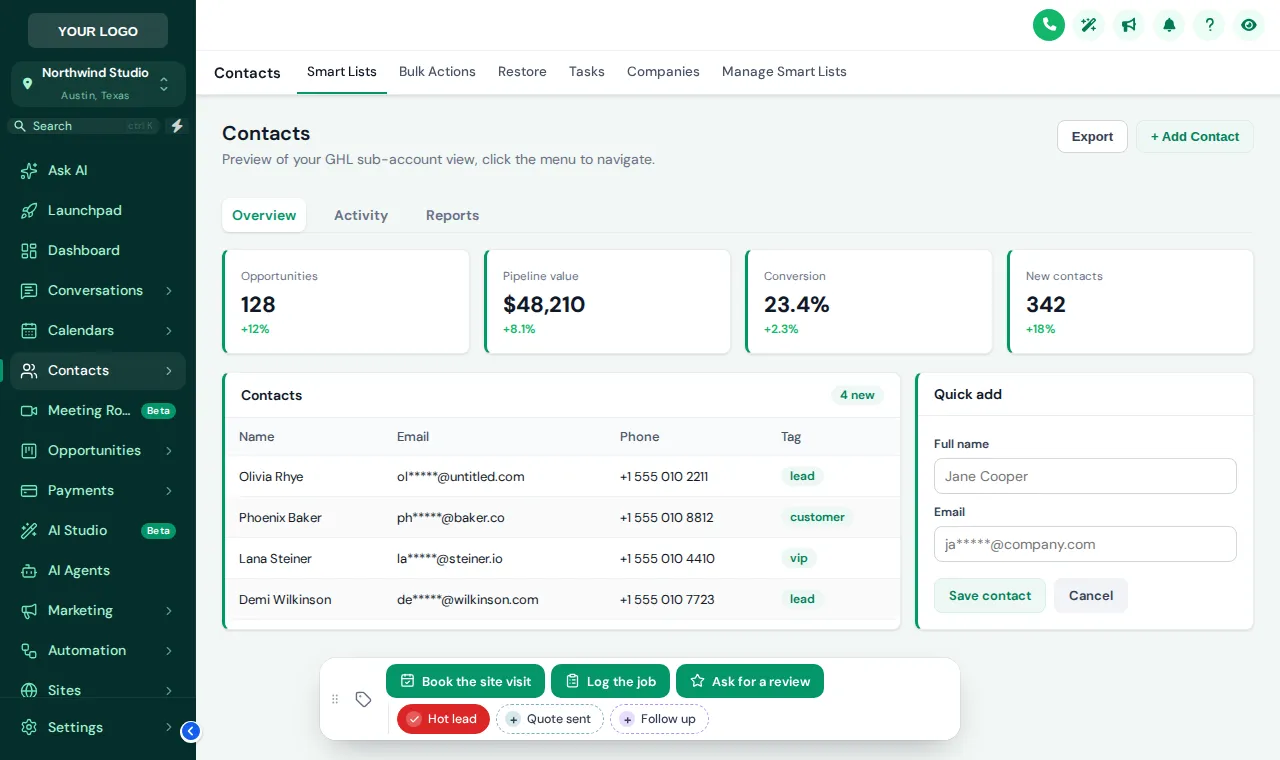
The contact actions bar is a small floating bar on GoHighLevel contact records. It holds quick tags that toggle on and off with a tap, and buttons that add or remove tags or open a short form that writes straight into custom fields. Tags can start your existing workflows. It sits in one of 6 positions and can be dragged.
The real customizer engine on a sample GoHighLevel account. No login, nothing saved.
Loading the live preview
A colour per tag The real actions bar on a sample contact. Tap a quick tag, open Log the job to see its form, or drag the bar by its grip. Nothing is saved in the preview.
An HVAC or roofing office can tag a caller Hot lead, log the job value and book the visit in three taps while still on the phone.
A button that adds the review request tag lets staff trigger the review workflow from our kits the moment a job is finished.
Forms with select lists stop free-typed lead sources, so the dashboard numbers your client sees are consistent.
Inside the editor, after your login arrives. Install is the same one line for every part: see the install steps.
List the tags your team uses most and give each a label and a colour.
Each button adds or removes tags, or opens a short form whose fields map to custom fields.
Choose one of 6 positions and whether staff can drag it.
Open any contact and the bar is there. Tags that trigger workflows work exactly as they do when added by hand.
Contact actions bar is included from Kit Builder up. Each is a one-time payment for a lifetime account.
Tier 2
$499one-time
Bolt on the working parts: menus, dashboards, pipelines and the contact actions bar.
Best for: Agencies running several client sub-accounts who want menus, dashboards and boards that match the brand.
Login emailed within minutes (max 24 hours). One-time payment, lifetime access.
Tier 3
$999one-time
Every part in the box, including the widgets that capture leads on client websites.
Best for: White-label resellers and agencies that build lead capture into every client website.
Login emailed within minutes (max 24 hours). One-time payment, lifetime access.
A self-serve account, not a done-for-you service. You design and install it yourself; support helps if you get stuck. GoHighLevel and HighLevel are trademarks of HighLevel Inc. BuildKitHQ is independent and is not affiliated with or endorsed by HighLevel. The customizer runs on the GHL Customer Care platform; your account and login come from there.
Kit Builder ($499) and Kit Complete ($999). Kit One does not include the actions bar.
Indirectly, the safe way: a button adds or removes a tag, and any workflow you have with that tag as its trigger runs as normal. Nothing bypasses your workflows.
Yes. A button can open a short form with text, number, date and select fields, each mapped to one of your custom fields. Saving writes the values to the contact.
It appears for users who can open contact records, and every change goes through the same permissions as an edit made by hand.
Yes: a colour per tag, your brand colour for all of them, or a green-when-added, grey-when-not scheme.
Pick one of 6 positions and allow dragging, so staff can move it aside. It remembers where each person put it.
Yes. Use the tags the kit already listens for, such as a review request or a booking tag, and the kit’s workflows fire from the bar.
No. The preview runs the real bar on a sample contact, but nothing is stored or sent.
12 opportunities board designs with a colour per stage.
From Kit Builder, $499CZ-02Left, right or top-bar navigation, 8 mega menu styles and a floating quick menu.
From Kit One, $199CZ-0418 sub-account dashboard designs in light, dark and photo styles.
From Kit Builder, $499All ten parts of the GHL Customizer KitSnapshot kits for the sub-accounts themselves
Login emailed within minutes (max 24 hours), then build it in the editor and paste one line. From $499, one-time.
One-time payment, lifetime access
Nothing beyond the strictly necessary runs until you say so. Analytics and marketing scripts stay blocked if you decline, and you can change your mind from the footer at any time.
Strictly necessary
Keeps your theme, accessibility and consent choices on this device. Cannot be switched off because nothing works without it.
Analytics
Google Analytics 4 page and event counts so we can see which kits people actually look at. Sets _ga cookies.
Marketing
Lets us measure which ad or referral brought you here and show relevant follow-ups. Off unless you turn it on.